Classic Citrix XenServer Removal in Gateway 22.0.0
- Effective Date: September 2026 (tentative)
- Announcement Date: June 2026
The Citrix XenServer Classic integrations will be removed from the OpsRamp Gateway 22.0.0 release, targeted for September 2026 (tentatively).
The removal is due to the end-of-life status of XenServer 6.x/7.x, platform rebranding to Citrix Hypervisor, and security compliance requirements that restrict vulnerable third-party dependencies at the gateway.
Impact on Existing Customers
Customers running OpsRamp Gateway versions lower than 22.0.0
- Existing XenServer Classic integrations will continue to function until they upgrade to 22.0.0.
When customers upgrade the OpsRamp Gateway to version 22.0.0 or later
- All XenServer Classic integrations will stop working.
Required Customer Action
Customers must:
- Install the Citrix Hypervisor SDK App (replacement integration) prior to upgrading their gateways to 22.0.0.
- Start using the SDK-based integration for Citrix Hypervisor monitoring.
Note
There is no migration path from the XenServer Classic integrations to the Citrix Hypervisor SDK integration.
- Customers must perform a cut over by removing the XenServer Classic integration and completing a fresh installation of the Citrix Hypervisor SDK app.
- The SDK integration uses a different data model (resources/metrics), so monitoring data will only populate after installation.
Deprecation of Classic Alert Policies
- Effective Date: September 2026
- Announcement Date: June 2026
Classic Alert Policies (Setup -> Setup -> Alerts) are being deprecated. Users are encouraged to transition to V2 Alert Policies, which provide an improved user interface, consistent filtering using OpsQL across the platform, and simplified alert actions.
To access V2 Alert Policies, navigate to Setup -> Account -> Alert Policies. If the Alert Policies tile is not visible, contact SaaS Support.
Users can also access V2 Alert Policies from existing Classic policy pages by selecting “Try the new experience” from the top-right corner of each policy page. This option will be available until the September 2026 release.
Deprecation of PowerShell Remoting Over WinRM
- Effective Date: September 2026
- Announcement Date: June 2026
PowerShell Remoting over WinRM used by the following integrations is being deprecated and will be removed with the release of Gateway 22.0.0. OpenSSH is now supported for these integrations and is the recommended communication mode going forward. Customers should plan to migrate to OpenSSH before Gateway 22.0.0 to avoid disruptions and ensure compatibility with future releases.
The following are the affected integrations:
- Windows Hyper-V Cluster
- Windows failover cluster monitoring
- AzureStack HCI
- Microsoft System Center Virtual Machine Manager
- MS SQL Cluster
We are enhancing the security posture of OpsRamp Monitoring Integrations 2.0 by transitioning from PowerShell Remoting over WinRM to a more secure OpenSSH-based model.
Until the release of Gateway 22.0.0, all affected integrations support both communication modes:
- OpenSSH (recommended)
- PowerShell Remoting over WinRM
Customers can select the communication mode using the Connection Mode field available in the integration configuration.
Recommended action
If you currently use PowerSSH Remoting over WinRM:
- Configure OpenSSH Server on the target Windows systems. For details, see the Prerequisites section in the affected integration documentation.
- Ensure TCP port 22 is accessible from the gateway to the target host.
- Update the integration configuration to use OpenSSH as the Connection Mode.
- Verify that discovery and monitoring are operating as expected after the configuration change.
- Complete the migration to OpenSSH before upgrading to Gateway 22.0.0.
Prerequisites for OpenSSH
To use OpenSSH communication:
- Install and enable OpenSSH Server.
- Ensure OpenSSH Server is accessible on port 22 from the gateway.
- Enable the required authentication method.
- Update the
sshd_configfile with the required PowerShell subsystem entry.
For complete setup instructions, refer to the documentation for the affected integrations.
What happens if customers do not migrate?
Customers who continue to use older Gateway versions (for example, Gateway 18.x or 20.x) and do not upgrade either the Gateway or the affected integration versions may continue to use PowerShell Remoting over WinRM.
However, customers upgrading to:
- Gateway 22.0.0 or later, or
- New versions of the affected integrations released after the first week of September 2026 must migrate to OpenSSH prior to upgrading, as PowerShell Remoting over WinRM will no longer be supported in those releases. Integrations still configured with the PowerShell connection mode will stop functioning until the connection mode is updated to OpenSSH.
Customers are strongly encouraged to migrate to OpenSSH well in advance to ensure a seamless transition and avoid any disruption to monitoring operations.
Deprecation of Veritas Cluster persona in MS SQL Cluster Monitoring Integration 2.0
- Effective Date: June 2026
- Announcement Date: May 2026
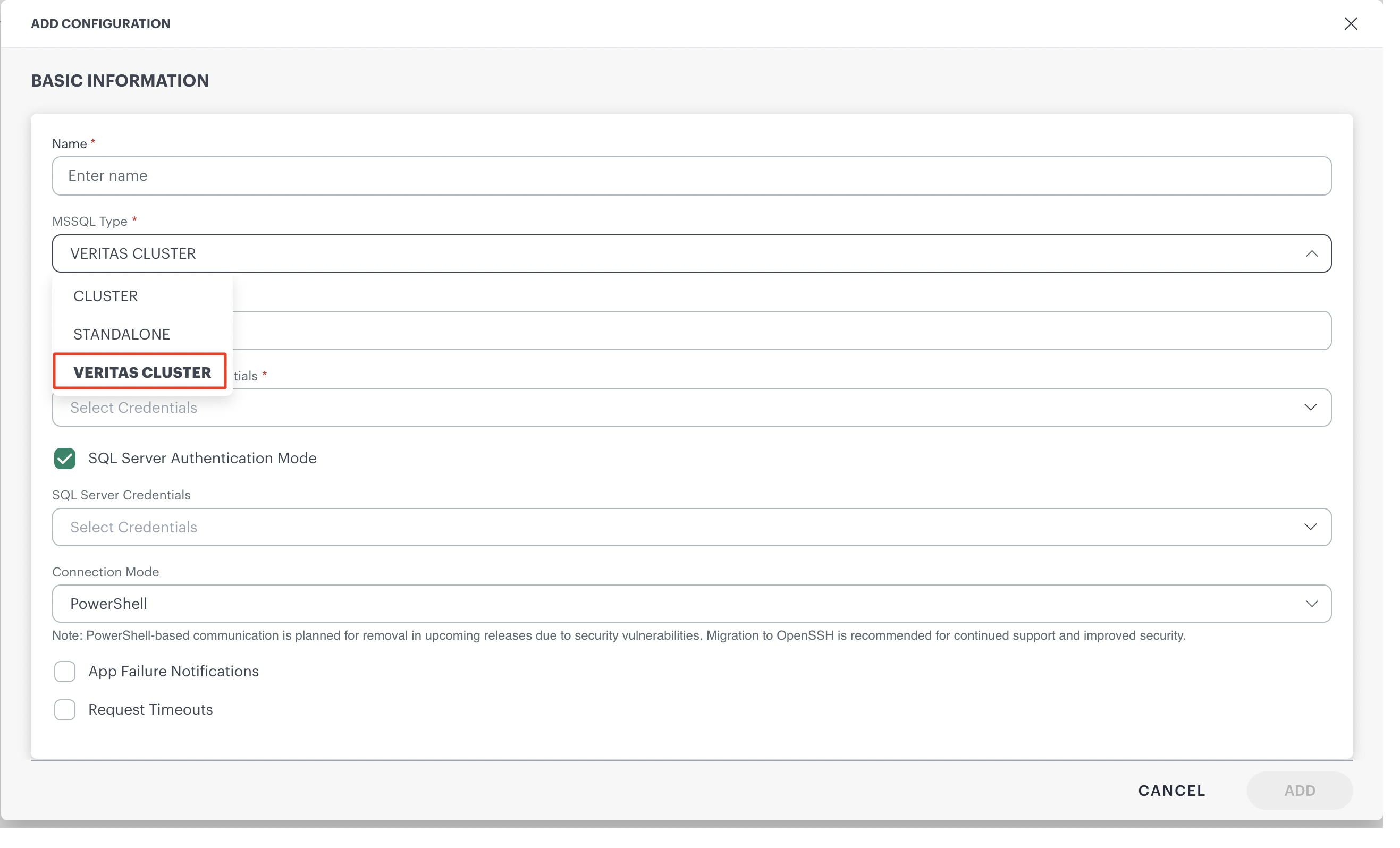
Effective June 2026, MS SQL Cluster Monitoring Integration 2.0 will no longer support the “Veritas Cluster” persona.
Deprecation of Classic Adapter templates
- Effective Date: July 2026
- Announcement Date: May 2026
OpsRamp will officially deprecate support to the following classic adapters templates.
Click here to see the details of the deprecation notice
Deprecation of Informix Database Integration Support on Windows OS
- Effective Date: June 2026
- Announcement Date: April 2026
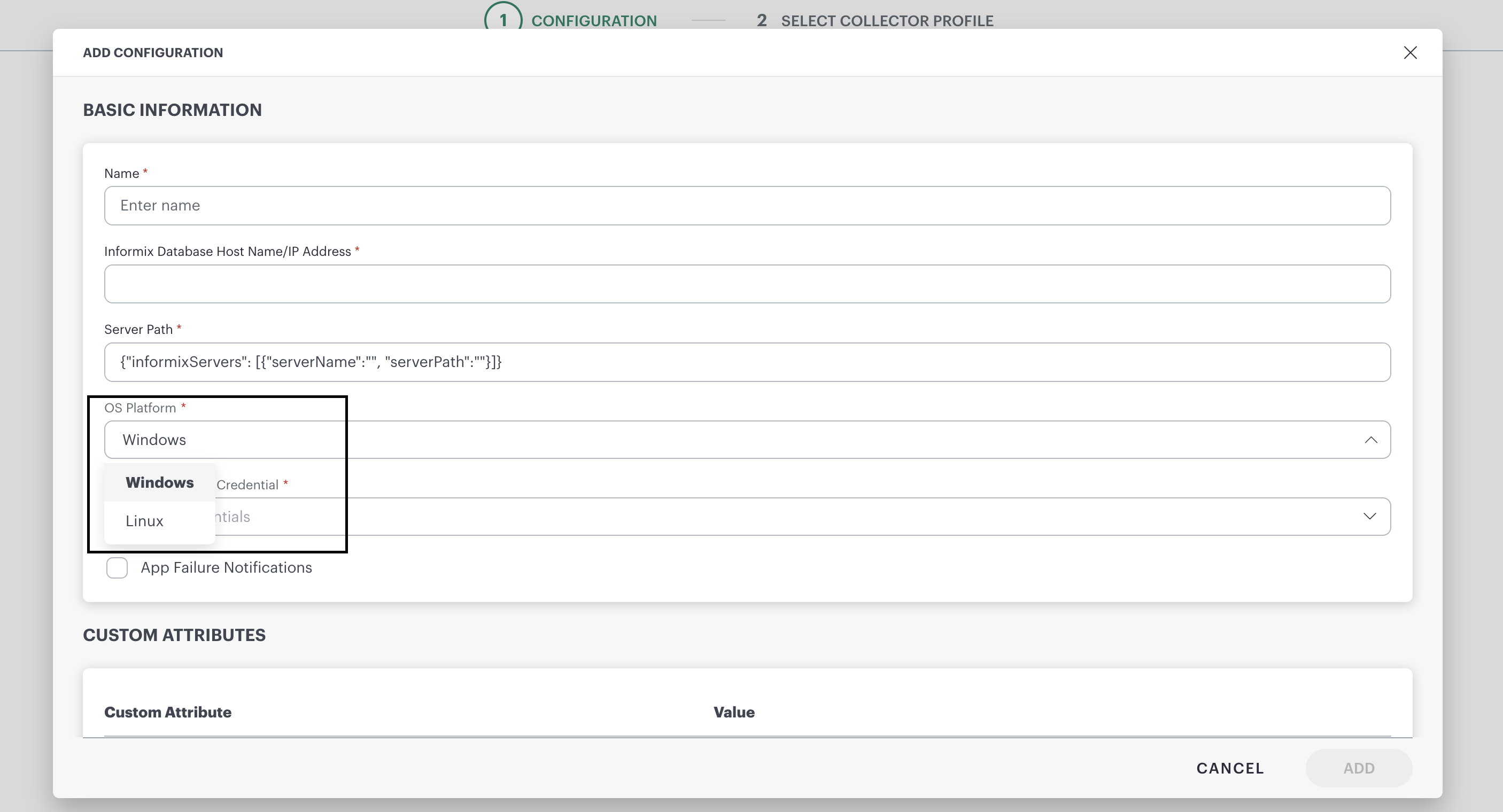
Effective June 2026, Informix Database Monitoring Integration 2.0 will no longer support the Windows operating system and will support only the Linux OS Platform configuration.
Deprecation of Classic Apps
- Effective Date: July 2026
- Announcement Date: April 2026
Effective July 2026, the Nutanix, Pure Storage, and Viptela Classic Apps will be deprecated completely.
You are encouraged to use the latest applications available, which provide an enhanced user experience and improved functionality.
The table below lists each Classic App with its corresponding SDK App with documentation links.
| Classic App | SDK App |
|---|---|
| Nutanix | Nutanix Prism Central |
| Pure Storage | Pure Storage Flash Array |
| Viptela | Cisco Viptela (SD-WAN) |
Deprecation of Classic Process Automation
- Effective Date: August 2026
- Announcement Date: April 2026
The Classic Process Automation feature, formerly available under Automation > Process Automation, will be permanently removed starting with the OpsRamp 2026.08-U1 platform release (effective August 2026).
After this release:
- The Classic Process Automation interface will no longer be available.
- All UI related actions and functionality will be removed.
- Existing process definitions will remain accessible in Process Automation 2.0 and will continue to function as expected.
To continue creating and managing OpsRamp automation workflows, use Process Automation 2.0, with new capabilities and an improved workflow experience.
Deprecation: Kubernetes 2.0 Pod Annotation Collection
- Effective Date: July 2026
- Announcement Date: April 2026
OpsRamp is deprecating the Kubernetes 2.0 agent capability that discovers Kubernetes Pod annotations and sends them to the OpsRamp SaaS Platform as custom attributes.
Pod annotations are user‑defined and may contain sensitive or customer‑specific information. To ensure data privacy, security, and compliance, this information will no longer be collected or transmitted.
Impact: Pod annotations will no longer be captured or stored by the Kubernetes 2.0 agent. Other Kubernetes discovery and monitoring capabilities remain unaffected.
Note
This change affects future data ingestion only. It does not purge or delete any previously ingested (historical) data.Classic NetApp Cluster and NetApp Filer Removal in Gateway 22.0.0
- Effective Date: September 2026 (tentative)
- Announcement Date: April 2026
The NetApp Cluster and NetApp Filer Classic integrations will be removed from the OpsRamp Gateway 22.0.0 release, targeted for September 2026 (tentatively).
This removal is due to security vulnerabilities identified in the NetApp Cluster/Filer classic integrations. OpsRamp already provides a fully supported and secure alternative: NetApp Ontap SDK Integration. Customers must use this SDK-based integration for all NetApp storage monitoring going forward.
Impact on Existing Customers
Customers running OpsRamp Gateway versions lower than 22.0.0
- Existing NetApp Cluster/Filer Classic integrations will continue to function until they upgrade to 22.0.0.
When customers upgrade the OpsRamp Gateway to version 22.0.0 or later
- All NetApp Cluster/Filer Classic integrations will stop working.
Required Customer Action
Customers must:
- Install the NetApp Ontap SDK App (replacement integration) prior to upgrade their Gateways to 22.0.0.
- Start using the SDK app for all NetApp storage monitoring.
Note:
There is no migration path from the NetApp Cluster/Filer classic integrations to the NetApp Ontap SDK.
- Customers will need to cut over by removing the NetApp Cluster/Filer classic integration and perform a fresh installation of the NetApp Ontap SDK App.
- The SDK integration uses different resources/metrics; therefore, new data will populate only post‑installation as this will be a fresh integration.
Deprecation: Classic Rosters
- Effective Date: May 2026
- Announcement Date: March 2026
Classic Rosters will be deprecated and removed starting with the May 2026 release. This change is part of our ongoing efforts to standardize and enhance the roster management experience across OpsRamp.
- The Classic Rosters interface (accessible via Setup → Setup → Accounts → Rosters) will no longer be supported after May 2026.
- Customers should transition to V2 Rosters, accessible via Setup → Account → Users and Permissions → Rosters.
- Existing roster data configured in the Classic UI will remain available and visible in the V2 UI, ensuring a smooth transition.
Deprecation of CyberArk Password Manager and ManageEngine Password Manager integrations
- Effective Date: April 2026
- Announcement Date: March 2026
Effective April 2026, the CyberArk Password Manager and ManageEngine Password Manager integrations will be deprecated completely. As a result, you will not be able to configure or use these integrations.
Their deprecation and removal will have no functional impact on existing environments.
Deprecation note of Classic applications
- Effective Date: May 2026
- Announcement Date: February 2026
OpsRamp will officially deprecate support to the following classic applications.
- NetApp Cluster
- NetApp Filer
- XenServer
- Cisco HyperFlex
Deprecation: Support for N, N-1, N-2 Gateways on EOL OS
- Effective Date: March 2026
- Announcement Date: February 2026
OpsRamp will no longer provide technical support, security patches, OS-level patches, application enhancements, or bugfixes for gateways running on end-of-life (EOL) operating systems, even if the gateway application version is N, N-1, or N-2.
Upgrade the operating system to a supported version to remain eligible for support.
Deprecation: Support for Service Desk Settings
- Effective Date: March 2026
- Announcement Date: January 2026
Classic Service Desk Configuration and Automation will be deprecated and removed starting with the March 2026 release. Only V2 Service Desk Configuration and Automation will be supported, offering an enhanced user experience and improved functionality.