You can update the Chrome packages using one of the following methods:
- Method 1: Using OpsRamp Agent Remote Script (Recommended)
- Method 2: Manual Execution
Method 1: Using OpsRamp Agent Remote Script
- Navigate to Automation > Scripts v2.
- Create a Script Category (Global, Partner-specific, or Client-specific).
- Click the Add to create a new script. Provide the following script details:
- Name: Chrome Package Upgrade (Example)
- Description: Patch script to update Chrome
- Execution Time: 60 seconds
- Platform: Linux
- Paste this following script in the script content:
#!/bin/bash set -x export KUBECONFIG=/etc/rancher/rke2/rke2.yaml # Only this exact deployed version is eligible for the 22.0.1 patch REQUIRED_VERSION="22.0.0" # Validate input arguments if [[ -z "$1" || -z "$2" ]]; then echo "Usage: $0 <namespace> <registry-url>" echo "Example: $0 default us-central1-docker.pkg.dev" exit 1 fi REPO_USER=$3 REPO_PASS=$4 # check $3 and $4 are not set if [[ -n "$3" && -n "$4" ]]; then helm registry login "$2" -u $REPO_USER -p $REPO_PASS fi # Assign provided arguments NAMESPACE="$1" REGISTRY="$2" # Chart path (with runtime registry) CHART_PATH="oci://$REGISTRY/opsramp-registry/gateway-cluster-charts/webprobe" # Fail fast if the cluster is unreachable, so an empty version is never mistaken for "skip" if ! helm list --filter webprobe -n "$NAMESPACE" >/dev/null 2>&1; then echo "ERROR: unable to reach the cluster or list the webprobe release in namespace '$NAMESPACE'." echo " Check KUBECONFIG (current: ${KUBECONFIG:-unset}) and that the gateway cluster is up." exit 1 fi # Get current deployed chart version CURRENT_VERSION=$(helm list --filter webprobe -n "$NAMESPACE" | awk 'NR==2 {print $9}' | awk -F '-' '{print $NF}') # Conditionally run Helm upgrade — patch only the 22.0.0 release if [[ "$CURRENT_VERSION" == "$REQUIRED_VERSION" ]]; then echo "Version $CURRENT_VERSION matches $REQUIRED_VERSION — proceeding with 22.0.1 patch..." helm upgrade webprobe \ "$CHART_PATH" \ --version 22.0.1 -n "$NAMESPACE" --reuse-values helm list --filter webprobe -n "$NAMESPACE" else echo "Version $CURRENT_VERSION is not $REQUIRED_VERSION — skipping 22.0.1 patch." fi - Click on Parameters and add the following parameters to the script.
Note
Make sure that you create the parameters in the order listed below, and provide variable values according to your specific requirements.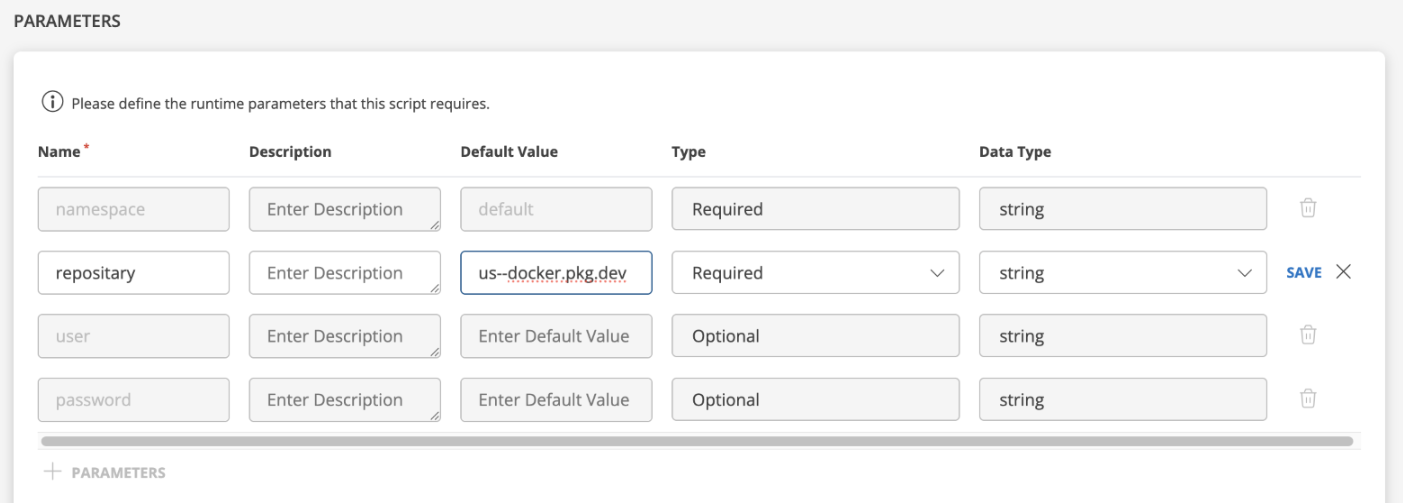
- Save the script
- Schedule the script execution:
- Select the script
- Click
Schedule(right panel) - Fill in details:
- Schedule Name
- Target Resource(s)
- Schedule Type:
One-time
- Ensure all parameter values are correctly set.
Note
If you are using a custom namespace or a custom repository, ensure you specify the repository name and provide the corresponding repository username and password. - Click Save.
- Run the Scheduled Script from the Scheduled Script section.
- Review Execution Logs from the right-side panel for the status.
Method 2: Manual Execution
Use this if Agent based execution isn’t possible.
Prerequisites
- Access to the gateway system
- Appropriate user credentials
Steps for Manual Execution:
- Login to Gateway using:
gateway-adminif nextgen gateway running with Ubuntu 22 only. - Take root access by using the following command and enter password:
sudo su -update.sh and add the following shell script to it.#!/bin/bash
set -x
export KUBECONFIG=/etc/rancher/rke2/rke2.yaml
# Only this exact deployed version is eligible for the 22.0.1 patch
REQUIRED_VERSION="22.0.0"
# Validate input arguments
if [[ -z "$1" || -z "$2" ]]; then
echo "Usage: $0 <namespace> <registry-url>"
echo "Example: $0 default us-central1-docker.pkg.dev"
exit 1
fi
REPO_USER=$3
REPO_PASS=$4
# check $3 and $4 are not set
if [[ -n "$3" && -n "$4" ]]; then
helm registry login "$2" -u $REPO_USER -p $REPO_PASS
fi
# Assign provided arguments
NAMESPACE="$1"
REGISTRY="$2"
# Chart path (with runtime registry)
CHART_PATH="oci://$REGISTRY/opsramp-registry/gateway-cluster-charts/webprobe"
# Fail fast if the cluster is unreachable, so an empty version is never mistaken for "skip"
if ! helm list --filter webprobe -n "$NAMESPACE" >/dev/null 2>&1; then
echo "ERROR: unable to reach the cluster or list the webprobe release in namespace '$NAMESPACE'."
echo " Check KUBECONFIG (current: ${KUBECONFIG:-unset}) and that the gateway cluster is up."
exit 1
fi
# Get current deployed chart version
CURRENT_VERSION=$(helm list --filter webprobe -n "$NAMESPACE" | awk 'NR==2 {print $9}' | awk -F '-' '{print $NF}')
# Conditionally run Helm upgrade — patch only the 22.0.0 release
if [[ "$CURRENT_VERSION" == "$REQUIRED_VERSION" ]]; then
echo "Version $CURRENT_VERSION matches $REQUIRED_VERSION — proceeding with 22.0.1 patch..."
helm upgrade webprobe \
"$CHART_PATH" \
--version 22.0.1 -n "$NAMESPACE" --reuse-values
helm list --filter webprobe -n "$NAMESPACE"
else
echo "Version $CURRENT_VERSION is not $REQUIRED_VERSION — skipping 22.0.1 patch."
fiSave the file.
Grant permission to the file using the following command:
chmod +x update.shRun the script using the following command:
a. Command with namespace and reposiotry
Examples:./update.sh <namespace> <repository>- With default namespace and default repository
./update.sh <namespace> <repository> - With custom namespace and default repository
./update.sh <namespace> <repository>Note
Replacegateway-namespacewith your actual gateway namespace. - With custom namespace and custom repository with no credentials
./update.sh <namespace> <repository>Note
Replacegateway-namespaceandcustom-repositorywith your actual namespace and repository URL.
b. Command with namespace and custom repository with authorization
Example./update.sh <namespace> <repository_name> < repository_username < repository_password>sh update.sh gateway-namespace custom-repository repository_username repository_passwordNote
Replace the placeholders with your actualnamespace,repository URL,username, andpassword.- With default namespace and default repository
Verify the Webprobe Helm version (should be
22.0.1).helm list | grep webprobeAccess the Webprobe container:
kubectl exec -it -n <namespace> webprobe-0 -- bashCheck the installed Chrome versions:
chromedriver --version
dpkg -l | grep -E "chrome"
Expected Versions:
| Package | Expected Version |
|---|---|
| Google Chrome | 155.0.8059.39 |