This page explains how to identify and recover from the OpsRamp Gateway Read‑Only Mode alert. The issue can occur on NextGen Gateway deployment and requires manual intervention.
Problem
You may receive the following alert:
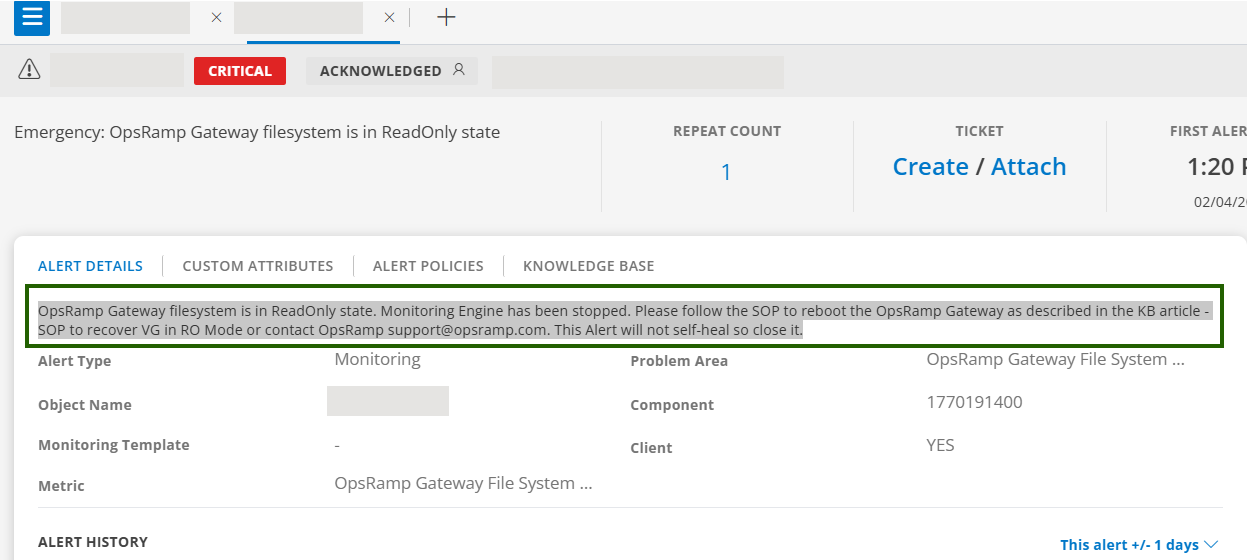
This alert is triggered when:
- PVC out of space.
- Misconfigured or failing StorageClass / CSI.
- Longhorn (or other CSI) volume issues causing RO mount.
As a result,
- Monitoring data collection is interrupted.
- Gateway services that require filesystem write access may stop functioning.
- Manual recovery and alert closure are required.
Procedure
Verify the Read‑Only State
Run the following command on the gateway host or inside the gateway pod to check if the read-only condition exists:
touch /var/log/app/tmp/ro-test.$RANDOMRemediation – NextGen Gateway (Kubernetes)
Check PVC status
kubectl describe pvc vprobe-logs-nextgen-gw-0 -n <namespace>Verify StorageClass / Longhorn
- Confirm the StorageClass is available and healthy.
- Longhorn volumes Healthy (not Degraded), no node disk pressure.
- Restart the gateway pod
kubectl delete pod nextgen-gw-0 -n <namespace> - If pod deletion does not fix the issue, move the
StatefulSetto another node by updating its pod spec:kubectl edit statefulset nextgen-gw -n <namespace>
Under .spec.template.spec, set the YAML:
nodeName: <new-node-name>- Validate:
vprobe/monitoringlogs show successful heartbeat writes.- No “read-only filesystem” errors.
Best Practices
- Configure log rotation for
/var/logand/var/log/app. - Monitor PVC usage on NextGen Gateways and configure alerts at recommended thresholds (70/85/95%).
- Ensure CSI/Longhorn is healthy (replicas, node disk pressure, controller pods).
Handling Filesystem Corruption (fsck) in NextGen Gateway (Longhorn PVC)
Filesystem corruption can prevent Longhorn from mounting a PVC in NextGen Gateway. The following errors appear in pod events:
kubectl describe pod nextgen-gw-0 -n <namespace>Sample event:
Warning  FailedMount  56s (x5809 over 8d)  kubelet  MountVolume.MountDevice failed for volume "pvc-b3ca140a-dab9-49f6-9f39-063594e58521" :
rpc error: code = Internal desc = 'fsck' found errors on device /dev/longhorn/pvc-b3ca140a-dab9-49f6-9f39-063594e58521 but could not correct them:
fsck from util-linux 2.39.3
/dev/longhorn/pvc-b3ca140a-dab9-49f6-9f39-063594e58521 contains a file system with errors, check forced.
...
UNEXPECTED INCONSISTENCY; RUN fsck MANUALLY.
Important: Do not run fsck on a mounted PVC from within the pod. The Longhorn block device must be repaired on the node where it is attached.
Procedure
Confirm the fsck error and retrieve the device path
kubectl describe pod nextgen-gw-0 -n <namespace>From the
FailedMountevent, record the device path (for example:/dev/longhorn/pvc-b3ca140a-dab9-49f6-9f39-063594e58521).Identify the node with the attached PVC
kubectl get pods -o wide -n <namespace>
Example:
NAME           READY   STATUS            AGE   IP          NODE              ...
nextgen-gw-0   0/3     ContainerCreating 12m   10.42.0.31  opsramp-gateway   ...
The NODE column identifies the gateway node (such as opsramp-gateway) to which the Longhorn storage device is attached.
SSH to the node and repair the filesystem
fsck -y /dev/longhorn/pvc-b3ca140a-dab9-49f6-9f39-063594e58521The
-yflag automatically confirms repairs. For critical data, consider creating a Longhorn snapshot before repair (see Longhorn Troubleshooting).Delete the pod to remount the repaired volume
kubectl delete pod nextgen-gw-0 -n <namespace>Kubernetes recreates the pod, allowing Longhorn to mount the repaired volume.
Validate successful restoration
touch /var/log/app/tmp/testVerify:
- No “read-only filesystem” or fsck errors in logs:
kubectl logs nextgen-gw-0 -n <namespace> - vprobe/monitoring heartbeat writes are succeeding
- The Read-Only Mode alert does not recur
- No “read-only filesystem” or fsck errors in logs:
FAQ
- Does the Read‑Only Mode alert clear automatically?
No. The alert does not self‑heal and must be closed manually after the issue is resolved. - Is PVC expansion supported for NextGen Gateway?
Currently, PVC expansion is not supported.