Introduction
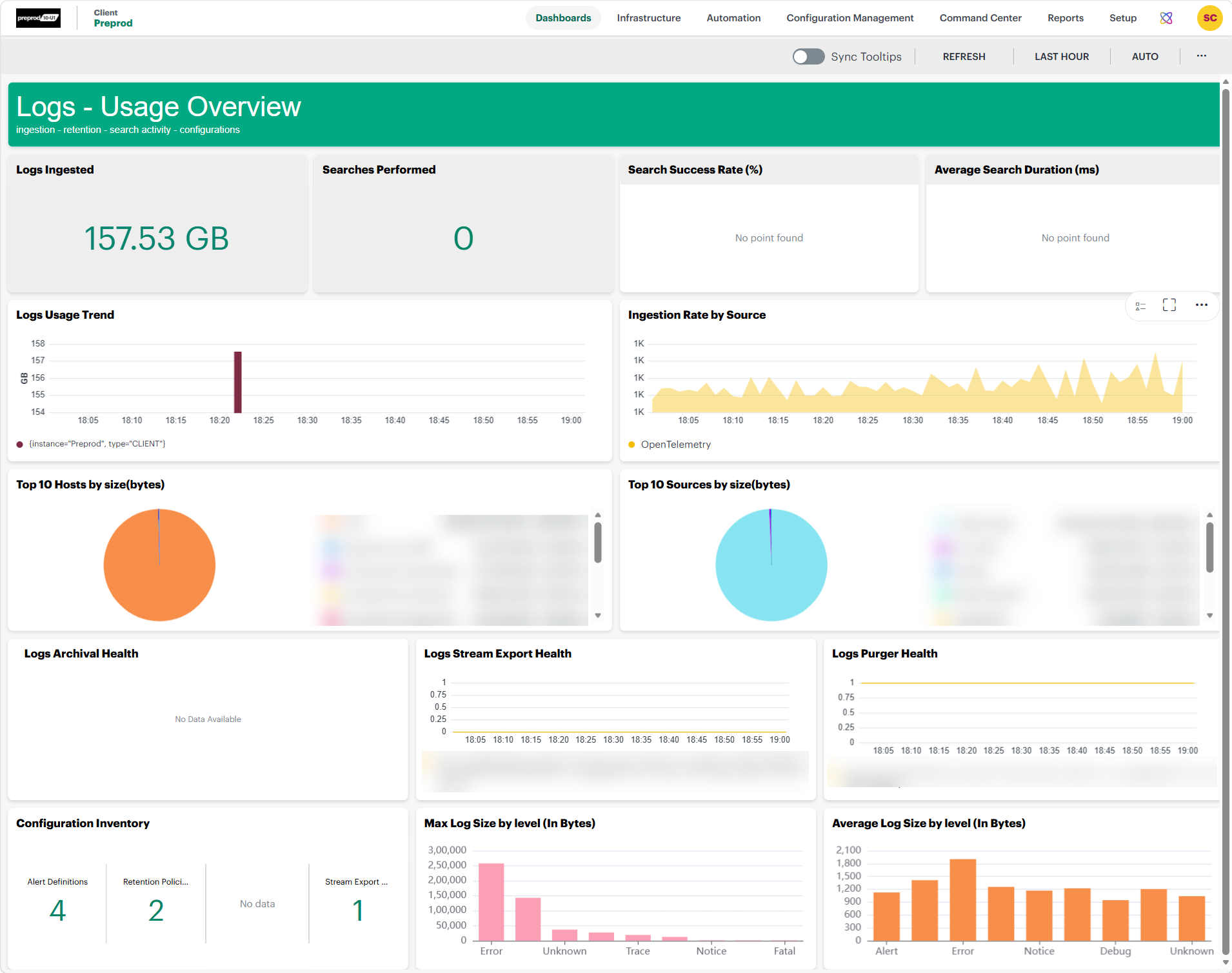
Usage Overview is a dashboard that provides a centralized view of log ingestion, search activity, source distribution, configuration inventory, and log management service health. The dashboard supports configurable time ranges, and all widgets automatically update based on the selected time range to provide consistent visibility into log volume, search performance, source contributions, configuration metrics, and operational health.It enables administrators to monitor log consumption, analyze usage trends, identify high-volume log producers, and track the operational status of critical log management components from a single dashboard.
To view dashboard:
- Navigate to Infrastructure > Logs.
- On the left side of this page, click the Menu icon.
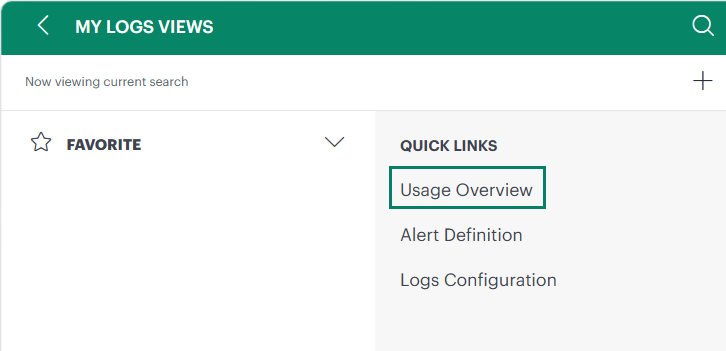
- From the MY LOGS VIEWS page, under QUICK LINKS, select Usage Overview.
The dashboard page is displayed.
Dashboard Widgets
The Usage Overview dashboard includes the following widgets:
- Logs Ingested
- Searches Performed
- Search Success Rate (%)
- Average Search Duration (ms)
- Logs Usage Trend
- Ingestion Rate by Source
- Top 10 Hosts by Size (Bytes)
- Top 10 Sources by Size (Bytes)
- Logs Archival Health
- Logs Stream Export Health
- Logs Purger Health
- Configuration Inventory
- Max Log Size by Level (In Bytes)
- Average Log Size by Level (In Bytes)
Logs Ingested
The Logs Ingested widget displays the total volume of log data ingested during the selected time range. This metric represents all logs successfully collected and processed by the platform regardless of source, host, or application.
Searches Performed
The Searches Performed widget displays the total number of log search requests executed during the selected time range.
Search Success Rate (%)
The Search Success Rate widget displays the percentage of search requests completed successfully.
Average Search Duration (ms)
The Average Search Duration widget displays the average time, measured in milliseconds (ms), required to process log search requests during the selected time range.
Logs Usage Trend
The Logs Usage Trend widget displays log ingestion volume over time. This visualization helps administrators analyze historical ingestion patterns, identify growth trends, and detect abnormal changes in log generation activity.
Ingestion Rate by Source
The Ingestion Rate by Source widget displays log ingestion volume grouped by source over time.
A source represents the platform, application, service, integration, or log collection mechanism that generates or forwards log data to OpsRamp.
Top 10 Hosts by Size (Bytes)
The Top 10 Hosts by Size widget displays the hosts generating the largest amount of log data during the selected time range.
Top 10 Sources by Size (Bytes)
The Top 10 Sources by Size widget displays the log sources contributing the highest percentage of overall ingested log data.
Logs Archival Health
The Logs Archival Health widget displays the operational health of archival services responsible for moving logs to long-term storage.
Logs Stream Export Health
The Logs Stream Export Health widget displays the status of log export operations.
Stream exports forward log data to external systems, third-party integrations, analytics platforms, and SIEM solutions.
Logs Purger Health
The Logs Purger Health widget displays the status of purge operations responsible for removing expired logs after retention periods have elapsed.
Configuration Inventory
The Configuration Inventory widget displays a summary of configured log management resources.
Depending on the environment, the widget may include:
- Alert Definitions
- Retention Policies
- Stream Export Configurations
- Additional supported configurations
This widget provides a quick overview of the current log management configuration status.
Max Log Size by Level (In Bytes)
The Max Log Size by Level widget displays the largest log entry recorded for each severity level during the selected time range.
Severity Levels
- Error: Largest error log message, typically containing detailed exception or failure information.
- Unknown: Largest log entry that could not be mapped to a defined severity level.
- Trace: Largest trace log entry, often associated with diagnostic or execution details.
- Notice: Largest notice-level log entry generated.
- Fatal: Largest fatal log entry associated with critical application or system failures.
Average Log Size by Level (In Bytes)
The Average Log Size by Level widget displays the average size of log entries for each severity level during the selected time range.
Severity Levels
- Alert: Average size of alert log messages.
- Error: Average size of error log messages.
- Notice: Average size of notice log messages.
- Debug: Average size of debug log messages.
- Unknown: Average size of log messages that do not have a recognized severity level.