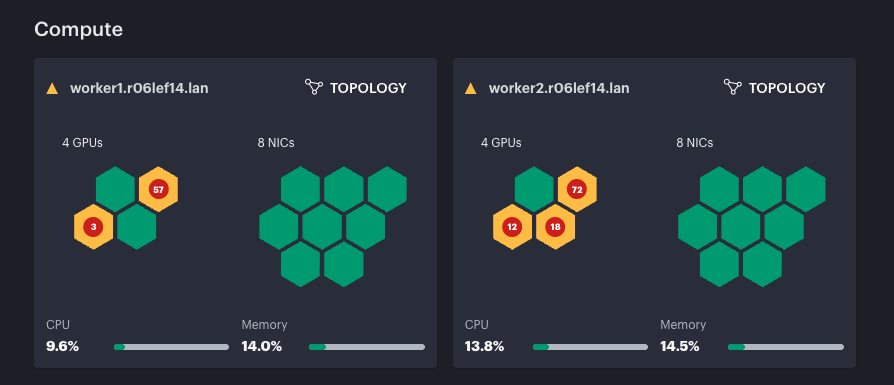
The Compute layer shows the GPU and compute resources that support your AI workloads. It helps you connect application and model behavior to the worker nodes, GPUs, and network interfaces (NICs) that provide the underlying capacity.
What you can investigate
| Information | What it helps you understand |
|---|---|
| Compute nodes and resources | Which nodes and GPU resources are associated with the selected AI cluster and workload. |
| GPU utilization | How much of the available GPU processing capacity is being used. |
| GPU memory | Available GPU memory usage information, which can help identify memory pressure. |
| GPU health and power | Available NVLink bandwidth, power usage, power-utilization or power-violation events, temperature, thermal events, and energy-consumption information. |
| Node health | Available CPU and memory utilization for the worker node. |
| GPU and NIC relationships | How GPUs and network interfaces are connected within the compute environment. |
| Alerts | Compute alerts associated with a GPU, node, or related resource, when alerts are configured and available. |
Investigate GPU performance
- Select the affected node or GPU.
- Review utilization and memory for the affected period.
- Check temperature, power, and applicable hardware signals.
- Review alerts.
- Identify model workloads associated with the resource.
- Review GPU-to-NIC relationships.
- Compare the same period with model and network behavior.
High GPU utilization alone does not establish a problem. Interpret utilization together with workload demand, latency, memory consumption, thermal conditions, and other resource signals.
Understand the compute signals
| Signal | What it means |
|---|---|
| GPU utilization and memory | Show use of GPU processing and memory capacity. Sustained high use can be a reason to check capacity and workload placement; interpret it with workload demand and the selected time window. |
| NVLink bandwidth | Provides information about traffic over the GPU interconnect. Compare it with relevant GPU and network activity when investigating data movement between GPUs. |
| Power and temperature | Describe GPU operating conditions. Power usage is a measurement; power-utilization or power-violation events and thermal events are indicators to review in the associated resource details and alerts. |
| CPU, memory, and GPU/NIC relationships | CPU and memory utilization describe worker-node use. GPU and NIC relationships show how resources are associated and can help identify which infrastructure to inspect when an application or model signal changes. |
Why this layer is important
- Identify resource pressure. High utilization or memory use can help explain reduced capacity or slower inference.
- Spot hardware conditions. Temperature, link, and alert information can point to GPU or node conditions that need attention.
- Follow workload dependencies. GPU and NIC relationships connect compute health with the network path used by AI workloads.
Compute data depends on GPU metrics collection and resource discovery being configured for the cluster. If GPU resources or metrics are missing, verify the compute integration and onboarding results. See Troubleshooting AI Observability.
×![]()