Introduction
The M365 integration enables discovery of the following M365 services, providing visibility into service availability and performance for root cause analysis and remediation:
| API Endpoint | Usage Statistics |
|---|---|
| M365 Apps | Provides usage statistics for Microsoft 365 Apps. |
| M365 Azure Information Protection | Provides usage statistics for Azure Information Protection. |
| M365 Bookings | Provides usage statistics for Microsoft Bookings. |
| M365 Dynamics 365 Apps | Provides usage statistics for Dynamics 365 Apps. |
| M365 Exchange Online | Provides usage statistics for Exchange Online. |
| M365 Forms | Provides usage statistics for Microsoft Forms. |
| M365 Identity Service | Provides usage statistics for Identity Service. |
| M365 Mobile Device Management | Provides usage statistics for Mobile Device Management. |
| M365 Office for the web | Provides usage statistics for Office for the web. |
| M365 OneDrive for Business | Provides usage statistics for OneDrive for Business. |
| M365 Planner | Provides usage statistics for Planner. |
| M365 Power Apps | Provides usage statistics for Power Apps. |
| M365 Power Apps in Microsoft 365 | Provides usage statistics for Power Apps in Microsoft 365. |
| M365 Power Automate | Provides usage statistics for Power Automate. |
| M365 Power Automate in Microsoft 365 | Provides usage statistics for Power Automate in Microsoft 365. |
| M365 Power BI | Provides usage statistics for Power BI. |
| M365 SharePoint Online | Provides usage statistics for SharePoint Online. |
| M365 StaffHub | Provides usage statistics for StaffHub. |
| M365 Stream | Provides usage statistics for Microsoft Stream. |
| M365 Suite | Provides usage statistics for Microsoft 365 Suite. |
| M365 Sway | Provides usage statistics for Sway. |
| M365 Teams | Provides usage statistics for Microsoft Teams. |
| M365 Yammer Enterprise | Provides usage statistics for Yammer Enterprise. |
| Microsoft Defender for Cloud Apps | Provides usage statistics for Defender for Cloud Apps. |
| Microsoft Kaizala | Provides usage statistics for Microsoft Kaizala. |
| Microsoft Viva | Provides usage statistics for Microsoft Viva. |
| Project for the web | Provides usage statistics for Project for the web. |
| Project Online | Provides usage statistics for Project Online. |
| Skype for Business | Provides usage statistics for Skype for Business. |
| Microsoft Intune | Provides usage statistics for Microsoft Intune. |
After completing the integration installation and set up, Microsoft 365 resources are discovered and monitoring is enabled as specified in the configuration profile.
Supported Metrics
Click here to view the supported metrics
| Resource | Metric Name | Metric Display Name | Units |
|---|---|---|---|
| Exchange | office365_exchange_ServiceStatus Service status of service that resembles current operability of the service using a number from 0-16. | Exchange Online Status | |
| office365_exchange_IncidentCount Service Incident Count that clarifies the number of log entries by Microsoft for specific reasons. Provided information: resolved count, pending count, total count. | Exchange Online Incident Count. | Count | |
| office365_exchange_ServiceOutageInHours The number of hours of service has been out of order. | Dynamic 365 Apps Service Outage in Hours. | Hours | |
| office365_exchange_MailboxSizeTotal Total storage consumption by all mailboxes | Mailbox Total Size | Gigabytes | |
| office365_exchange_ActiveOrTotalMailboxCount Number of mailboxes with active count. Active means the user sent/received or read a mail on that day. Categories: total count, active count | Active/total mailbox count | Count | |
| office365_exchange_MailboxQuotaLimitCount Number of mailboxes that have crossed a specific limit. Categories: Under Limit, Warning Issued, Send Prohibited, Send/Receive Prohibited | Number of mailboxes under quota limit count | Count | |
| office365_exchange_MessagesTotalSentReadReceived Number of messages sent, received, read, or any of these three by the organization in total. Categories: sent, received, read, total | Total messages sent/read/received | Count | |
| office365_exchange_AppUsage Number of users of different apps or protocols.
| Individual specific app usage in Exchange Online | Count | |
| SharePoint | office365_sharepoint_UniqueUserCount Number of unique users who in any way interacted with SharePoint. Categories: Viewed Or Edited, Synced, Shared Internally, Shared Externally. | Number of unique users who interacted with Sharepoint in specific ways. | Count |
| office365_sharepoint_ActiveUserCount Total number of interactions with SharePoint without respect to the uniqueness of the user.
| Number of active users who interacted with Sharepoint in specific ways | Count | |
| office365_sharepoint_PageVisitCount Number of unique pages visited by users. | Number of unique pages visited by users. | Count | |
| office365_sharepoint_ActiveFileCount Number of files that have been interacted with on that day. Categories: total, active. | Number of files in SharePoint that have been interacted with. | Count | |
| office365_sharepoint_TotalFileCount Total number of files in SharePoint Categories: total, active. | Total number of files in SharePoint | Count | |
| office365_sharepoint_Storage Total storage consumed using SharePoint. | Total storage consumed using SharePoint | Gigabytes | |
| office365_sharepoint_TotalPageVisitCount Number of pages viewed across all sites. Provided info: page visit count. | Number of pages viewed across all sites | Count | |
| office365_sharepoint_ServiceStatus Service status of service that resembles current operability of the service using a number from 0-16. | Sharepoint Service Status | ||
| office365_sharepoint_IncidentCount service Incident Count that clarifies the number of log entries by Microsoft for specific reasons. Provided information: resolved count,pending count, total count. | Sharepoint Online Incident Count | Count | |
| office365_sharepoint_ServiceOutageInHours The number of hours of service has been out of order. | Sharepoint Online Service Outage in Hours | Hours | |
| Yammer | office365_yammer_InteractionWithMessagesCount Number of interactions with Yammer messages. Categories: liked, posted, read. | Number of interaction with Yammer messages | Count |
| office365_yammer_UniqueUserCountInteractingWithMessages Number of unique users who interacted with Yammer messages. Categories: liked, posted, read. | Number of unique users who interacted with Yammer messages | Count | |
| office365_yammer_UserCountByDeviceType Number of users by device type interacting using Yammer.
| Number of users by device type interacting using Yammer | Count | |
| office365_yammer_DailyUserCountByDeviceType Number of daily users by device type interacting using Yammer.
| Number of daily users by device type interacting using Yammer | Count | |
| office365_yammer_GroupCount Number of groups in Yammer. Categories: total, active. | Number of groups in Yammer | Count | |
| office365_yammer_InteractionInGroupsCount Number of interaction with messages in Yammer groups. Categories: liked, posted, read. | Number of interaction with messages in Yammer groups | Count | |
| office365_yammer_ServiceStatus Service status of service that resembles current operability of the service using a number from 0-16. | Yammer Enterprise Status | ||
| office365_yammer_IncidentCount service Incident Count that clarifies the number of log entries by Microsoft for specific reasons. Provided information: resolved count, pending count, total count. | Yammer Enterprise Incident Count | Count | |
| office365_yammer_ServiceOutageInHours The number of hours of service has been out of order. | Yammer Enterprise Service Outage in Hours | Hours | |
| Microsoft Teams | office365_microsoftteams_DailyUniqueUsersByDeviceType Number of Microsoft Teams daily unique users by device type.
| Number of Microsoft Teams daily unique users by device type. | Count |
| office365_microsoftteams_DailyActivitiesByActivityType Number of Microsoft Teams activities by activity type.
| Number of Microsoft Teams activities by activity type. | Count | |
| office365_microsoftteams_DailyUniqueUsersByActivityType Number of Microsoft Teams unique users by activity type.
| Number of Microsoft Teams users by activity type | Count | |
| office365_microsoftteams_ServiceStatus Service status of service that resembles current operability of the service using a number from 0-16. | Microsoft Teams Status | ||
| office365_microsoftteams_IncidentCount service Incident Count that clarifies the number of log entries by Microsoft for specific reasons. Provided information: resolved count, pending count, total count. | Microsoft Teams Incident Count | Count | |
| office365_microsoftteams_ServiceOutageInHours The number of hours of service has been out of order. | Microsoft Teams Service Outage in Hours | Hours | |
| OneDriveForBusiness | office365_onedrive_ActiveUserCount Total number of interactions with OneDrive without respect to the uniqueness of the user.
| Number of users who interacted with OneDrive | Count |
| office365_onedrive_UniqueUserCount Number of unique users who in any way interacted with OneDrive.
| Number of unique users who interacted with OneDrive | Count | |
| office365_onedrive_ActiveSiteCount Number of active business sites in OneDrive. Categories: total, active. | Number of active business sites in OneDrive | Count | |
| office365_onedrive_TotalFileCount Total number of files in OneDrive. Categories: total, active | Total number of files in OneDrive | Count | |
| office365_onedrive_Storage Total storage consumed using OneDrive. | Total storage consumed using OneDrive | Gigabytes | |
| office365_onedriveforbusiness_ServiceStatus Service status of service that resembles current operability of the service using a number from 0-16. | OneDrive for Business Status | ||
| office365_onedriveforbusiness_IncidentCount Service Incident Count that clarifies the number of log entries by Microsoft for specific reasons. Provided information: resolved count, pending count, total count. | OneDrive for Business Incident Count | Count | |
| office365_onedriveforbusiness_ServiceOutageInHours The number of hours of service has been out of order. | OneDrive for Business Service Outage in Hours | Hours | |
| OSDPPlatform (Microsoft 365 suite) | office365_osdpplatform_ActiveUserCount Number of users who interacted with specific services.
| Number of daily active user in specific services/td> | Count |
| office365_osdpplatform_ActiveInactiveUserInServicesCount Number of users if active or not in specific services.
| Number of users with activity type in services | Count | |
| office365_osdpplatform_GroupActivityCount Number of activities in groups with activity type.
| Number of group activities | Count | |
| office365_osdpplatform_ActiveGroupCount Number of groups. Categories: active, total | Number of group that have interacted with Office 365 | Count | |
| office365_osdpplatform_Storage Total storage consumed by all the users. Categories: Mailbox Storage Used, Site Storage Used | Total storage consumed by all the users | Gigabytes | |
| office365_osdpplatform_FileCount Total number of files used by all the. Categories: active, total | Total number of files used by all the users. | Count | |
| office365_osdpplatform_ServiceStatus Service status of service that resembles current operability of the service using a number from 0-16. | Microsoft 365 suite Status | ||
| office365_osdpplatform_IncidentCount Service Incident Count that clarifies the number of log entries by Microsoft for specific reasons. Provided information: resolved count, pending count, total count. | Microsoft 365 suite Incident Count | Count | |
| office365_osdpplatform_ServiceOutageInHours The number of hours of service has been out of order. | Microsoft 365 suite Service Outage in Hours | Hours | |
| OrgLiveID | office365_orgliveid_ServiceStatus Service status of service that resembles current operability of the service using a number from 0-16. | Identity Service Service Status | |
| office365_orgliveid_IncidentCount Service Incident Count that clarifies the number of log entries by Microsoft for specific reasons. Provided information: resolved count, pending count, total count. | Identity Service Service Incident Count | Count | |
| office365_orgliveid_ServiceOutageInHours The number of hours of service has been out of order. | Identity Service Service Service Outage in Hours. | Hours | |
| Lync | office365_lync_ServiceStatus Service status of service that resembles current operability of the service using a number from 0-16. | Skype for Business Status | |
| office365_lync_IncidentCount service Incident Count that clarifies the number of log entries by Microsoft for specific reasons. Provided information: resolved count, pending count, total count. | Skype for Business Incident Count | Count | |
| office365_lync_ServiceOutageInHours The number of hours of service has been out of order. | Skype for Business Service Outage in Hours | Hours | |
| DynamicsCRM | office365_dynamicscrm_ServiceStatus Service status of service that resembles current operability of the service using a number from 0-16. | Dynamic 365 Apps Status | |
| office365_dynamicscrm_IncidentCount service Incident Count that clarifies the number of log entries by Microsoft for specific reasons. Provided information: resolved count, pending count, total count. | Dynamic 365 Apps Incident Count | Count | |
| office365_dynamicscrm_ServiceOutageInHours The number of hours of service has been out of order. | Dynamic 365 Apps Service Outage in Hours | Hours | |
| RMS | office365_rms_ServiceStatus Service status of service that resembles current operability of the service using a number from 0-16. | Azure Information Protection Status | |
| office365_rms_IncidentCount Service Incident Count that clarifies the number of log entries by Microsoft for specific reasons. Provided information: resolved count, pending count, total count. | Azure Information Protection Incident Count | Count | |
| office365_rms_ServiceOutageInHours The number of hours of service has been out of order. | Azure Information Protection Service Outage in Hours | Hours | |
| MobileDeviceManagement | office365_mobiledevicemanagement_ServiceStatus Service status of service that resembles current operability of the service using a number from 0-16. | Mobile Device Management for Office 365 Status | |
| office365_mobiledevicemanagement_IncidentCount Service Incident Count that clarifies the number of log entries by Microsoft for specific reasons. Provided information: resolved count, pending count, total count. | Mobile Device Management for Office 365 Incident Count. | Count | |
| office365_mobiledevicemanagement_ServiceOutageInHours The number of hours of service has been out of order. | Mobile Device Management for Office 365 Service Outage in Hours | Hours | |
| Planner | office365_planner_ServiceStatus Service status of service that resembles current operability of the service using a number from 0-16. | Planner Status | |
| office365_planner_IncidentCount Service Incident Count that clarifies the number of log entries by Microsoft for specific reasons. Provided information: resolved count, pending count, total count. | Planner Incident Count | Count | |
| office365_planner_ServiceOutageInHours The number of hours of service has been out of order. | Planner Service Outage in Hours | Hours | |
| SwayEnterprise | office365_swayenterprise_ServiceStatus Service status of service that resembles current operability of the service using a number from 0-16. | Sway Status | |
| office365_swayenterprise_IncidentCount Service Incident Count that clarifies the number of log entries by Microsoft for specific reasons. Provided information: resolved count, pending count, total count. | Sway Incident Count | Count | |
| office365_swayenterprise_ServiceOutageInHours The number of hours of service has been out of order. | Sway Service Outage in Hours | Hours | |
| PowerBIcom | office365_powerbicom_ServiceStatus Service status of service that resembles current operability of the service using a number from 0-16. | Power BI Status | |
| office365_powerbicom_IncidentCount Service Incident Count that clarifies the number of log entries by Microsoft for specific reasons. Provided information: resolved count, pending count, total count. | Power BI Incident Count | Count | |
| office365_powerbicom_ServiceOutageInHours The number of hours of service has been out of order. | Power BI Service Outage in Hours | Hours | |
| Intune | office365_Intune_ServiceStatus Service status of service that resembles current operability of the service using a number from 0-16. | Microsoft Intune Status | |
| office365_Intune_IncidentCount Service Incident Count that clarifies the number of log entries by Microsoft for specific reasons. Provided information: resolved count, pending count, total count. | Microsoft Intune Incident Count | Count | |
| office365_Intune_ServiceOutageInHours The number of hours of service has been out of order. | Microsoft Intune Service Outage in Hours | Hours | |
| StaffHub | office365_staffhub_ServiceStatus Service status of service that resembles current operability of the service using a number from 0-16. | Microsoft Staffhub Status | |
| office365_staffhub_IncidentCount Service Incident Count that clarifies the number of log entries by Microsoft for specific reasons. Provided information: resolved count, pending count, total count. | Microsoft Staffhub Incident Count | Count | |
| office365_staffhub_ServiceOutageInHours The number of hours of service has been out of order. | Microsoft Staffhub Service Outage in Hours | Hours | |
| kaizalamessagingservices | office365_kaizalamessagingservices_ServiceStatus Service status of service that resembles current operability of the service using a number from 0-16. | Microsoft Kaizala Status | |
| office365_kaizalamessagingservices_IncidentCount Service Incident Count that clarifies the number of log entries by Microsoft for specific reasons. Provided information: resolved count, pending count, total count. | Microsoft Kaizala Incident Count | Count | |
| office365_kaizalamessagingservices_ServiceOutageInHours The number of hours of service has been out of order. | Microsoft Kaizala Service Outage in Hours | Hours | |
| Bookings | office365_bookings_ServiceStatus Service status of service that resembles current operability of the service using a number from 0-16. | Microsoft Bookings Status | |
| office365_bookings_IncidentCount Service Incident Count that clarifies the number of log entries by Microsoft for specific reasons. Provided information: resolved count, pending count, total count. | Microsoft Bookings Incident Count | Count | |
| office365_bookings_ServiceOutageInHours The number of hours of service has been out of order. | Microsoft Bookings Service Outage in Hours | Hours | |
| officeonline | office365_officeonline_ServiceStatus Service status of service that resembles current operability of the service using a number from 0-16. | Office for the web Status | |
| office365_officeonline_IncidentCount Service Incident Count that clarifies the number of log entries by Microsoft for specific reasons. Provided information: resolved count, pending count, total count. | Office for the web Incident Count | Count | |
| office365_officeonline_ServiceOutageInHours The number of hours of service has been out of order. | Office for the web Service Outage in Hours | Hours | |
| O365Client | office365_o365client_ServiceStatus Service status of service that resembles current operability of the service using a number from 0-16. | Microsoft 365 Apps Status | |
| office365_o365client_IncidentCount Service Incident Count that clarifies the number of log entries by Microsoft for specific reasons. Provided information: resolved count, pending count, total count. | Microsoft 365 Apps Incident Count | Count | |
| office365_o365client_ServiceOutageInHours The number of hours of service has been out of order. | Microsoft 365 Apps Service Outage in Hours | Hours | |
| PowerApps | office365_powerapps_ServiceStatus Service status of service that resembles current operability of the service using a number from 0-16. | Power Apps Status | |
| office365_powerapps_IncidentCount Service Incident Count that clarifies the number of log entries by Microsoft for specific reasons. Provided information: resolved count, pending count, total count. | Power Apps Incident Count | Count | |
| office365_powerapps_ServiceOutageInHours The number of hours of service has been out of order. | Power Apps Service Outage in Hours | Hours | |
| PowerAppsM365 | office365_powerappsm365_ServiceStatus Service status of service that resembles current operability of the service using a number from 0-16. | Power Apps in Microsoft 365 Status | |
| office365_powerappsm365_IncidentCount Service Incident Count that clarifies the number of log entries by Microsoft for specific reasons. Provided information: resolved count, pending count, total count. | Power Apps in Microsoft 365 Incident Count | Count | |
| office365_powerappsm365_ServiceOutageInHours The number of hours of service has been out of order. | Power Apps in Microsoft 365 Service Outage in Hours | Hours | |
| MicrosoftFlow | office365_microsoftflow_ServiceStatus Service status of service that resembles current operability of the service using a number from 0-16. | Microsoft Power Automate Status | |
| office365_microsoftflow_IncidentCount Service Incident Count that clarifies the number of log entries by Microsoft for specific reasons. Provided information: resolved count, pending count, total count. | Microsoft Power Automate Incident Count | Count | |
| office365_microsoftflow_ServiceOutageInHours The number of hours of service has been out of order. | Microsoft Power Automate Service Outage in Hours | Hours | |
| MicrosoftFlowM365 | office365_microsoftflowm365_ServiceStatus Service status of service that resembles current operability of the service using a number from 0-16. | Microsoft Power Automate in Microsoft 365 Status | |
| office365_microsoftflowm365_IncidentCount Service Incident Count that clarifies the number of log entries by Microsoft for specific reasons. Provided information: resolved count, pending count, total count. | Microsoft Power Automate in Microsoft 365 Incident Count | Count | |
| office365_microsoftflowm365_ServiceOutageInHours The number of hours of service has been out of order. | Microsoft Power Automate in Microsoft 365 Service Outage in Hours | Hours | |
| Forms | office365_forms_ServiceStatus Service status of service that resembles current operability of the service using a number from 0-16. | Microsoft Forms Status | |
| office365_forms_IncidentCount Service Incident Count that clarifies the number of log entries by Microsoft for specific reasons. Provided information: resolved count, pending count, total count. | Microsoft Forms Incident Count | Count | |
| office365_forms_ServiceOutageInHours The number of hours of service has been out of order. | Microsoft Forms Service Outage in Hours | Hours | |
| ProjectOnline | office365_projectonline_ServiceStatus Service status of service that resembles current operability of the service using a number from 0-16. | Project Online Status | |
| office365_projectonline_IncidentCount Service Incident Count that clarifies the number of log entries by Microsoft for specific reasons. Provided information: resolved count, pending count, total count. | Project Online Incident Count | Count | |
| office365_projectonline_ServiceOutageInHours The number of hours of service has been out of order. | Project Online Service Outage in Hours | Hours | |
| ProjectForTheWeb | office365_projectfortheweb_ServiceStatus Service status of service that resembles current operability of the service using a number from 0-16. | Project for the web Status | |
| office365_projectfortheweb_IncidentCount Service Incident Count that clarifies the number of log entries by Microsoft for specific reasons. Provided information: resolved count, pending count, total count. | Project for the web Incident Count | Count | |
| office365_projectfortheweb_ServiceOutageInHours The number of hours of service has been out of order. | Project for the web Service Outage in Hours | Hours | |
| Stream | office365_stream_ServiceStatus Service status of service that resembles current operability of the service using a number from 0-16. | Microsoft Stream Status | |
| office365_stream_IncidentCount Service Incident Count that clarifies the number of log entries by Microsoft for specific reasons. Provided information: resolved count, pending count, total count. | Microsoft Stream Incident Count | Count | |
| office365_stream_ServiceOutageInHours The number of hours of service has been out of order. | Microsoft Stream Service Outage in Hours | Hours | |
| Viva | office365_viva_ServiceStatus Service status of service that resembles current operability of the service using a number from 0-16. | Microsoft Viva Status | |
| office365_viva_IncidentCount Service Incident Count that clarifies the number of log entries by Microsoft for specific reasons. Provided information: resolved count, pending count, total count. | Microsoft Viva Incident Count | Count | |
| office365_viva_ServiceOutageInHours The number of hours of service has been out of order. | Microsoft Viva Service Outage in Hours | Hours | |
| cloudappsecurity | office365_cloudappsecurity_ServiceStatus Service status of service that resembles current operability of the service using a number from 0-16. | Microsoft Defender for Cloud Apps Status | |
| office365_cloudappsecurity_IncidentCount Service Incident Count that clarifies the number of log entries by Microsoft for specific reasons. Provided information: resolved count, pending count, total count. | Microsoft Defender for Cloud Apps Incident Count | Count | |
| office365_cloudappsecurity_ServiceOutageInHours The number of hours of service has been out of order. | Microsoft Defender for Cloud Apps Service Outage in Hours | Hours |
Register the application with Azure AD
These steps register and authorize a new application to call the reports API.
Log in to the Azure portal using an administrator account.
From the Azure Services menu, Navigate to the App registrations page:
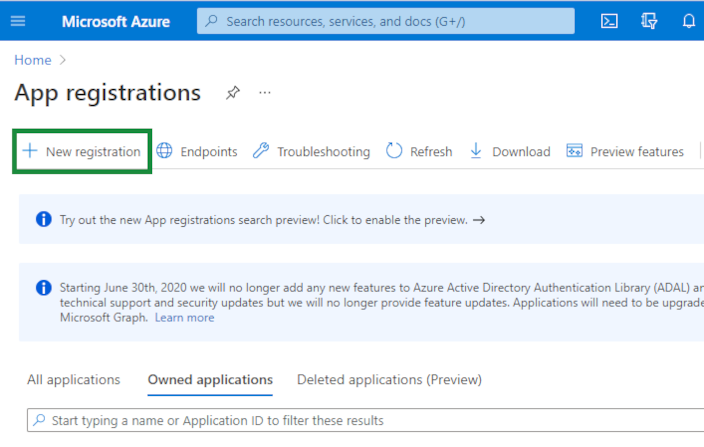
Select + New Registration.
Enter a display Name and select from the Support account types for who is authorized to access the API:
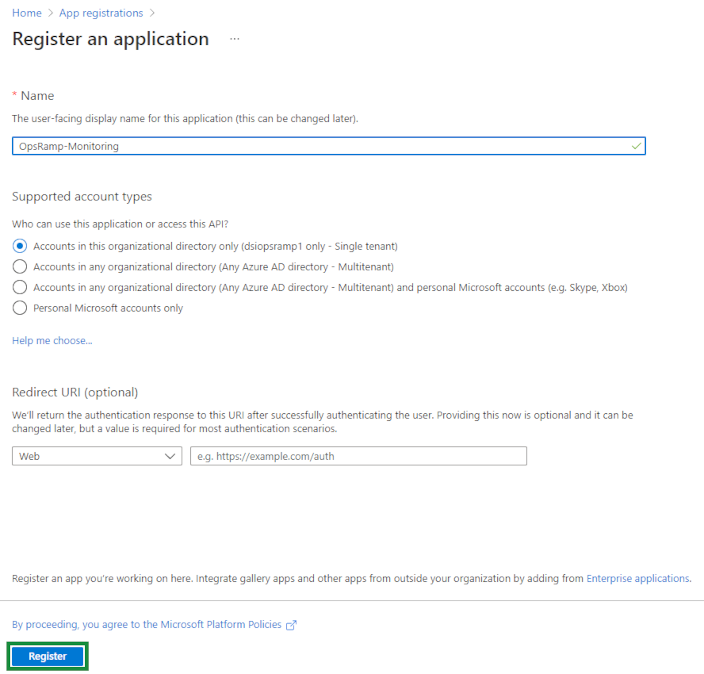
Click Register.
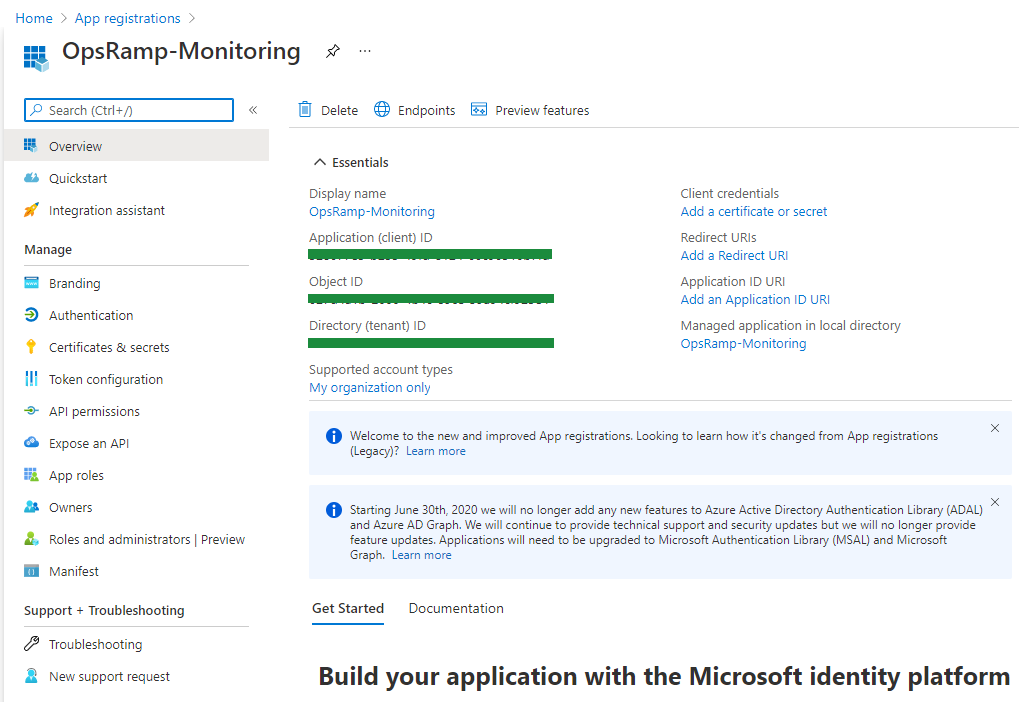
On the registration page, save the values in the Application (client) ID and Directory (tenant) ID fields. These are needed later to complete the OpsRamp part of the integration in Step 3: Configure the integration:
Configure API permissions
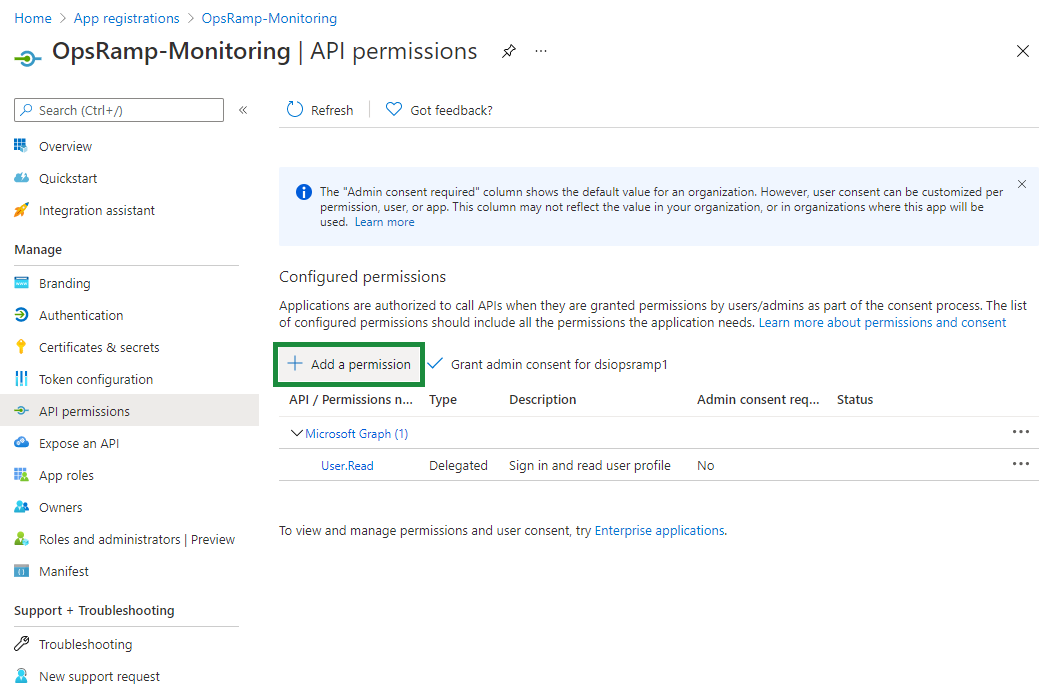
Add a Microsoft Graph permission in the left navigation panel, click API permissions to add new permissions for the Microsoft Graph APIs:
Add a Microsoft Graph permission
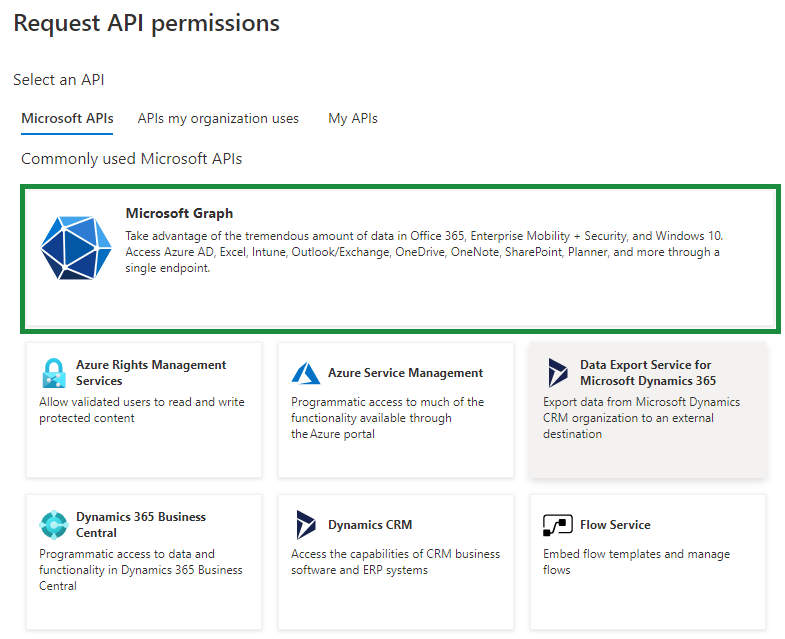
Click + Add a permission to get a list of commonly used APIs:
You want to add a permission to the Microsoft Graph API. Select Microsoft Graph:
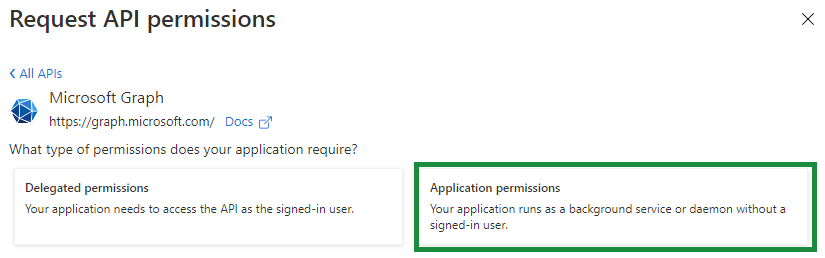
Click Application permissions to specify the type of permission needed:
Select the following permissions:
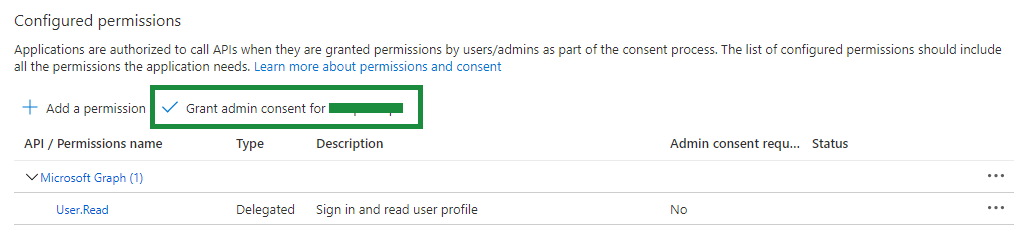
Permission Description User.Read.All Allows the application to read user profiles and basic company information in your organization. Reports.Read.All Allows the application to read all service usage reports, including Office 365 and Azure Active Directory, without a signed-in user. ServiceHealth.Read.All Allows the application to read your tenant's service health information, including service issues and health overviews, without a signed-in user. Go to the API Permissions page and grant permission for all configured permissions by selecting Grant admin consent for xyz:
Add a client secret
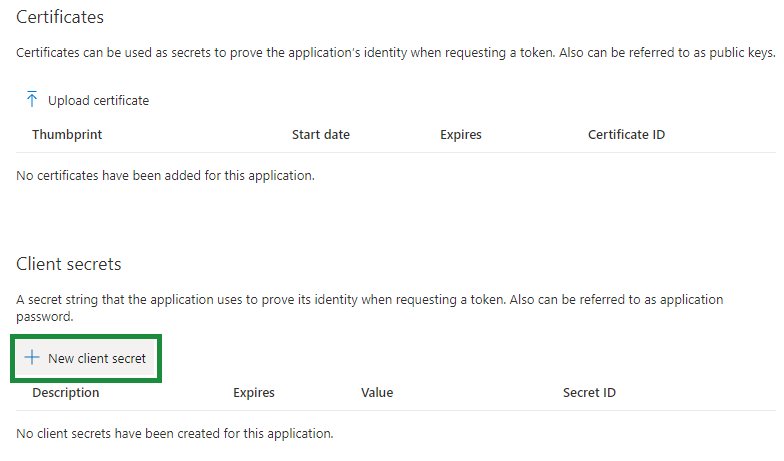
In the left navigation panel, click Certificates & secrets:
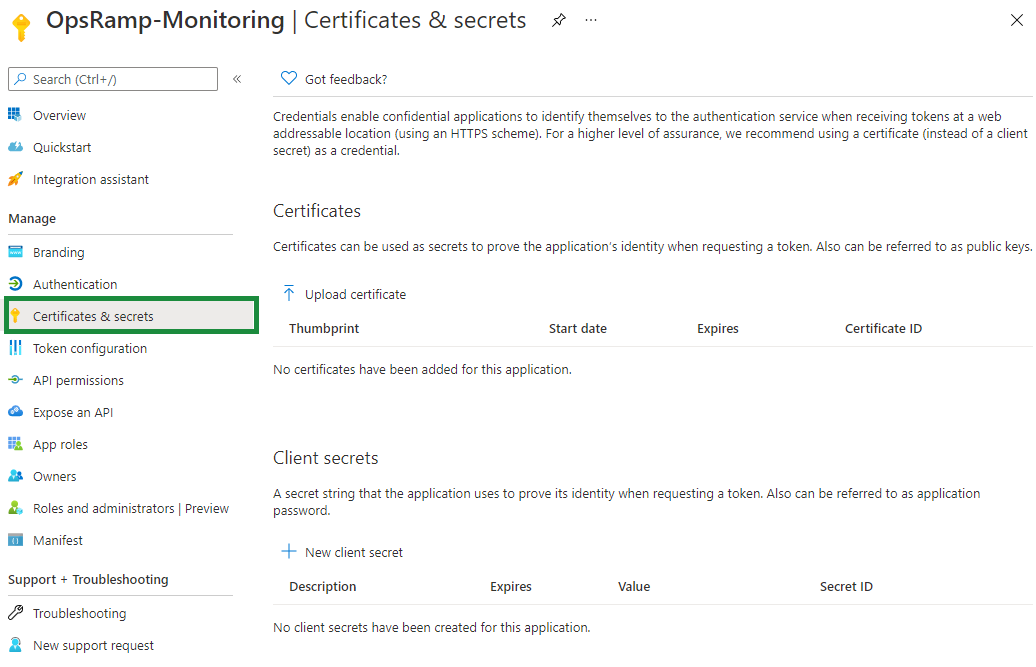
Select + New client secret.
Add a Description and select a time duration for when the secret Expires:
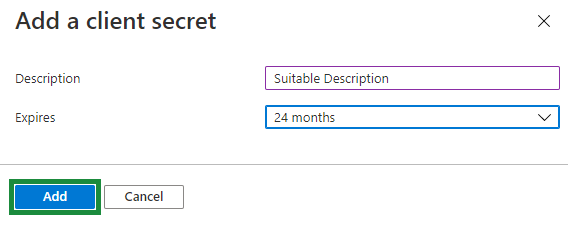
Click Add.
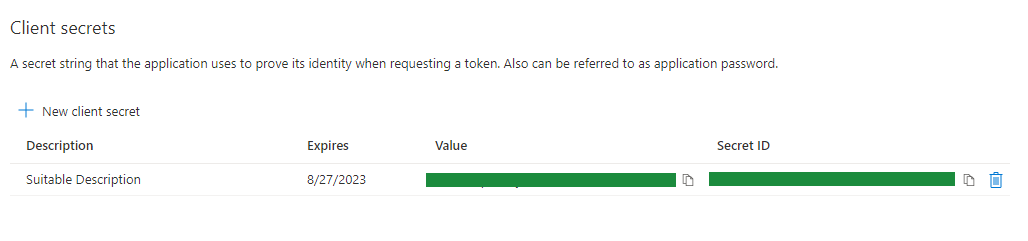
Save the Value and Secret ID. These are needed later to complete the OpsRamp part of the integration in Step 3: Configure the integration:
Configure the integration
From All Clients, select a client.
Navigate to Setup > Account.
Select the Integrations and Apps tab.
The Installed Integrations page, where all the installed applications are displayed. If there are no installed applications, it will navigate to the Available Integrations and Apps page.
Click + ADD on the Installed Integrations page. The Available Integrations and Apps page displays all the available applications along with the newly created application with the version.
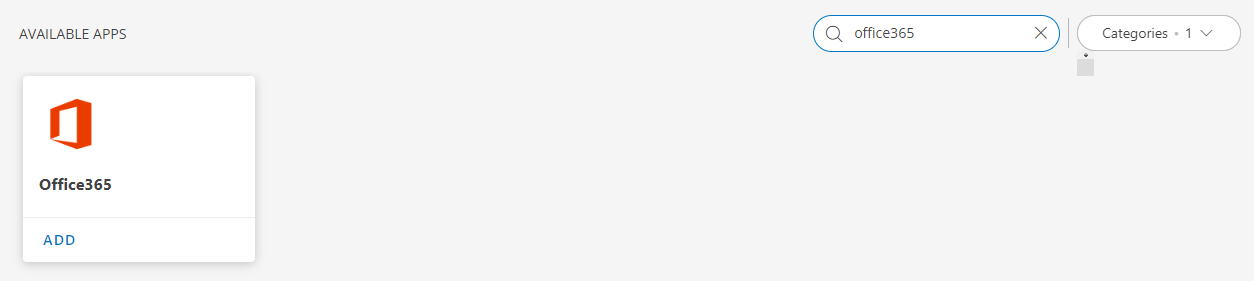
Note: Search for the application using the search option available. Alternatively, use the All Categories option to search.Click ADD under Office365:
In Add OFFICE365 page, enter account information:
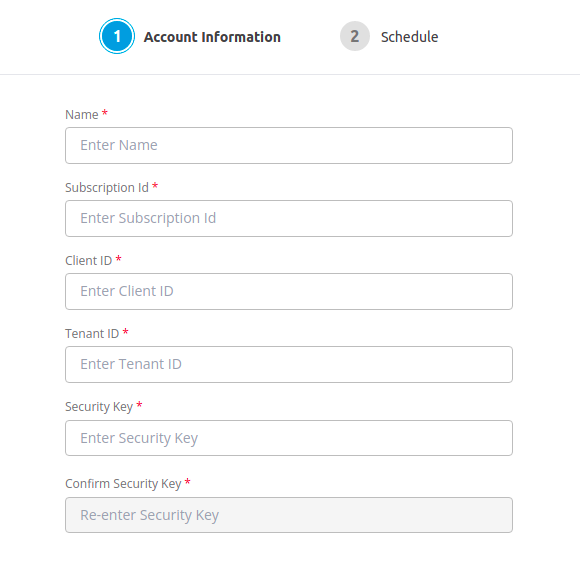
Property Description Name (required) User-defined, descriptive integration name. Subscription Id (required) Azure subscription ID, from Azure services > Subscriptions. Client ID (required) OpsRamp client ID saved from Step 1. Tenant ID (required) OpsRamp tenant ID saved from Step 1. Security Key> (required) Client secret ID saved from the Add an Office 365 Management API permission step. Confirm Security Key (required) Re Enter the Security Key. Click Next.In the RESOURCE TYPE section, select:
- ALL: All the existing and future resources will be discovered.
- SELECT: You can select one or multiple resources to be discovered.
In the DISCOVERY SCHEDULE section, select Recurrence Pattern to add one of the following patterns:
- Minutes
- Hourly
- Daily
- Weekly
- Monthly

Click Finish.The application is now installed and displayed on the Installed Integration page. Use the search field to find the installed application.
Risks, Limitations & Assumptions
The availability is shown unknown for few resources even if it is enabled on the respective resource metrics. This is because of the presence of multiple native type resources under the same resource type.
Probable list of health statuses
| Health Status from API | Description | Service status shown in OpsRamp portal |
|---|---|---|
| Investigating | A potential issue was identified by Microsoft and information is being gathered about the issue and the scope of impact. | 0 |
| ServiceDegradation | Microsoft has confirmed that there is an issue that may affect use of a service or feature. You might see this status if a service is performing more slowly than usual, there are intermittent interruptions, or if a feature is not working. | 1 |
| ServiceInterruption | You will see this status if Microsoft determines that an issue affects the ability for users to access the service. In this case, the issue is significant and can be reproduced consistently. | 2 |
| RestoringService | The cause of the issue has been identified by Microsoft and action is being taken to bring the service back to a healthy state. | 3 |
| ExtendedRecovery | This status indicates that corrective action is in progress to restore service to most users but will take some time to reach all the affected systems. You might also see this status if Microsoft has made a temporary fix to reduce impact while Microsoft waits to apply a permanent fix. | 4 |
| InvestigationSuspended | You will see this status if Microsoft's detailed investigation of a potential issue results in a request for additional information from customers to allow us to investigate further. If Microsoft needs you to take action, you will be notified about what data or logs Microsoft needs. | 5 |
| ServiceRestored | Microsoft has confirmed that corrective action has resolved the underlying problem and the service has been restored to a healthy state. View the issue details to find out what went wrong. | 6 |
| PostIncidentReviewPublished | Microsoft has published a post-incident report for a specific issue that includes root cause information and next steps to ensure a similar issue does not reoccur. | 7 |
| FalsePositive | After a detailed investigation, Microsoft has confirmed the service is healthy and operating as designed. No impact to the service was observed or the cause of the incident originated outside of the service. | 8 |
| ServiceOperational | Service features are healthy and running smoothly. | 9 |
| VerifyingService | The action has been taken to mitigate the issue and verified that the service is healthy. | 10 |
| Resolved | Reserved for future use. | 11 |
| MitigatedExternal | Reserved for future use. | 12 |
| Mitigated | Reserved for future use. | 13 |
| ResolvedExternal | Reserved for future use. | 14 |
| Confirmed | Reserved for future use. | 15 |
| Reported | Reserved for future use. | 16 |
See serviceHealthStatus values for more details.