Introduction

Citrix Virtual applicationss and Desktops provides virtualization solutions that give IT control of virtual machines, applications, and security while providing anywhere access for any device.The service allows you to manage on-premises data center and public cloud workloads together in a hybrid deployment.

Available resources under Citrix Virtual applications and Desktops are as follows:

  • Citrix Site: A site is the name you give to citrix Cloud deployment. It comprises the Delivery Controllers and other core components, Virtual Delivery Agents (VDAs), connections to hosts, machine catalogs, and delivery groups.
  • Delivery Group: A delivery group specifies one or more machines from a catalog.
  • Machine Catalog: A Machine catalog is a collection of virtual or physical machines that have the same operating system type (for example, Windows multi-session, Ubuntu single-session).
  • Citrix Desktop: A virtual desktop is a software computing platform with applicationss and data that is accessible from multiple devices and locations over a network.
  • Citrix Application: Citrix Workspace application provides users with quick, secure, self-service access to documents, applications, and desktops. Citrix Workspace application provides on-demand access to Windows, Web, and Software as a Service (SaaS) applications.
  • Citrix Machine:Citrix Machine Creation Services is a component of the XenDesktop virtual desktop infrastructure platform that IT administrators use to design and deliver virtual desktop images.

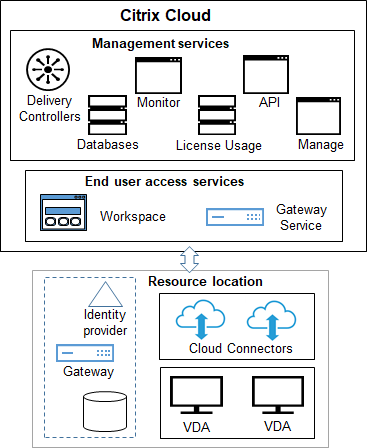
Citrix Architecture diagram:

Citrix site overview

Citrix site overview

Get Customer ID and Region

  1. Login to Citrix Cloud portal.

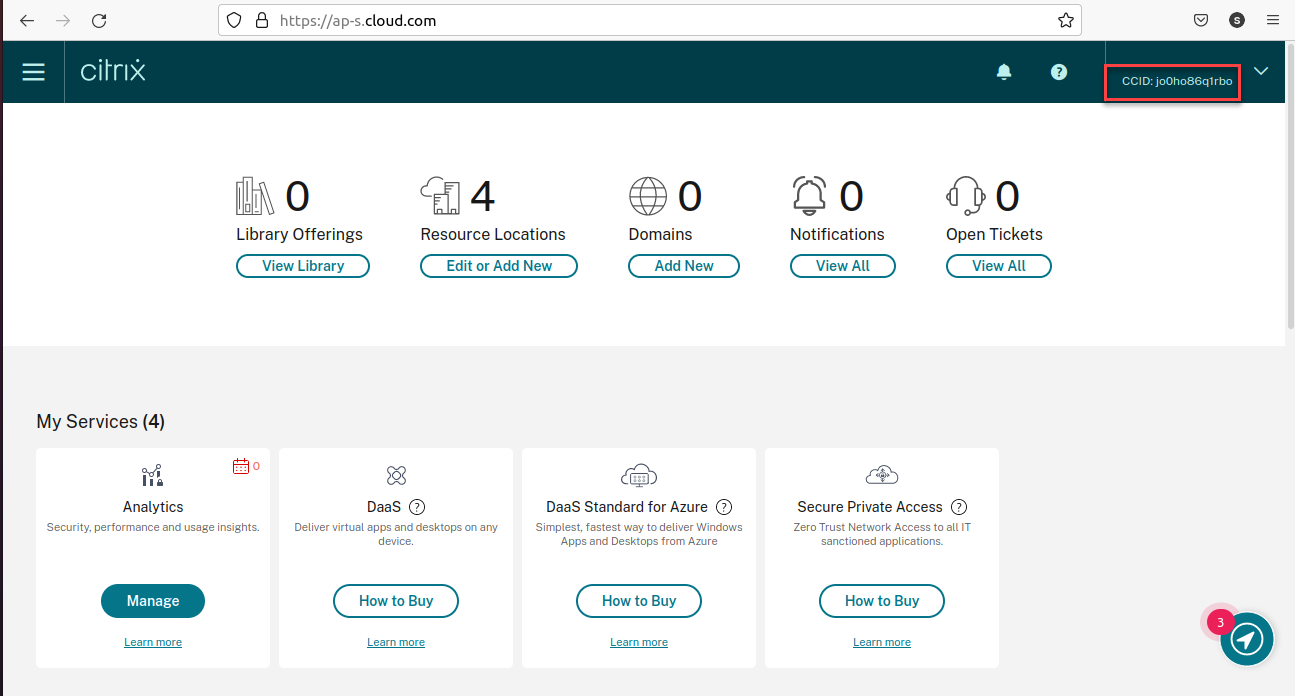
  2. Once you log in, you can find the Customer ID on the right pane as shown below:

  3. In Profile, navigate to Account Settings.

  4. Locate the Region or Data Residency information associated with your Citrix Cloud tenant.

Citrix Cloud Region Mapping

Citrix Cloud RegionOpsRamp Region Selection
United States (US)US/EU/APS Region
European Union (EU)US/EU/APS Region
Asia Pacific South (AP-S)US/EU/APS Region
Japan (JP)JP Region

Get Client ID and Secret Key

  1. Login to Citrix Cloud portal.

  2. Once you log in, on the left pane, click Menu.

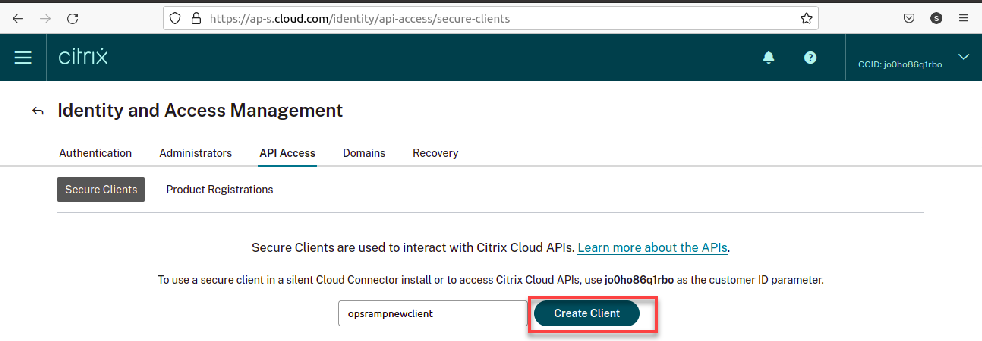
  3. Click Identity and Access Management. In the Identity and Access Management page, select the API Access tab.

  4. In Secure Clients screen, enter the client name and click Create Client as shown below:

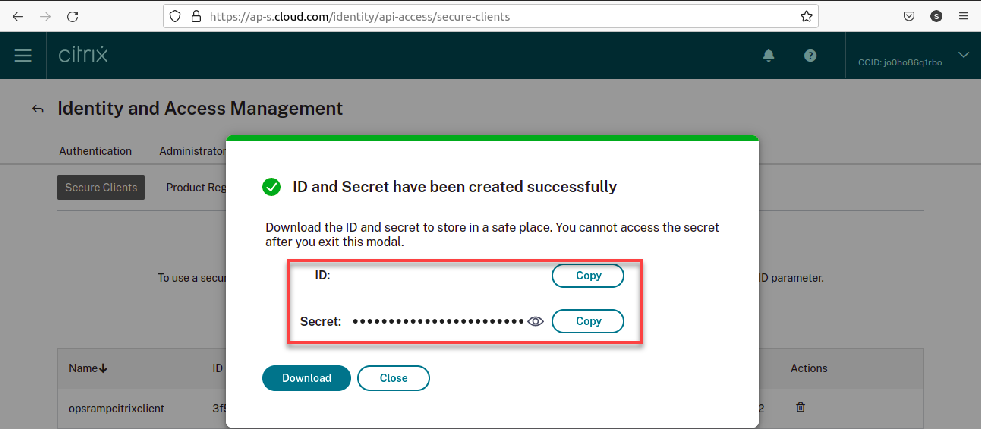
  5. From the create client details page, copy or download the client ID and secret key.

Configure the integration

  1. From All Clients, select a client.
  2. Go to Setup > Account.
  3. Select the Integrations and Apps tab.
  4. The Installed Integrations page, where all the installed applications are displayed.
    Note: If there are no installed applications, it will navigate to the ADD APP page.
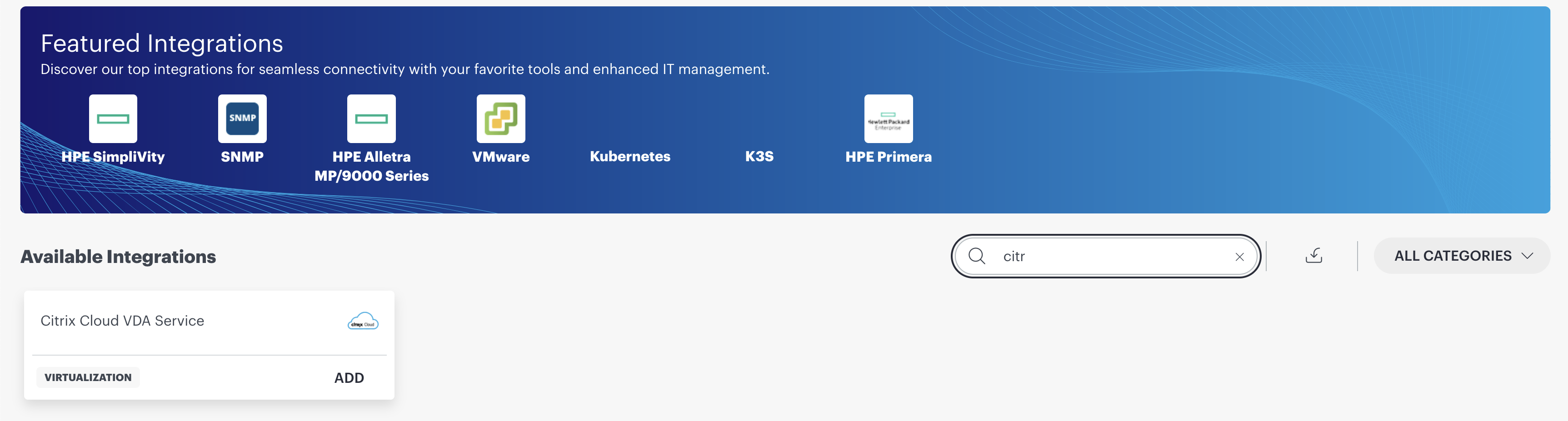
  5. Click + ADD on the Installed Integrations page. The Available Integrations and Apps page displays all the available applications along with the newly created application with the version.
    Note: You can even search for the application using the search option available. Also you can use the All Categories option to search.
  6. Select Citrix Cloud VDA Service.
  1. Enter your account information:
Image
PropertyDescription
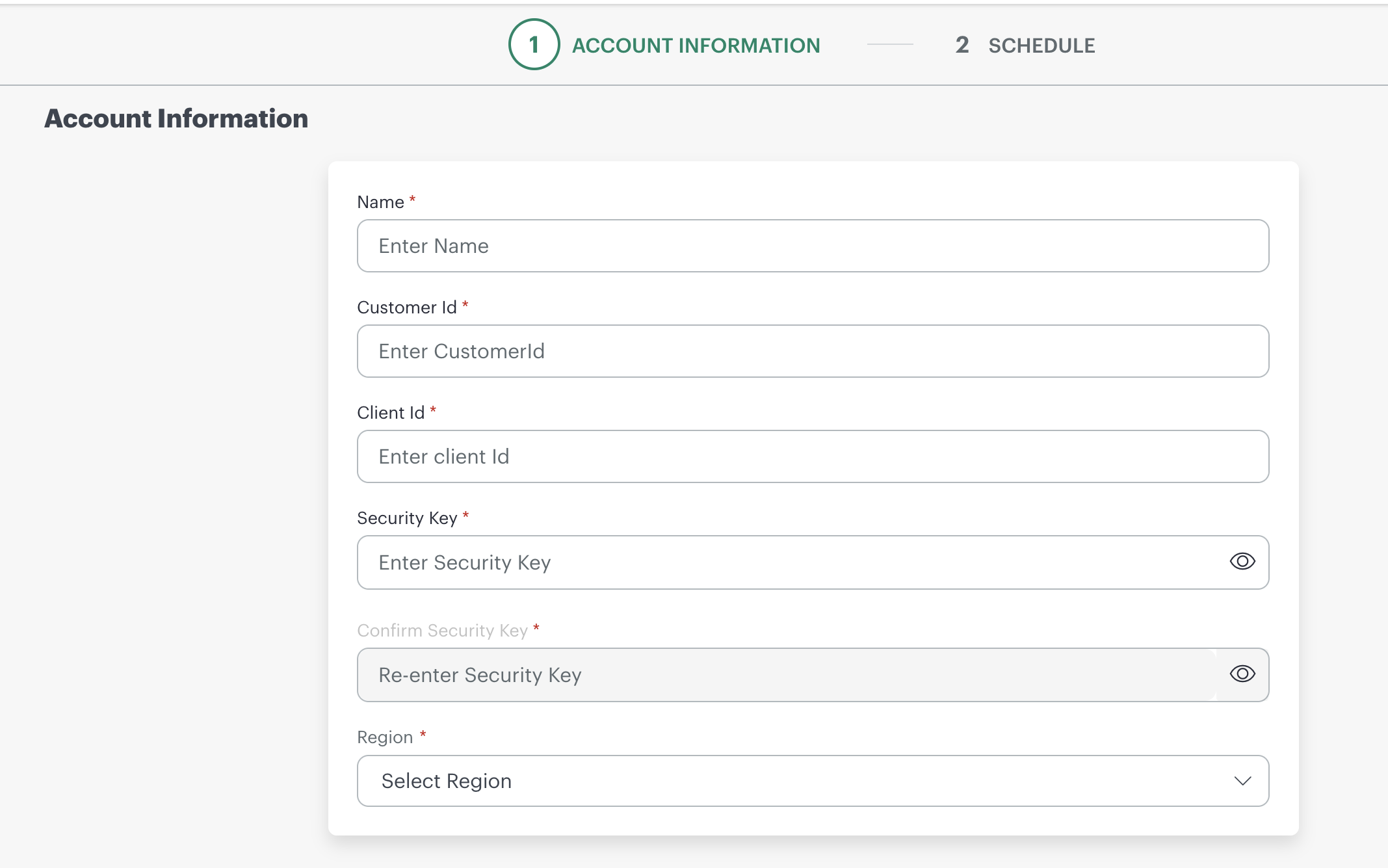
Name(required) Enter integration name.
Customer Id(required) Enter the Customer ID saved from Get Customer ID and Region.
Client Id(required) Enter the Client ID saved from Get Client ID and Secret Key.
Security Key(required) Enter the Security Key saved from Get Client ID and Secret Key.
Confirm Security Key(required) Re-enter the Security Key saved from Get Client ID and Secret Key.
Region(required) Enter the region name saved from Get Customer ID and Region.
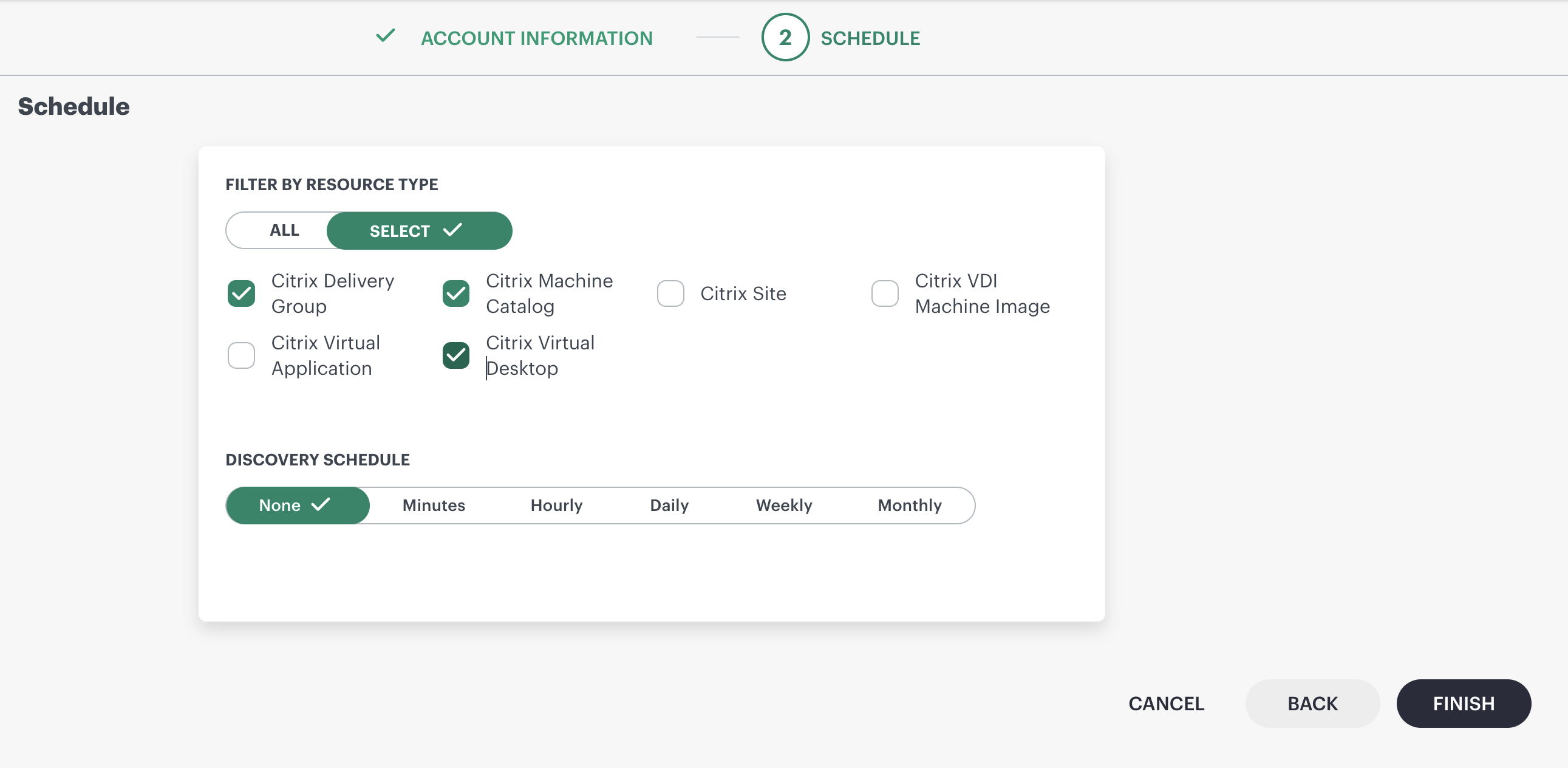
  1. Click Next.In the RESOURCE TYPE section, select:

    • ALL: All the existing and future resources will be discovered.
    • SELECT: You can select one or multiple resources to be discovered.
  2. In the DISCOVERY SCHEDULE section, select Recurrence Pattern to add one of the following patterns:

    • Minutes
    • Hourly
    • Daily
    • Weekly
    • Monthly
      Image
  3. Click Finish.
    The application is now installed and displayed on the Installed Integration page. Use the search field to find the installed application.

  4. After configuring the integration, Citrix Cloud metrics can be viewed from the Infrastructure > Resources page.

Available resources under Citrix CVDA are as follows:

  • Citrix Site
  • Citrix Delivery Group
  • Citrix Machine Catalog
  • Citrix Virtual Desktop
  • Citrix Virtual Application
  • Citrix VDI Machine Image

Supported Metrics

Click here to view the supported metrics
Resource TypeMetric NameMetric Display NameUnitsDescription
Citrix Sitecitrixcvda_site_LicenseGraceSessionsRemainingLicense Grace Sessions RemainingCountLicense Grace Sessions Remaining
citrixcvda_site_LicensedSessionsActiveLicensed Sessions ActiveCountNo of active licensed sessions
citrixcvda_site_PeakConcurrentLicenseUsersPeak Concurrent License UsersCountPeak Concurrent License Users
Citrix Delivery Groupcitrixcvda_deliverygroup_SessionCountSession CountCountdelivery group session count
citrixcvda_deliverygroup_TotalMachinesTotal MachinesCounttotal number of machines
citrixcvda_deliverygroup_MachineUnregisteredCountUnregistered Machine CountCountunregistered machine count
citrixcvda_deliverygroup_SessionLingeringSession Lingering EnabledBooleanLingering session enabling state. 0- false, 1- true
citrixcvda_deliverygroup_SessionPrelaunchPrelaunch Session EnabledBooleanprelaunch session enabling state. 0- false, 1- true
citrixcvda_deliverygroup_StateEnabledDelivery Group State EnabledBooleandelivery group enabling state. 0 -false, 1 - true
citrixcvda_deliverygroup_RegisteredMachinesRegistered MachinesCountnumber of registered machines
citrixcvda_deliverygroup_DesktopsAvailableDesktops CountCountnumber of desktops available
citrixcvda_deliverygroup_DesktopsDisconnectedDisconnected Desktops CountCountcount of disconnected desktops
citrixcvda_deliverygroup_DesktopsFaultedFaulted Desktops CountCountnumber of faulted desktops
citrixcvda_deliverygroup_DesktopsUnregisteredUnregistered Desktops CountCountnumber of unregistered desktops
citrixcvda_deliverygroup_IsBrokenIs Delivery Group BrokenBooleanbroken state of delivery group. 0 - false, 1 - true
citrixcvda_deliverygroup_MachinesInMaintenanceModeMachines In Maintenance ModeCountnumber of machines in maintenance mode
citrixcvda_deliverygroup_DesktopsInUseDesktops In UseCountnumber of desktops in used state
citrixcvda_deliverygroup_DesktopsNeverRegisteredDesktops Never RegisteredCountnumber of desktops that are not registered
citrixcvda_deliverygroup_DesktopsPreparingPreparing Desktops CountCountnumber of desktops preparing
citrixcvda_deliverygroup_MaxAverageLoadThresholdMax Average Load ThresholdCountdelivery group max average load threshold value
citrixcvda_deliverygroup_OffPeakBufferSizePercentOff Peak Buffer Size PercentPercentagepercentage of off Peak buffer size
citrixcvda_deliverygroup_PeakBufferSizePercentPeak Buffer Size PercentPercentagepercentage of peak buffer size
citrixcvda_deliverygroup_SecureIcaRequiredSecureIca RequiredBooleanWhether securelca required or not. 0 -false, 1- true
citrixcvda_deliverygroup_UnassignedMachinesUnassigned Machines CountCountnumber of unassigned machines
Citrix Machine Catalogcitrixcvda_machinecatalog_DiskSizeGBMachine Catalog Disk SizeGBmachine catalog disk size in GB
citrixcvda_machinecatalog_CpuCountCPU CountCountcpu count
citrixcvda_machinecatalog_CoresPerCpuCountCores Per CPU CountCountCores Per CPU Count
citrixcvda_machinecatalog_MemoryMBMemory In MBMBMemory In MB
citrixcvda_machinecatalog_MachineCountMachine CountCountmachine count
citrixcvda_machinecatalog_AssignedCountAssigned CountCountmachine catalog assigned count
citrixcvda_machinecatalog_IsBrokenMachine Catalog Broken StateBooleanMachine Catalog Broken State. 0- false, 1 - true
citrixcvda_machinecatalog_DiskImageStatusDisk Image StatusNone (Enum)Disk Image Status. 0 - Unknown, 1- Other
citrixcvda_machinecatalog_NumAvailableMachineAccountsAvailable Machine Accounts CountCountnumer of avalailable machine accounts
citrixcvda_machinecatalog_JobsInProgressJobs In ProgressCountnumber of jobs in progress state
citrixcvda_machinecatalog_AvailableAssignedCountAvailable Assigned CountCountavailable assigned count
citrixcvda_machinecatalog_AvailableCountMachine Catalog Available CountCountnumber of machine catalogs available
citrixcvda_machinecatalog_AvailableUnassignedCountMachine Catalog Available Unassigned CountCountMachine Catalog Available Unassigned Count
citrixcvda_machinecatalog_TotalCountMachine Catalog Total CountCounttotal machine catalogs count
citrixcvda_machinecatalog_UnassignedCountMachine Catalog Unassigned CountCountMachine Catalog Unassigned Count
citrixcvda_machinecatalog_UsedCountMachine Catalog Used CountCountMachine Catalog Used Coun
citrixcvda_machinecatalog_ProvisioningProgressMachine Catalog Provisioning ProgressCountMachine Catalog Provisioning Progress
Citrix Virtual Desktopcitrixcvda_desktop_MachinesForAssignmentDesktop Machines For AssignmentCountnumber of Desktop Machines For Assignment
citrixcvda_desktop_EnabledDesktop Enabling StateBooleanDesktop Enabling State. 0 -false, 1- true
citrixcvda_desktop_ExcludedUserFilterEnabledExcluded User Filter Enabling StateBooleanExcluded User Filter Enabling State. 0- false, 1- true
citrixcvda_desktop_IncludedUserFilterEnabledBooleanIncluded User Filter Enabling State. 0- false, 1- true
citrixcvda_desktop_LeasingBehaviorDesktop Leasing BehaviorNone (Enum)Desktop Leasing Behavior. 1- Allowed , 0- Notallowed
citrixcvda_desktop_MaxDesktopsMaximum DesktopsCountcount of maximum desktops
citrixcvda_desktop_SessionReconnectionDesktop Session ReconnectionNone (Enum)Desktop Session Reconnection. 0 - Unknown, 1- Alaways
citrixcvda_desktop_SecureIcaRequiredDesktop SecureIca RequiredBooleanDesktop SecureIca Required. 0- false, 1- true
Citrix Virtual Applicationcitrixcvda_application_EnabledApplication Enabling StateBooleanApplication Enabling State. 0-false, 1-true
citrixcvda_application_MaxPerUserInstancesMax Per User InstancesCountMax Per User Instances
Citrix VDI Machine Imagecitrixcvda_machine_PowerStatePower StateNone (Enum)machine power state. 0- Off, 1- On.
citrixcvda_machine_MaintanenceModeMaintanence ModeBooleanmaintenance mode. 0 - false, 1 - true
citrixcvda_machine_RegistrationStateRegistration StateNone (Enum)Registration State. 0- Unregistered, 1- Registered
citrixcvda_machine_ImageOutOfDateIs Image Out Of DateBooleanIs Image Out Of Date. 0- false, 1- true
citrixcvda_machine_IsAssignedAssigned StateBooleanIs Assigned machine. 0-false, 1 - true
citrixcvda_machine_LoadIndexMachine Load IndexCountMachine Load Index
citrixcvda_machine_SessionCountMachine Session CountCountMachine Session Count
citrixcvda_machine_SummaryStateSummary StateNone (Enum)Summary State. 0 - Unavailable, 1- Available
citrixcvda_machine_FaultStateFault StateNone (Enum)Fault State. 0 - "None", 1-"Unknown"

References

https://developer.cloud.com/citrix-cloud/citrix-cloud-api-overview/docs/get-started-with-citrix-cloud-apis