Dashboard
Enhanced Dashboard Management and Sharing Visibility
Managing large numbers of private and shared dashboards can make it challenging for users to identify ownership, understand access permissions, and quickly locate relevant dashboards. To simplify dashboard administration and improve discoverability, OpsRamp now introduces a user-centric dashboard management experience.
The updated interface organizes dashboards into clear categories such as My Dashboards, Shared To Me, Shared By Me, and All Dashboards, while also providing visibility into dashboard ownership and sharing metadata. This enhancement helps users quickly identify who owns a dashboard, understand how it has been shared, and efficiently manage access across the teams.
Enhanced Bar Chart Visualizations for Metric Tiles
Enhanced bar chart visualizations for metric tiles to provide more intuitive and consistent data representation across dashboards. You can now utilize stacked bar graphs to better visualize per-resource metric time-series data, eliminating previous overlapping issues. This update ensures that metric bar charts are consistent with log bar graphs, allowing you to easily interpret grouped resource data and categorical metric values within a specified time period.
See Metric Tile for more details.
Expanded query support for List Visualizations
You can now include up to 10 queries in a single List visualization, doubling the previous limit of five. This enhancement allows you to build more comprehensive dashboards and consolidate related data points into a single view, similar to advanced reporting in other platforms. To maintain optimal performance and clarity when using more than five queries, the system ensures each query returns a single data series and provides real-time validation hints during configuration.
See List Visualizations for more details.
Added alerts overview in default inventory dashboard
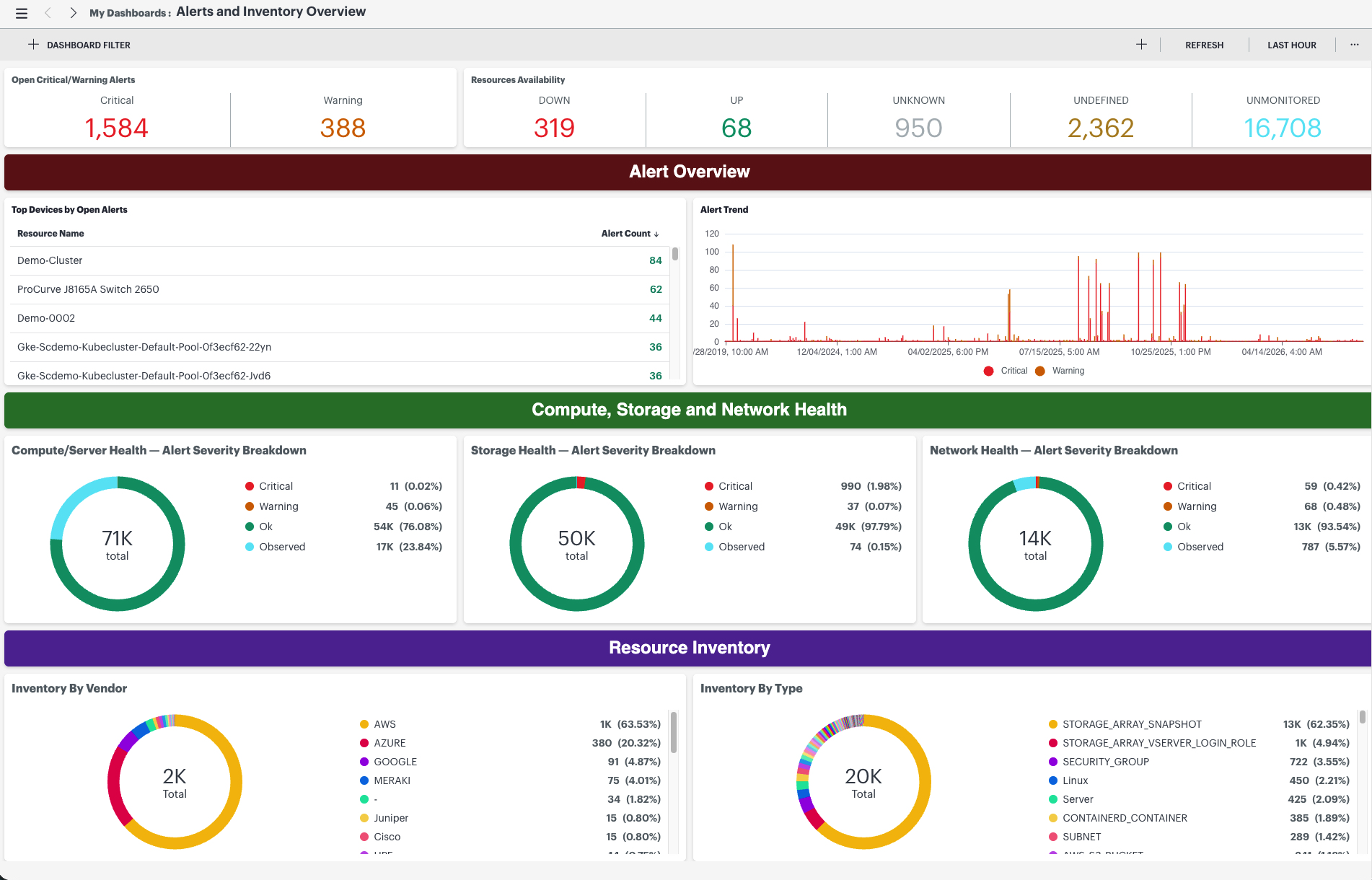
The default Inventory Overview dashboard now includes an Alerts Overview section, providing a unified view of infrastructure health and resource inventory.
The new widgets display open critical and warning alerts, alert trends, and resource availability, alongside existing inventory data. This enhancement helps you quickly monitor compute, storage, and network health while viewing resource distribution by vendor and resource type.
Tabbed Dashboard Navigation
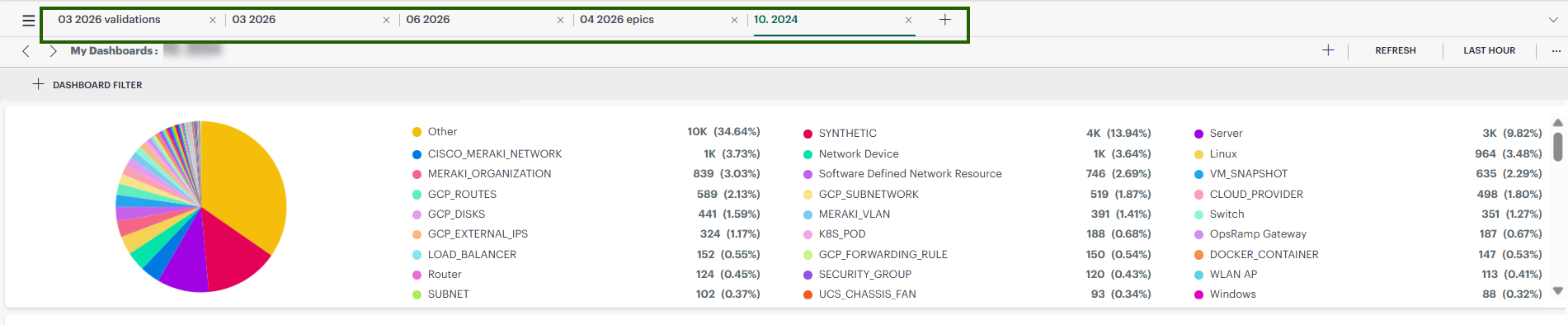
OpsRamp now features a tab-based dashboard navigation framework, enabling you to consolidate complex monitoring data into a single, organized view. This enhancement allows you to create multiple tabs or sections within a single dashboard, providing a streamlined way to switch between high-level overviews and granular technical insights without navigating away from your primary workspace.
Core Platform
Unified Log Visibility in Resource Details page
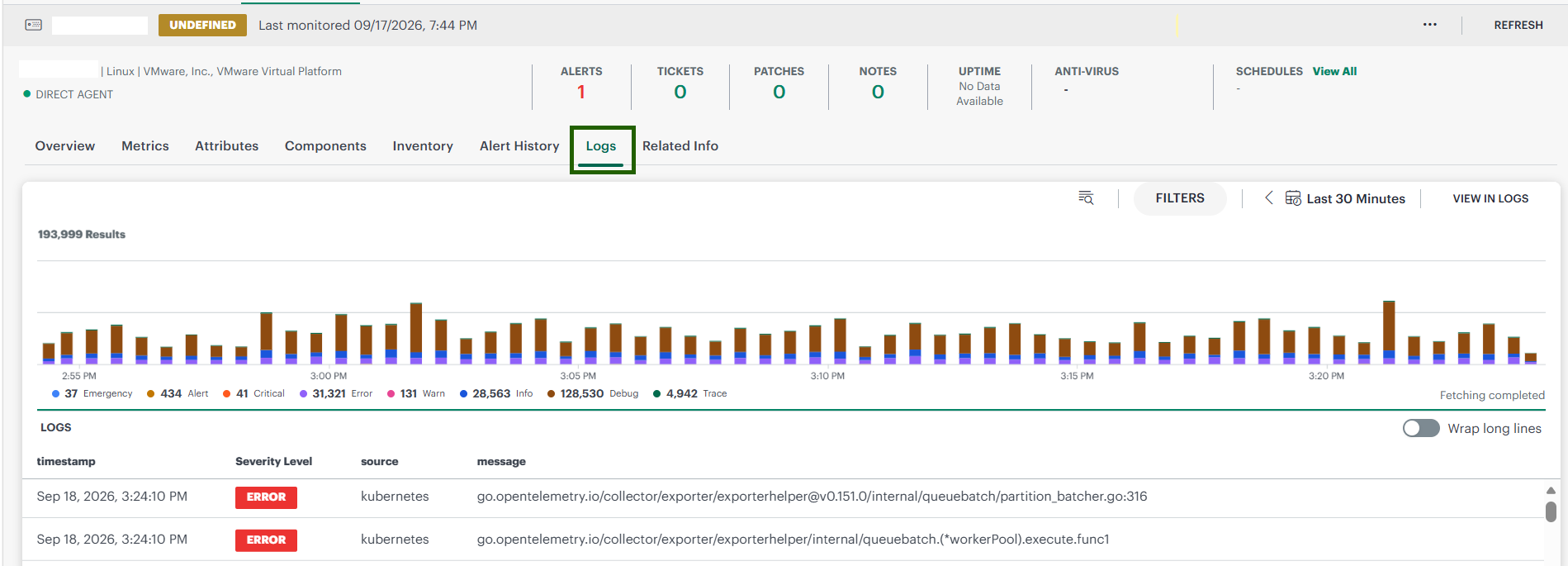
You can now view and analyze log entries directly within the resource-level details page, eliminating the need to navigate between multiple browser windows. This enhancement introduces a dedicated Logs tab alongside existing resource metrics, providing a unified troubleshooting experience.
When you access the Logs tab, the system automatically filters entries based on the specific resource context and displays them in a familiar tabular view, complete with a log distribution bar chart. You can perform keyword searches, apply severity and source filters, and adjust time ranges just as you would in the Log Explorer. For deeper analysis, you can use the View in Logs link to transition your current view and filters into the full Log Management module, significantly reducing the time required to correlate performance metrics with log events.
The View Logs option is no longer available in the Resource actions popup. To view a resource’s logs:
- On the Infrastructure > Search page, search for the resource.
- Click the resource name. The resource details page appears.
- Select the Logs tab.
See Logs for more details.
Resource Bulk Update Policy
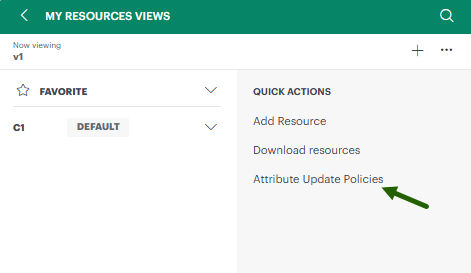
OpsRamp introduces Resource Bulk Update Policy, an automation feature for managing resource properties at scale.
Key Features
- Automatic property assignment— Apply timezone values automatically to matching resources.
- Discovery protection— Prevent overwrites from agent updates or discovery processes.
- Audit trail— Track all policy operations with detailed logging.
Benefits
- Enforce consistent configurations — Apply standardized settings uniformly across your entire resource inventory without manual intervention.
- Reduce manual resource edits — Eliminate time-consuming manual updates by automating bulk property assignments.
- Full visibility through logging — Track every policy operation with detailed audit trails for complete transparency and accountability.
Password Policy Update
The minimum password length requirement has been increased to 14 characters. This change applies across all password-related workflows, including:
- New user registration and account creation
- Accepting user invitations
- User login
- Forgot-password and password-reset flows
- Administrator-initiated password resets
- Change-password workflows
- Existing users whose current passwords are shorter than 14 characters
If a password does not meet the new 14-character minimum, it will be rejected, and the user will be prompted to update it before they can continue. Passwords that already meet or exceed the 14-character requirement are unaffected and will continue to work as expected.
See User-Portal for more details.
Configuration Versioning and Rollback Framework
Implemented a comprehensive versioning framework for system configurations for budget policies. You can:
- Track a full audit trail of changes, including who made each change and when.
- View version history and compare versions side by side to identify specific changes.
- Restore a earlier version immediately whenever you need to undo a change.
This improves operational reliability by enabling rapid recovery from misconfigurations, and supports accountability and audit compliance through detailed change records.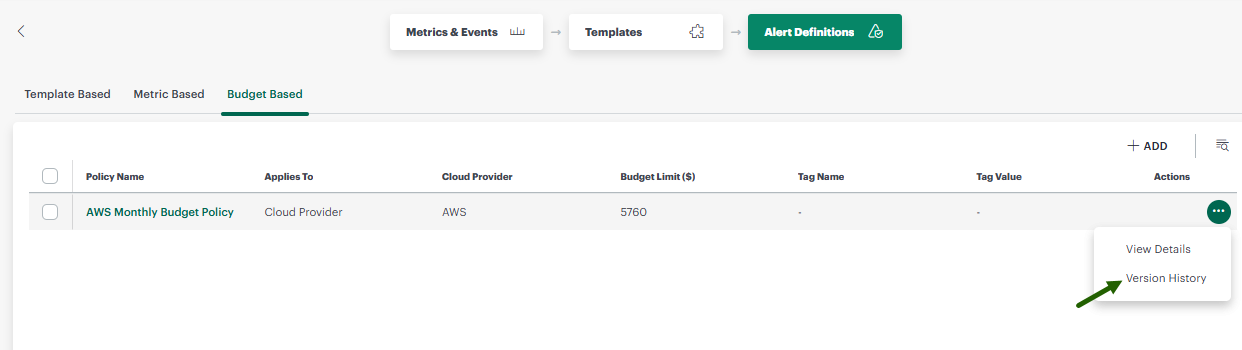
Expanded Configuration Versioning Support
OpsRamp now supports configuration versioning for more entities. You can track history, compare versions, and restore earlier states for:
- Metrics
- Events
- Monitoring Templates
- Template-based Alert Definition
- SNMP Installed Configuration
- Sites
- Service Maps
- Device Group
- SNMP Traps
- SysLogs
With this update, you can:
- Find regressions faster: Compare any two versions to see exactly what changed.
- Stay accountable: See who changed a configuration and when.
- Recover quickly: Roll back to a known-good version.
View Last Login Time in My Profile
My Profile section now displays the user’s last successful login date and time, formatted in the user’s applicable time zone, helping users verify recent account access.
Modernized UI Components and Theme Integration
We updated the platform’s design by replacing old system parts with a modern design framework. We rolled this update out across several areas, including Patch Management and Observability.
This change makes the platform look consistent, work more smoothly, and become easier for everyone to use and navigate. The new theme also makes the system faster, more responsive, and more professional.
Monitoring Management
Hostname visibility in Monitor Details reports
Introduced the Host Name attribute as a selectable field within the Monitor Details application. This enhancement allows you to include hostnames directly in your monitoring and availability reports, specifically for Oracle and MSSQL database resources. By having the hostname selected by default in the attributes menu, you can now more easily correlate database performance and availability metrics with their respective physical or virtual hosts, streamlining troubleshooting and reporting workflows.
Delete Custom Metrics and Events from the UI
You can now delete custom metrics and events directly from the UI without using APIs. You can delete only the metrics and events that you created and have permission to manage. Global metrics and events cannot be deleted.
To prevent disruptions to existing monitoring configurations, OpsRamp checks for dependencies before allowing deletion:
- Template dependencies: If a metric or event is associated with one or more templates, the deletion dialog displays the affected template names. You must remove these dependencies before proceeding.
- Metric dependencies: If a metric is used in derived metrics or metric-based alert definitions, you must remove these dependencies before deleting the metric.
- No dependencies: If no dependencies are found, you can delete the metric or event immediately.
These validations help you identify and resolve dependencies before deletion, reducing the risk of disrupting existing monitoring and alerting workflows.
Include or Exclude Metric Samples During Scheduled Maintenance
You can now include or exclude metric samples collected during scheduled maintenance when configuring Metric tiles using PromQL expressions. This enhancement helps provide a more accurate representation of resource performance by preventing expected maintenance activity from affecting the displayed metrics.
OpsRamp uses the system_resource_availability_state metric and its maintenance_state label to identify whether a resource was under scheduled maintenance:
maintenance_state="enabled": The resource was under scheduled maintenance.maintenance_state="disabled": The resource was not under scheduled maintenance.
You can use this label in your PromQL expressions to include or exclude metric samples based on the resource’s maintenance status.
For configuration instructions and PromQL examples, see Metric Tile.
Event Management
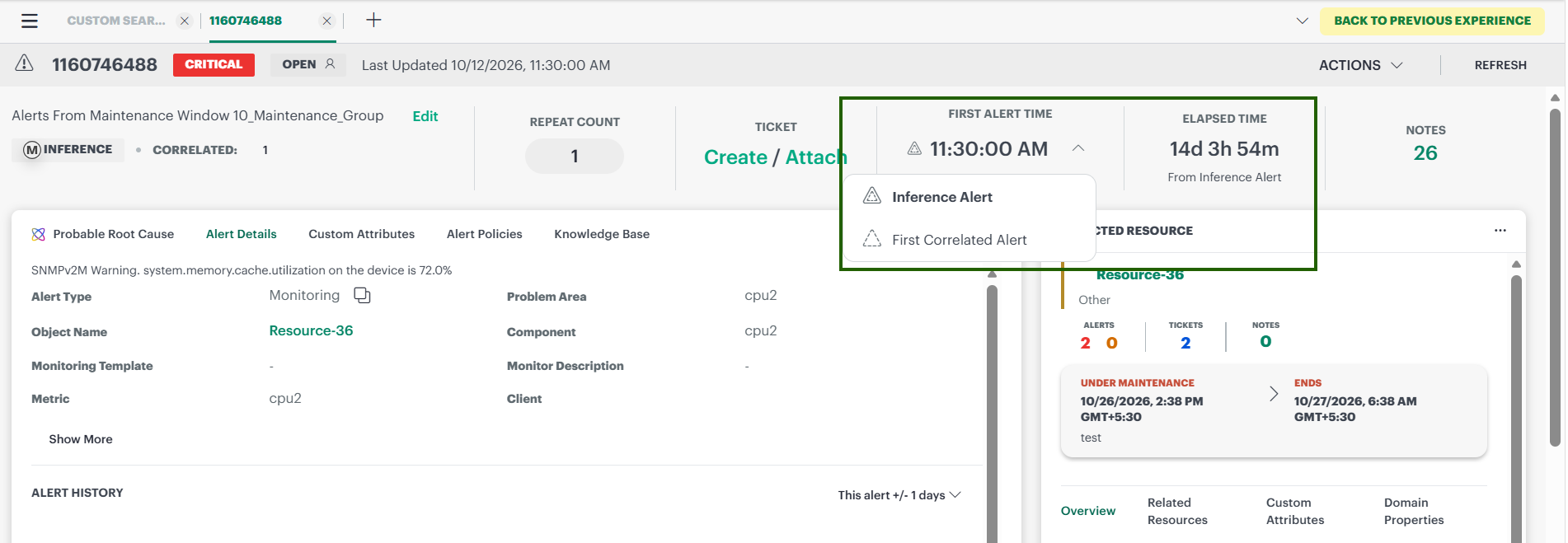
Elapsed time for inference alert to consider time of first correlated alert
Users can now view the time of the first correlated alert and time elapsed since its creation for Inference alerts. This is in addition to the current first inference creation time and time elapsed since inference creation.
Support for domain attributes in the subject and description in incident creation under escalation policy
Users can utilize resource domain attribute tokens in incident rule subject and description of an alert escalation policy, and token values are shown in an incident ticket.
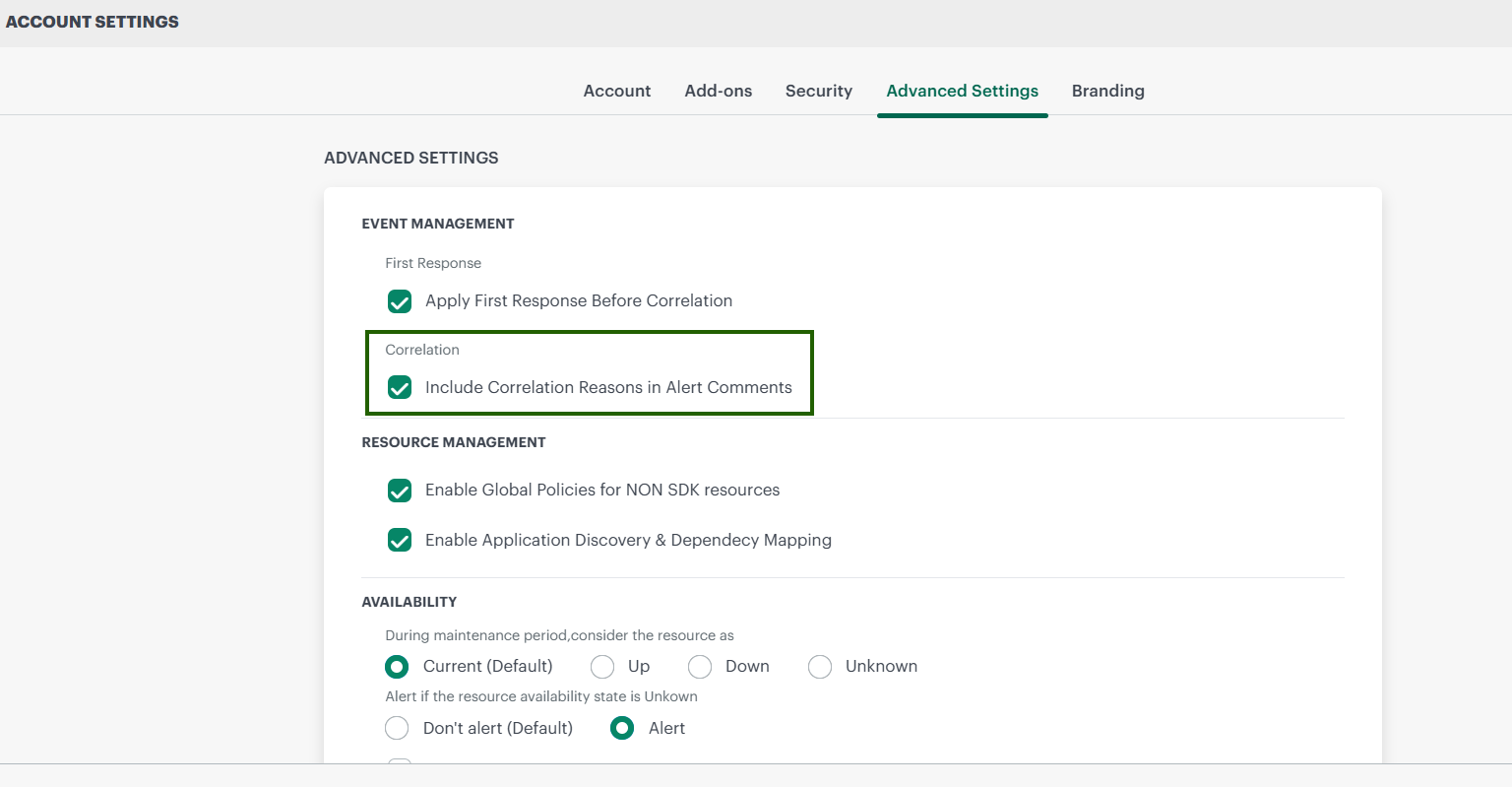
Reduce multiple correlation reason comments in ticket description
Users will have an option to include or exclude multiple alert correlation reason comments in an incident description.
Alert policies: add classic link on v2 UI
Users can use the “Back to Previous Experience” link available on all V2 Alert Policy pages, and the Alert Notification Template page to navigate to the corresponding Classic pages. This enables users to adopt the V2 experience while easily comparing it with the Classic experience, supporting a smooth transition to the V2 UI.
Log Management
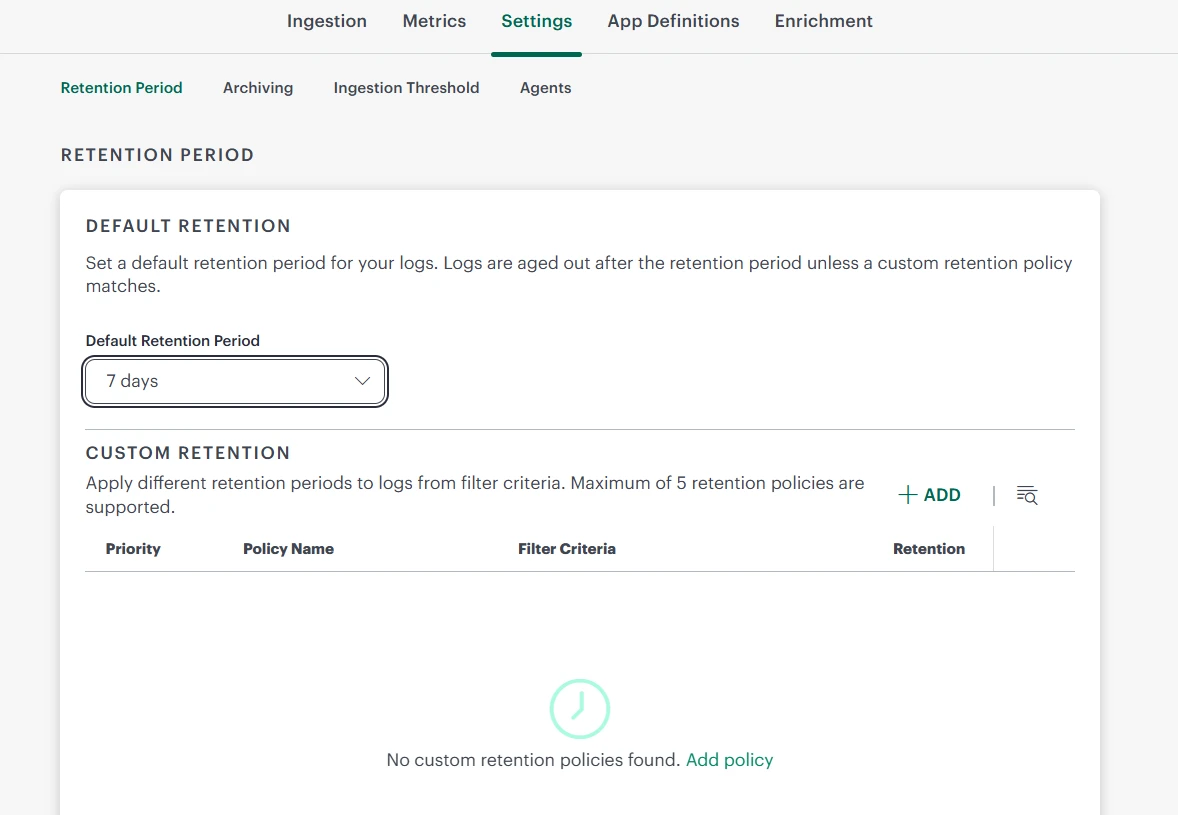
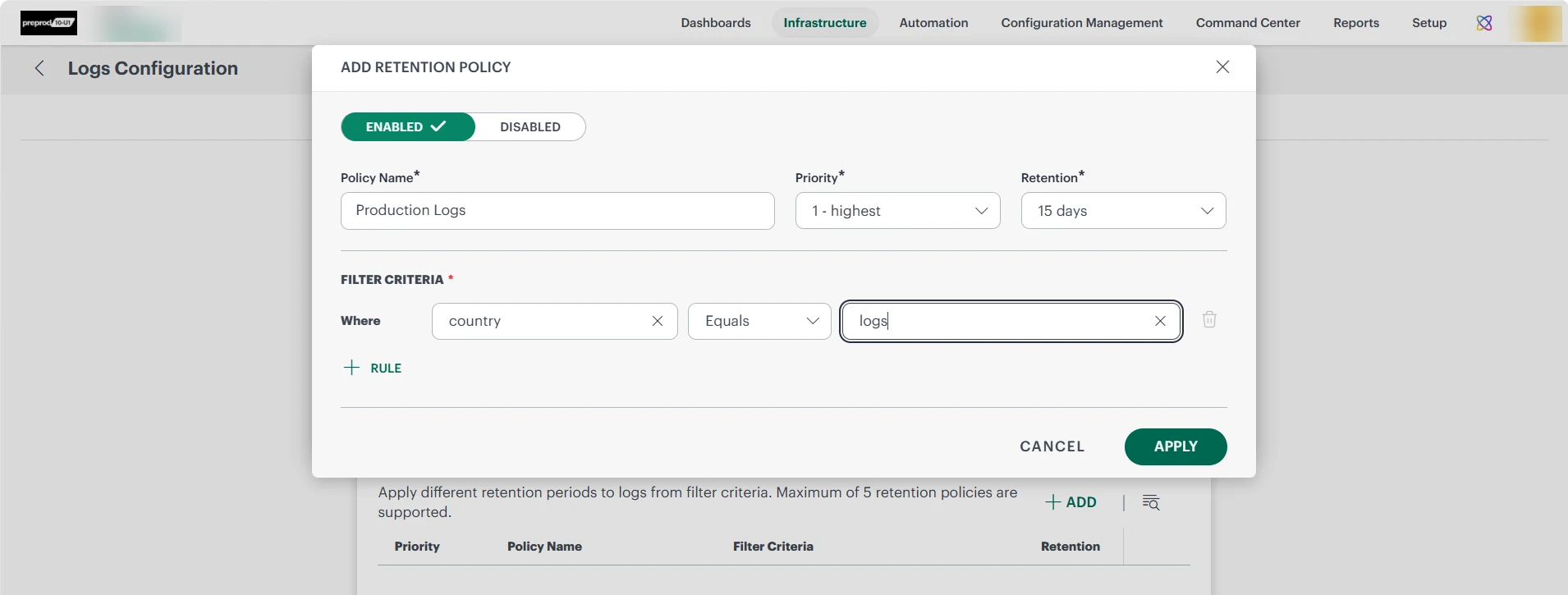
Selective Log Retention Policies
Added support for configuring multiple log retention policies based on log attributes such as location, country, group, environment, and tags. This enhancement enables granular, attribute-based retention management, allowing organizations to apply different retention periods to specific log data sets. Logs that do not match any configured retention policy continue to be governed by the default tenant-wide retention policy.
For more information, see Log Retention Policies
Log Explorer Enhancements
Infinity Scrolling
- Added search capabilities for Available Fields, Selected Fields, and field values with support for partial and case-insensitive matching.
- Available and Selected fields are now displayed in alphabetical order by default for easier navigation.
- Added support for executing queries by pressing Enter in the Advanced Query editor.
- Improved field coverage calculations to ensure percentages accurately represent the displayed log dataset and do not exceed 100%.
For more information, see Infinity Scrolling
Persisting Query Filters Between Basic and Advanced LogsQL
- Added bidirectional query conversion between Basic QL and Advanced QL for supported filters, operators, and logical conditions.
- Preserved a selected time range, applied filters, and query context when switching between query modes.
- Improved handling of unsupported Advanced QL constructs. Queries containing aggregations, group-by functions, pipelines, or nested expressions remain in Advanced QL, with a notification explaining why conversion to Basic QL is not supported.
For more information, see Switching between Basic QL and Advanced QL
Support log size as a search, aggregation, and visualization field
Introduced a new out-of-the-box field, log_size_bytes, which is automatically calculated for every ingested log to provide visibility into actual log data volume.
- Added the log_size_bytes field to provide visibility into actual log data volume alongside event counts.
- Added support for sum, avg, min, and max aggregations on
log_size_byteswithingroupByqueries for volume analysis. - Added the ability to identify high-volume log sources across applications, hosts, services, and namespaces.
- Added support for estimating data footprint and export sizes before downloading or streaming log datasets.
For more information, see Switching between Basic QL and Advanced QL
Support enterprise-scale log Ingestion notification thresholds and flexible units
Log volume notification threshold enhancements:
- Added support for configuring log volume notification thresholds using MB, GB, and TB units, providing greater flexibility and precision when defining threshold values.
- Updated labels and contextual messaging clearly indicate that configured thresholds generate notifications only and do not restrict, throttle, or interrupt log ingestion.
For more information, see Log Size Analytics
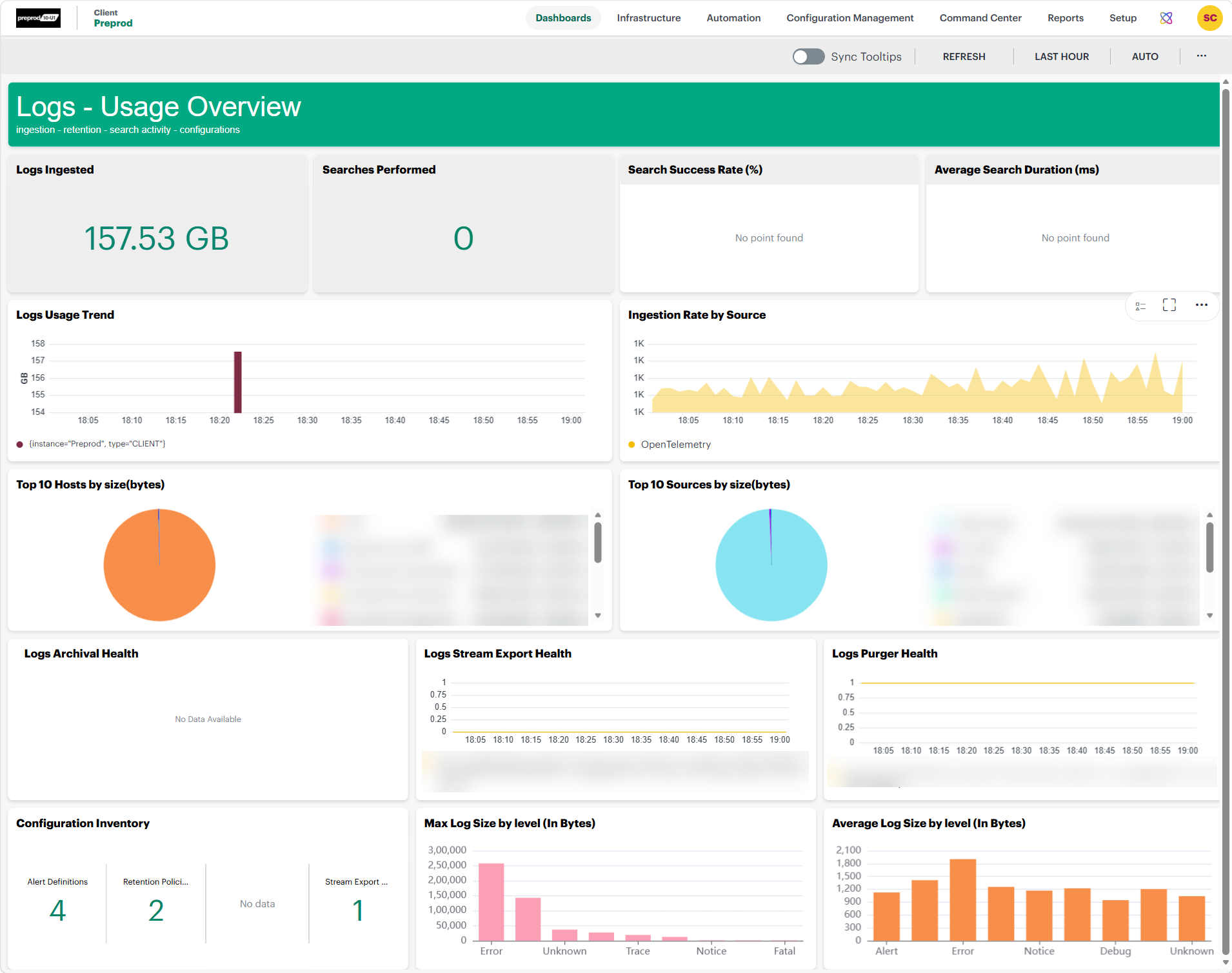
Usage Overview Dashboard Enhancements
- Introduced the Usage Overview dashboard, providing centralized visibility into log ingestion, search activity, and operational insights.
- Added visibility into log ingestion volume trends to help identify spikes and usage patterns.
- Added insights into the top log sources and hosts contributing to ingestion volume.
- Added search performance metrics, including total searches, average search duration, and search success rate.
- Added severity distribution and policy health insights for retention policies, archival policies, and third-party integrations.
For more information, see Usage Overview
Azure Blob Storage Support for Log Archival
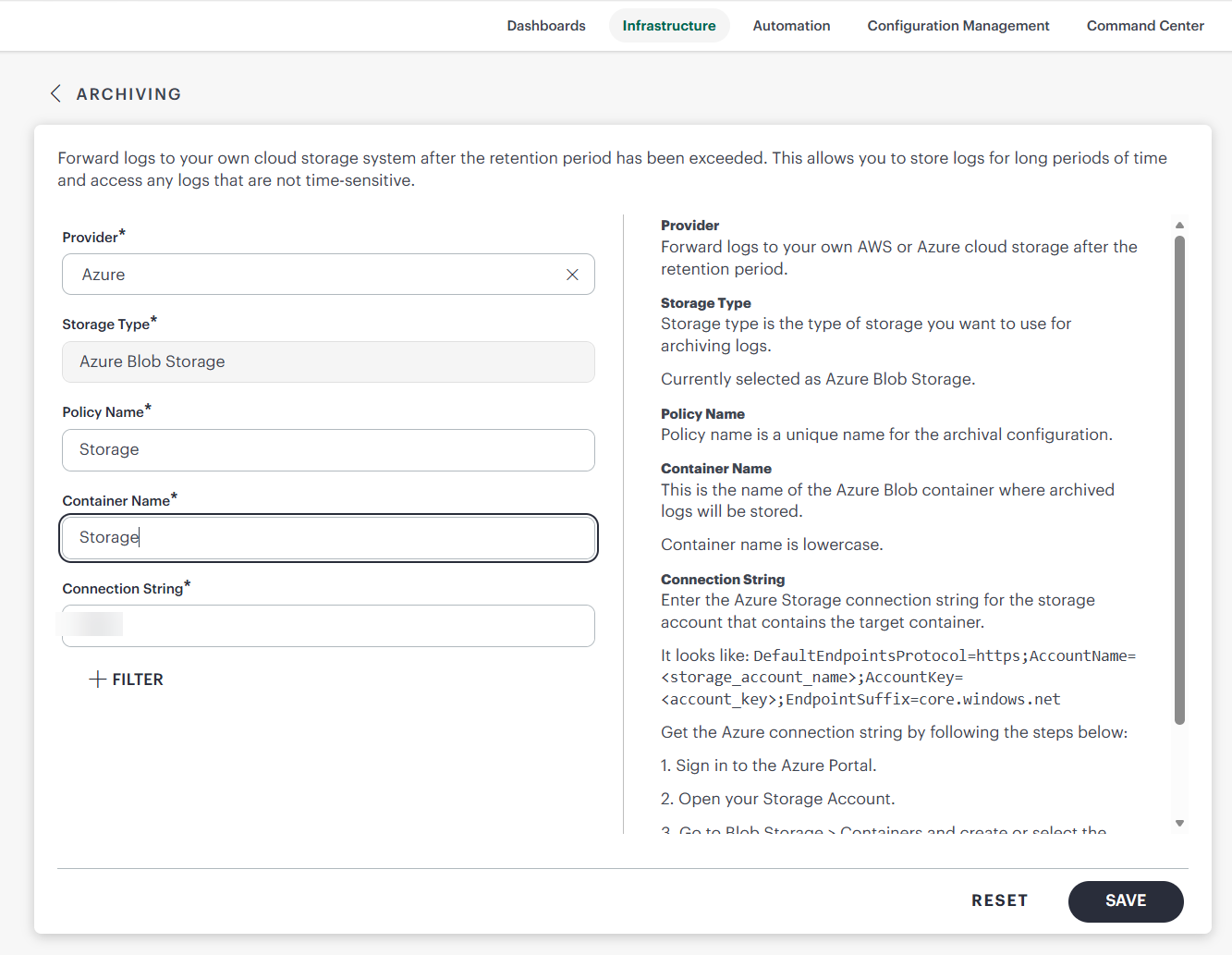
OpsRamp Log Management now supports Microsoft Azure Blob Storage as a cloud archival destination alongside AWS S3.
For more information, see Azure Blob Storage Configuration
Integrations Framework
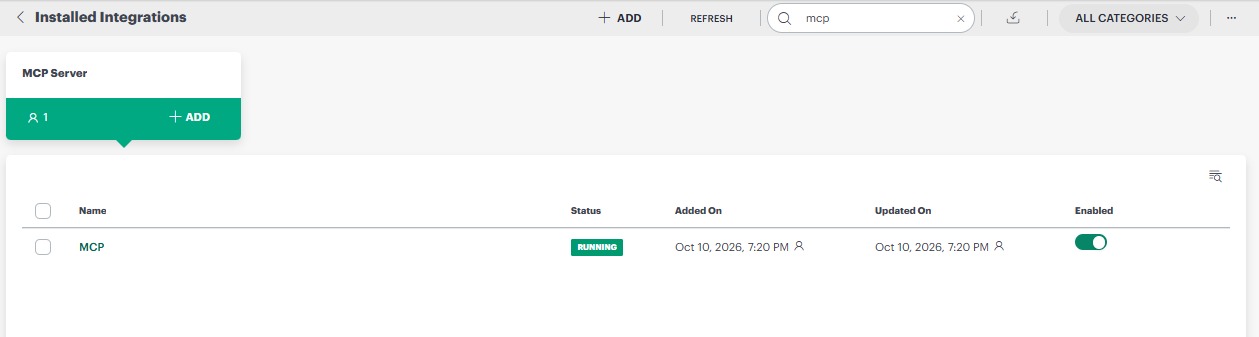
MCP Server Integration
OpsRamp now introduces the MCP Server integration to enable outbound communication capabilities within your environment. This integration allows you to leverage outbound details for streamlined connectivity without requiring complex inbound or event configurations.
By adding this integration, you can now manage MCP Server Outbound activities through a simplified, non-SDK interface. To ensure operational consistency, the system supports a single MCP Server integration per tenant and requires no additional configuration, allowing you to quickly establish outbound connectivity using existing integration APIs.
Reporting Apps
Resource Availability by Resource Time Zone
The Availability Details Report now includes a new Availability by Resource Time Zone option.
This option becomes available when users select the existing Availability By Resource option. When this setting is turned on, the system calculates availability based on the local time zone of each individual resource rather than using a single time zone for the entire report.
This enhancement provides a more accurate representation of resource availability across globally distributed environments by evaluating each server within its own local business hours.
How It Works
When users specify a reporting schedule, such as Monday-Friday, 8:00 AM to 8:00 PM, the selected time window is automatically applied relative to each resource’s configured time zone.
Example:
- Server A (IST): Availability calculated between 8:00 AM and 8:00 PM IST.
- Server B (PST): Availability calculated between 8:00 AM and 8:00 PM PST.
- Server C (GMT): Availability calculated between 8:00 AM and 8:00 PM GMT.
This ensures availability is measured during the relevant operational hours for each location.
Business Value
- Improves the accuracy of availability reporting across global infrastructures.
- Provides a more realistic view of resource availability during local business hours.
- Enables meaningful comparison of resource performance across regions.
- Supports more accurate business-hour and SLA-focused reporting.
Customer Benefits
- Better understand the impact of outages occurring during regional business hours.
- Improve operational decision-making with location-aware availability metrics.
- Obtain more relevant reporting for globally distributed resources and teams.
Multi-Status Selection for Integration Activity Reports
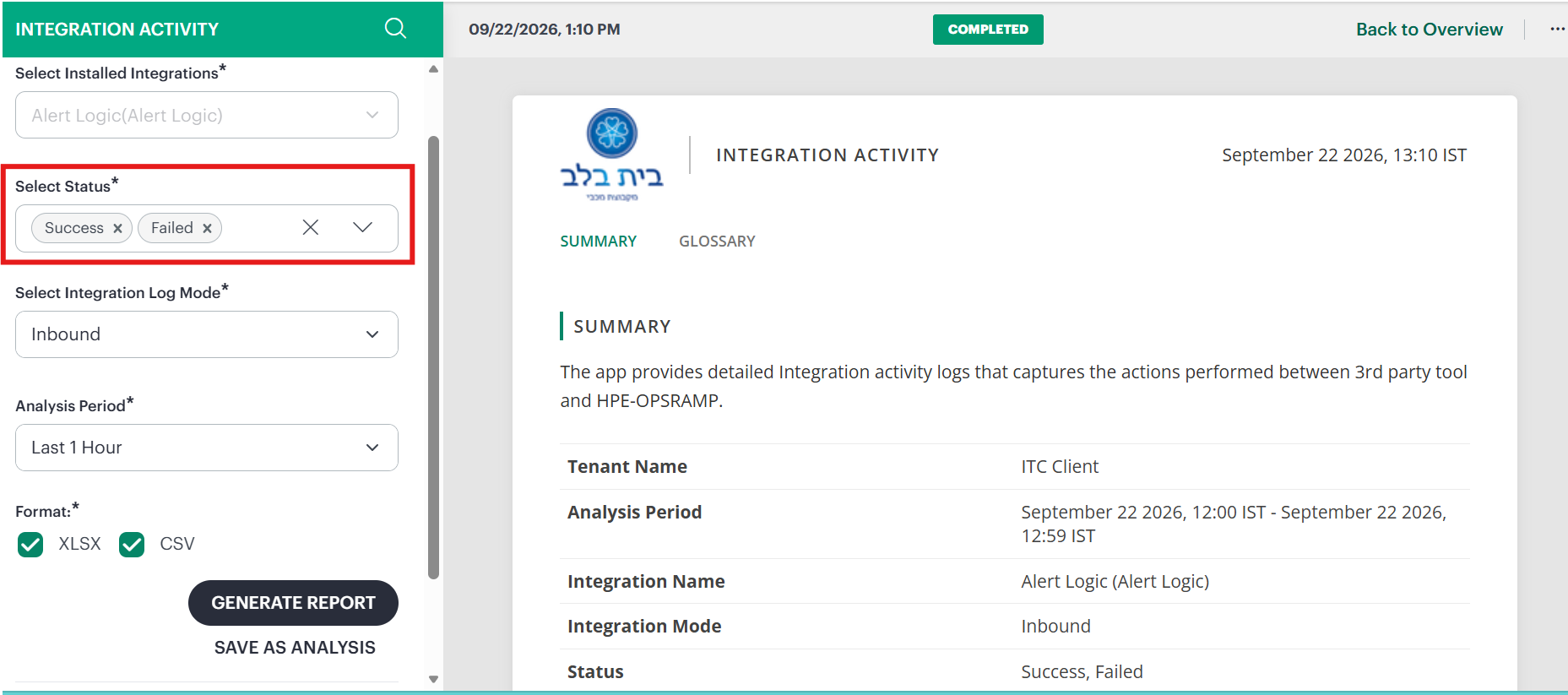
You can now generate Integration Activity reports with greater flexibility by selecting multiple statuses or all statuses simultaneously. This enhancement allows you to view combined data for Success, Failed, and Cancelled states in a single report, facilitating more comprehensive audits and faster troubleshooting of integration logs. By removing the restriction of single-status filtering, you can now perform side-by-side analysis of successful and failed activities to better understand integration performance and audit history across your environment.
Improved Reporting App Progress Visibility
The reporting application interface has been enhanced to provide more transparent and reliable experience during report generation. You can now view accurate progress percentages and estimation timestamps that indicate when a report is expected to complete. These real-time updates to the progress bar ensure you have clear visibility into the current status of your report generation tasks, allowing for better planning and improved operational efficiency.
Expanded Attribute Selection in Alert Listing
You can now select up to 40 attributes in the Alert Listing, an increase from the previous limit of 25. This enhancement provides you with greater flexibility to customize your alert views, enabling you to display more comprehensive data points simultaneously for improved monitoring and faster troubleshooting.
Metered Usage Report Enhancements
The Metered Usage Insights report has been updated to provide greater transparency and clarity regarding resource calculations and billing. You can now access a new Weight Ratio Table tab, which displays the current published weight ratios for resources by their native type. This addition helps you understand exactly how unweighted resource counts are converted into weighted values for invoicing.
Additionally, the report terminology has been standardized to distinguish between different resource types. All references to “resource” within the report have been renamed to Metered Resource, ensuring a clear distinction from gateway sizing resources and providing more precise usage insights.
Enhanced Metric Insights Report with Additional Attributes
Introduced support for additional attributes in the Metric Insights report to provide greater context and improved readability. You can now include the “snapshot creation date” for VMware snapshot aging monitors.
This enhancement eliminates the need for manual date calculations, allowing you to instantly identify when a snapshot was created. By providing fixed and consistent timestamps, this update simplifies troubleshooting, correlates snapshots with maintenance windows or incidents, and helps ensure compliance with organizational retention policies.
Multi-Client Selection Support in Executive Summary report
Executive Summary App now offers the capability for users to select multiple clients within the Partner scope, with a maximum limit of 5 clients per selection. This enhancement facilitates the generation of reports based on multiple client criteria.
By utilizing this feature, enables users to efficiently filter and retrieve only the relevant client data, thereby substantially minimizing the manual effort of filtering required client data after generating all clients report.
Interface Alias IP Attribute in Reporting and API
Added support for the Alias IP attribute at the interface level in Asset Inventory Report. The application now displays Alias IPs for individual network interfaces, improving network visibility and infrastructure data accuracy.
Enhanced Network Backup Insights
You can now access comprehensive network backup history details within the Network Backup Insights app for any selected reporting period. This enhancement introduces new data columns, including total backup attempts, successful and failed backup counts, and the current backup state. Additionally, the app now displays the specific reason for the latest backup failure, enabling you to quickly identify and troubleshoot issues to ensure complete data coverage across your managed devices.
Resource Management
Enhanced Resource Management and Attribute Control
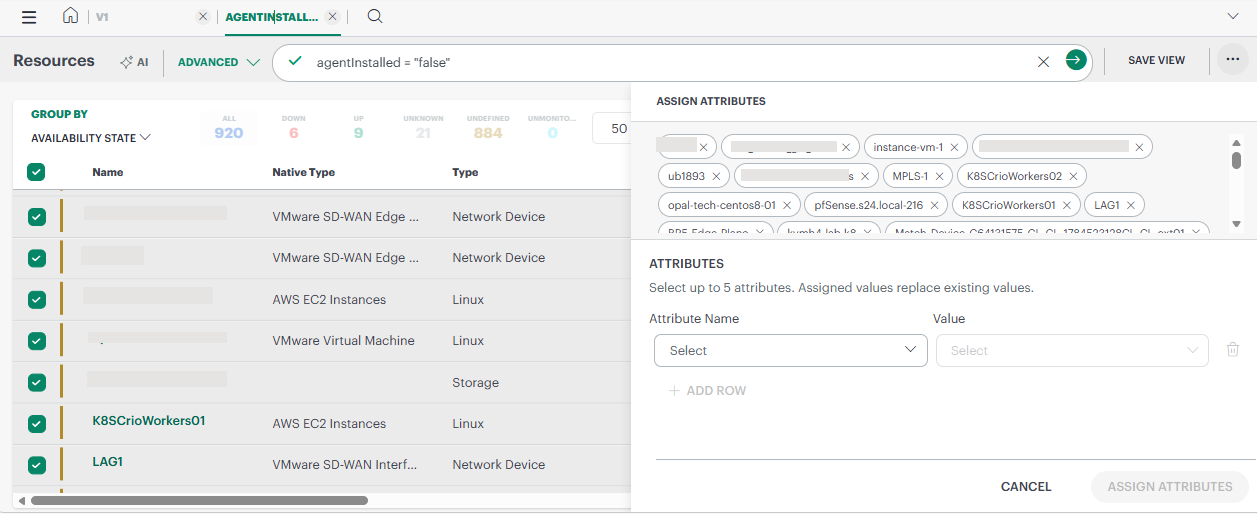
You can now select resources on the listing page and apply actions to them directly. Bulk actions, such as editing attributes or assigning owners, affect only the resources you selected. You no longer need to create separate rules or use a separate bulk update process, so targeted changes take fewer steps.
Highlights
- System Attributes in bulk update: You can now bulk update the system attributes ResourceType, TimeZone, Owner, Make, and Model.
- Unified attribute list: System Attributes and Custom Attributes appear together in the Bulk Action attributes list.
- Partner and Client level attributes: Both Partner-level and Client-level Custom Attributes appear in the attributes drop-down.
- Attribute limit: The Assign Attributes action supports up to 5 attributes at a time.
- Assignment status messages: Clear messages now show whether an assignment resulted in Success, Failed, or Partial Success.
See Assign attributes for more details.
Process Automation
Timezone Support for Timer Start Events
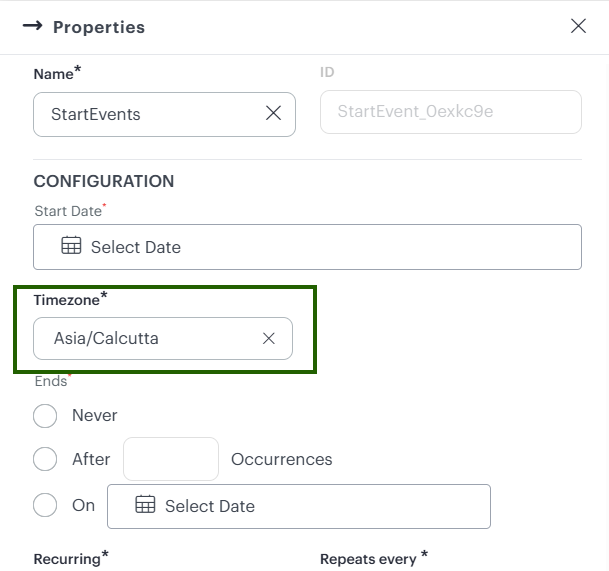
You can now select a specific timezone when configuring a Timer Start Event in a process definition. Daily, weekly, and monthly schedules run at the correct local time, even when the local day differs from the UTC day.
Support for Create Incident Actions in Platform Service Tasks
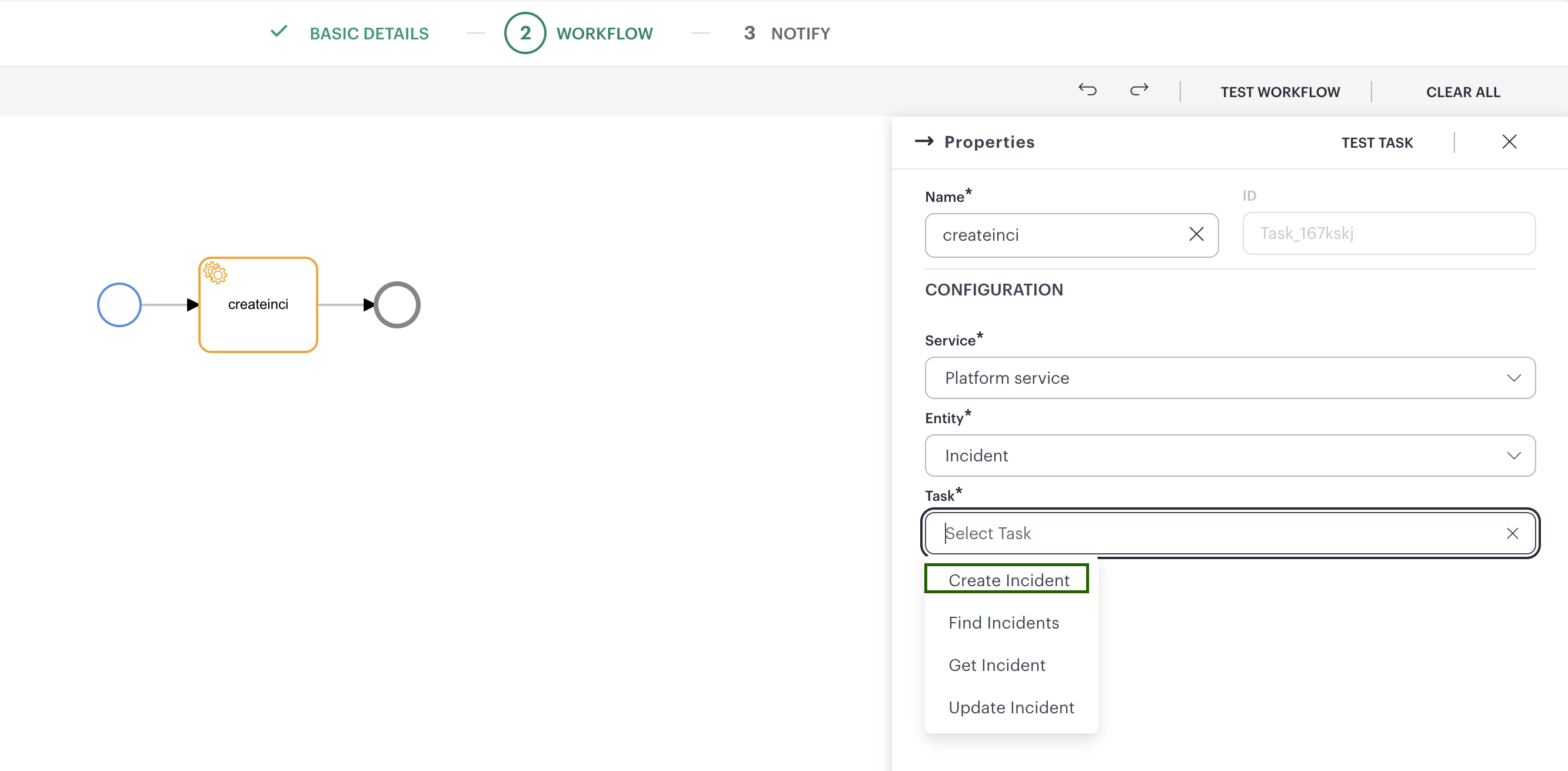
You can now create incidents directly from Process Automation using a Platform Service Task. This enhancement provides a metadata-driven custom form for configuring incident fields, including picklists, multi-select dropdowns, and date and duration inputs. Real-time validation helps ensure that mandatory fields are completed and schedule-sensitive values meet the required criteria.
See Platform Service Task for more details.
Optimized Query Performance for Alerts and Tickets
OpsRamp has introduced a default time-based filter for process automation tasks to improve query performance and reduce database load. When you use tasks such as Find Alerts, Find Incidents, Find Service Requests, Find Problems, or Find Change Requests without specifying a time range in your OpsQL filter, the system now automatically applies a default window of the last 7 days. Specifically, Find Alerts defaults to updatedTime >= -7d, while ticket-related tasks default to createdTime >= -7d.
If you provide your own createdTime or updatedTime criteria within the query, your custom settings will be honored, and no default filter will be appended. This enhancement ensures that large datasets are not scanned unnecessarily, resulting in faster search results while still allowing you full control over the time range when needed.
Public Cloud
AWS Direct Connect Virtual Interface Support
Introduced monitoring support for AWS Direct Connect Virtual Interfaces (VIF), enabling you to discover and manage VIF resources directly within the platform. This enhancement provides comprehensive visibility into your network connectivity by automatically discovering private, public, and transit VIFs and establishing their parent-child relationship with Direct Connect connections. You can now monitor performance through 11 new CloudWatch metrics, including BGP status, prefix counts, and utilization data and leverage real-time lifecycle event tracking via CloudTrail for automated discovery and deletion.
Expanded OCI and OCI Alloy Service Support
OpsRamp has expanded its integration coverage for Oracle Cloud Infrastructure (OCI) and OCI Alloy by introducing discovery and monitoring support for five additional resource types. You can now discover and monitor OCI Queues, OCI Vaults, OCI Bastions, OCI Internet Gateways, and OCI Service Gateways.
This enhancement enables you to gain deeper visibility into your OCI environment with automated resource entity creation and accurate attribute population, including lifecycle state, compartment, region, and tags. Additionally, you can now collect and analyze performance metrics for these newly supported services, ensuring a more comprehensive unified monitoring experience across your cloud infrastructure.
Metric Collection for AWS Gateway Target Groups
Introduced support for AWS Gateway Load Balancer Target Groups within the public cloud integration. You can now successfully discover, monitor, and manage these resources directly in OpsRamp. This enhancement ensures that monitoring data is collected accurately and that CloudWatch Alarms are correctly mapped to your Gateway Target Groups for improved visibility into your AWS infrastructure.
Discovery and Monitoring for AWS Gateway Load Balancers
Extended AWS integration support to include Gateway Load Balancers (GWLB). You can now discover these resources with the correct native type and collect essential monitoring metrics. This update also enables the detection of lifecycle events via CloudTrail and ensures that CloudWatch Alarms are properly associated with your Gateway Load Balancers for comprehensive health tracking.
Direct HTTP Ingestion for AWS Metric Streaming
Improved the performance and reliability of AWS metric streaming by implementing a direct HTTP ingestion path. This refactoring reduces latency by removing unnecessary internal network hops and aligns metric ingestion with the modern event collection pattern. Additionally, you can now download pre-populated CloudFormation templates directly from the AWS integration UI to simplify the setup of Kinesis Firehose for metric streaming.
Expanded Alibaba Cloud Service Support
Extended discovery and monitoring support for additional Alibaba Cloud services, including Prometheus instances, Function Compute, and Virtual Border Routers (VBR). This update allows you to gain visibility into a broader range of Alibaba resources, ensuring that identifiers, status, and performance metrics are accurately captured and monitored within your OpsRamp environment.
Azure Virtual Machine Disk Dependency Mapping
Enhanced Azure resource discovery to automatically establish and display relationships between parent resources and their child components. Specifically, all disks attached to an Azure Virtual Machine are now correctly captured and displayed under the parent resource’s Dependencies tab. This improvement provides a clearer view of resource hierarchies and dependencies within your Azure environment.
Enhanced Azure Cloud Integration
You can now discover and monitor six additional Azure services, providing deeper visibility into your cloud infrastructure’s performance and health. This enhancement enables you to collect and analyze key metrics for Bot Services, Cosmos DB for MongoDB Clusters, Purview Accounts, Power BI Dedicated Capacities, SQL Job Agents, and Storage Sync Services. By extending monitoring to these services, you can better track resource utilization, latency, and operational success rates, ensuring more comprehensive management of your Azure environment.
The following Azure services are now supported:
- Bot Services: Monitor request latency and traffic.
- Cosmos DB for MongoDB Clusters: Track CPU, memory, storage utilization, and request duration.
- Purview Accounts: Monitor data map capacity, storage size, and scan performance.
- Power BI Dedicated Capacities: Track CPU usage and workload metrics.
- SQL Job Agents: Monitor the success and failure rates of elastic jobs.
- Storage Sync Services: Track sync session results, server heartbeat, and cloud tiering performance.
Expanded Azure Service Discovery and Monitoring
OpsRamp has expanded its Azure cloud integration to support the discovery and monitoring of 13 additional Azure services. You can now gain comprehensive visibility and management capabilities for SQL Server Instances, App Services, SQL Virtual Machines, Function Apps, Managed Databases, Logic Apps (Standard), Capacity Pools, Azure Cosmos DB for MongoDB (RU), Azure Managed Redis, Azure Red Hat OpenShift Clusters, DNS Private Resolvers, Redis Enterprise Clusters, and Azure Managed Instances for Apache Cassandra.
This enhancement ensures a more complete view of your Azure environment, allowing you to track inventory and performance metrics for these critical resources directly within the platform.
Enhanced Meraki SaaS-based integration performance monitoring
You can now monitor additional performance metrics for Meraki devices within the SaaS-based integration. This update introduces support for tracking uplink status, latency, and packet loss for Firewall WAN uplinks, as well as memory utilization for Firewall, IP Camera, and Switch resources.
These metrics enable you to gain deeper visibility into network health and device performance, allowing for more precise alerting and component-level threshold configuration.
NextGen Gateway
SNMP trap processing - Self Service
OpsRamp now introduces a self-service capability to configure and manage SNMP trap processing directly from the UI.
You can upload MIB files to automatically parse trap definitions and add them to your scope (Service Provider, Partner, or Client). You can also view, search, and customize trap definitions, including severity, alert subject, and processing behavior.
You can copy global trap definitions into your scope (Service Provider, Partner, or Client) and modify them without affecting other tenants. Scoped configurations take precedence over global definitions, enabling flexible and tenant-specific customization.
This enhancement reduces dependency on backend configuration and helps you onboard vendor-specific SNMP traps faster.
Enhanced Elastic Gateway Scaling and Rebalance Visibility
You can now track the real-time progress of scale-up, scale-down, and rebalance operations for Elastic Gateways directly within the user interface. This enhancement introduces a step-by-step progress indicator that details key stages — such as replica creation, and resource redistribution - providing granular visibility into the operation’s status. Additionally, a new activity log within the gateway details view offers a historical record of these operations, including timestamps and outcomes.
These improvements eliminate the need for manual backend log inspections by surfacing actionable error details and redistribution percentages directly in the UI. This ensures you have clear feedback on whether an operation is completed fully or requires further action, such as a manual re-trigger, significantly improving operational efficiency and troubleshooting.
Note
Scaling actions live progress status will work only with Gateway 22.1.0 release.See Collector Profiles for more details.
OpsPilot
Enhanced Alert Policy Management in OpsPilot
Improved OpsPilot capabilities to allow you to manage and update existing alert policies directly through the AI assistant. This enhancement enables the modification of configured alert policies and the management of alert escalation policies using natural language commands, streamlining your operational workflows and reducing the need for manual configuration changes in the UI.
Conversation Pinning in OpsPilot
Introduced the ability to pin important conversations within the OpsPilot interface. This feature allows you to keep critical discussions easily accessible at the top of your chat history, persisting across sessions and page refreshes. Pinned conversations maintain their chronological order and remain searchable, helping you organize your AI-assisted workflows more effectively.
OpsRamp MCP Server for Third-Party AI Clients
Introduced a hosted Model Context Protocol (MCP) server that exposes OpsRamp capabilities to external AI clients and IDE agents. This framework provides a secure, tenant-scoped tool surface with built-in rate limiting and RBAC-mapped authorization. It enables you to interact with OpsRamp data and tools directly from third-party environments like Claude Desktop or Cursor, extending the reach of OpsRamp’s AI-driven operations.
User Personalization Framework for OpsPilot
Implemented a personalization framework that allows you to tailor your OpsPilot experience. You can now select preferred LLM models for different performance tiers and configure Human-in-the-Loop (HITL) auto-approval settings for CLI commands. These preferences are stored per-user and persist across conversations, reducing friction for trusted operations while maintaining control over the AI assistant’s behavior.
Centralized OpsPilot Configuration and Settings
Introduced a dedicated settings page for OpsPilot to manage both tenant-level and user-level configurations. Admins can now manage global policies, token limits, and external agent connections, while individual users can set their default LLM models. This centralized interface simplifies the administration of AI capabilities and allows for more granular control over the OpsPilot environment.
PDF Export for OpsPilot Conversations
Introduced the ability to download your OpsPilot interactions as PDF documents. You can now export either an entire conversation or a specific query-and-response pair directly from the chat interface. This enhancement provides a convenient way to archive, share, or document AI-generated insights and troubleshooting steps for offline reference or compliance purposes.
Conversation Scoping and Sharing in OpsPilot
Enhanced privacy and collaboration controls for OpsPilot conversations. All new conversations are now created as private by default, visible only to you. You can now explicitly share a conversation to make it visible to other users within your tenant or partner context, and easily revert shared conversations back to private mode when needed.
External MCP Connector for OpsPilot
Introduced the “Bring Your Own MCP” (BYOMCP) capability, allowing OpsPilot to connect to external Model Context Protocol (MCP) servers. You can now register external systems like Atlassian (Jira/Confluence) or GitHub as integrations and query them directly through OpsPilot using natural language. This enables a unified AI-driven workflow that spans both OpsRamp data and your external development or documentation tools.
AI-Powered Dashboard Analysis and Synthesis
Introduced AI-powered dashboard insights that synthesize data across multiple tiles to identify anomalies and trends. You can now generate a one-click executive summary that interprets PromQL, OpsQL, and LogsQL data in plain language. OpsPilot provides data-driven recommendations and health scores, helping you understand what has changed in your environment and providing actionable steps for resolution.
Classic Gateway
Multi-Tenant Gateway Selection in Log Explorer
Introduced UI and UX enhancements for managing multi-tenant gateway configurations. You can now designate primary clients and link multiple shared gateway profiles to a single primary gateway through a streamlined interface. This improvement provides better visibility and control over shared collector profiles, allowing admins to efficiently manage gateway resources across different tenants and clients.
SaaS Applications
Proactive API Token Expiry Alerts for VMware VeloCloud
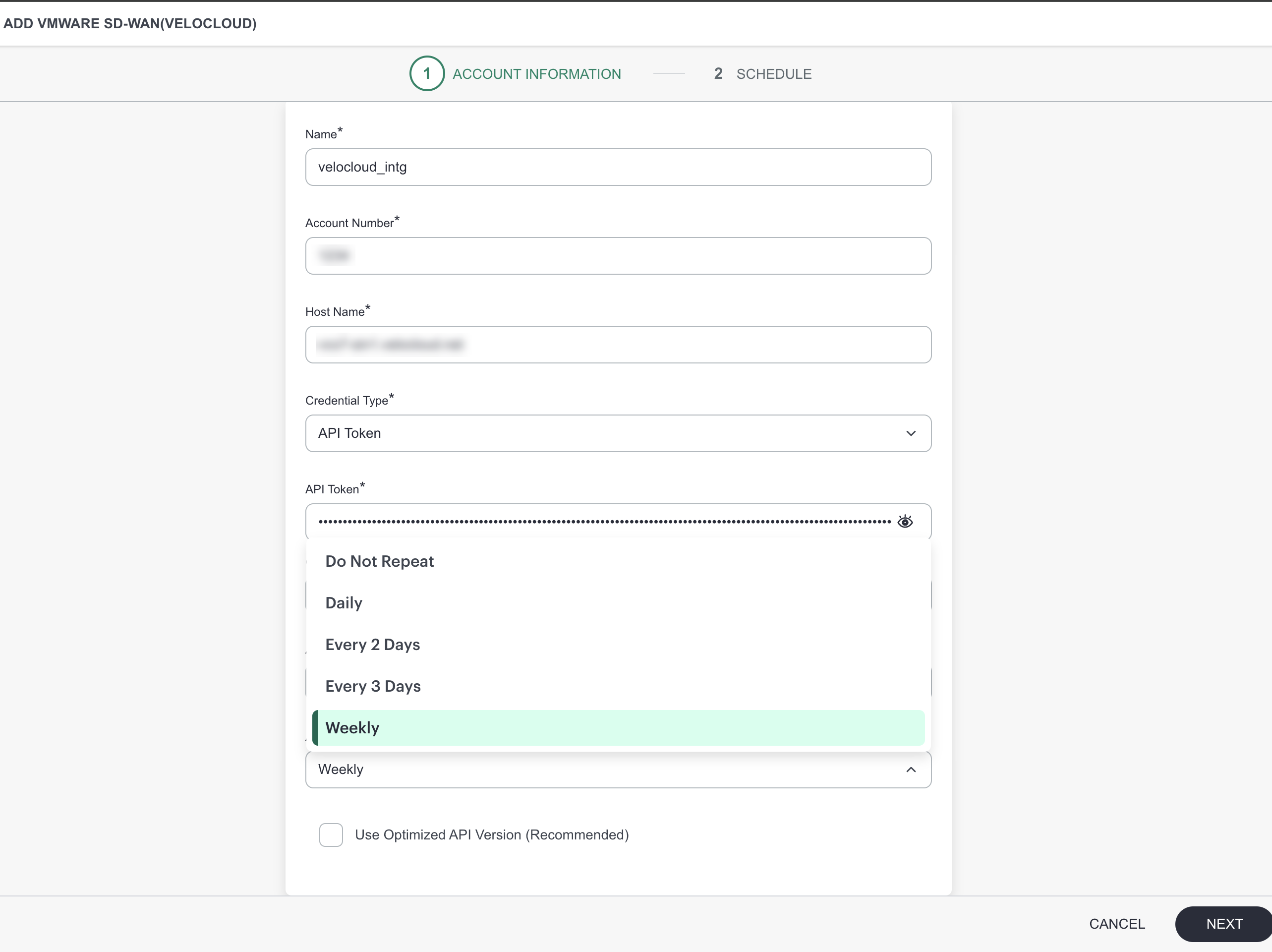
Introduced a proactive alerting system for VMware VeloCloud integrations using API Token authentication. You will now receive critical alerts before a token expires, preventing silent monitoring failures. The enhancement allows you to configure the notification lead time (e.g., 15 days) and the alert repeat interval, ensuring you have sufficient time to rotate credentials and maintain continuous visibility.
Tracing
Enhanced Trace Detail Visualization and Insights
Improved the trace details page with new visualizations and performance insights. You can now view color-coded spans based on transaction categories, making it easier to distinguish different types of operations within a trace tree. Additionally, the interface now displays exclusive duration percentages and downstream time for cross-service calls, providing deeper visibility into latency bottlenecks and service interactions.
For more information, see Tracing
Deep Database Transaction Insights in Tracing
Enhanced the Tracing Database page to provide more focused and actionable insights into database transactions. You can now analyze transaction classes independently with enriched visualizations and performance metrics. This update allows you to pinpoint database bottlenecks more effectively by separating detailed transaction views from the minimal overview tab.
For more information, see Tracing
Redesigned Trace Management Documentation
Completely revamped the Trace Management documentation to align with the new Tracing v2 UI and auto-instrumentation capabilities. The updated documentation provides a comprehensive overview of the dual ingestion model (sampled spans and non-sampled metrics), detailed guides for the new Auto-Instrumentation (AutoI) tool, and a feature mapping guide to help you transition from the legacy tracing experience.
For more information, see Tracing
NCM
Networkbackup report improvements
Network Backup History details are included for the selected reporting period in the Network Backup Insights app.
The app now shows total backups, successful and failed counts, the backup state, and the latest failure reason.
This enhancement enables users to monitor network backup health by summarizing activity, success and failure trends, and the current state. The latest failure reason helps administrators identify and troubleshoot issues faster, reducing investigation time and improving reliability
Metrics Engine
Dynamic Threshold Alert Definition – GA
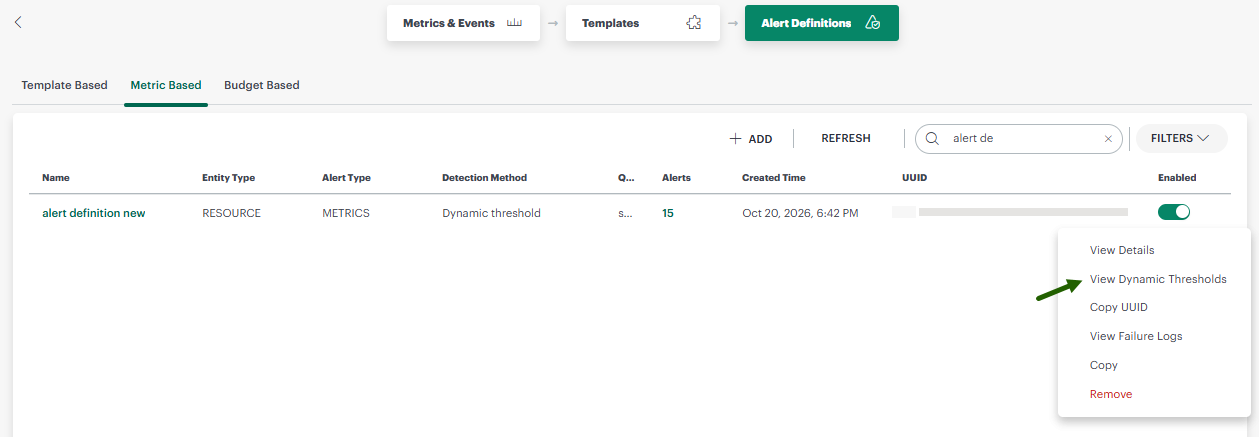
Alert definitions now support dynamic thresholding, providing more intelligent and adaptive monitoring. Instead of relying on static values, you can now enable an analytics-driven approach where the system automatically derives threshold values from the recent history of each metric series. This ensures that alerts are triggered based on anomalous behavior specific to each series, reducing false positives, and improving the accuracy of your notifications.
This enhancement allows you to maintain effective monitoring across both single-series and multi-series definitions without manual threshold adjustments. The system automatically recomputes these thresholds on a regular cadence to adapt to changing patterns, ensuring your alerting remains relevant over time. In cases where insufficient historical data is available, the system gracefully manages evaluations to prevent alert storms, providing a reliable and hands-off alerting experience
NPM
Enhanced Netflow v2 Landing Page and Overview
Introduced a redesigned Netflow Overview page that provides a comprehensive view of your network traffic health. The new interface features live KPI cards for traffic volume, flow counts, and active exporters, along with period-over-period comparisons. You can now leverage advanced PromQL and OpSQL query support to gain deeper insights into top conversations, sources, and ports directly from a centralized dashboard.
Advanced Backend Query Support for Netflow Insights
Implemented a high-performance precomputed serving tier for Netflow Dashboard v2 to support fast historical analysis. This backend enhancement enables complex insights across 7-120 day windows, covering traffic trends, protocol composition, and top contributors. The new architecture ensures tenant-isolated, consistent results for both real-time overview widgets and deep historical insights.
Updates in Upcoming Releases
Deprecation of Legacy Account Management Pages
As part of our ongoing efforts to simplify navigation and provide a more consistent administration experience, OpsRamp is deprecating the legacy account management pages currently available under Setup > Setup > Accounts.
The following pages have been consolidated into the modern Setup > Account experience and will continue to be available through their respective new locations:
| Legacy Page | New Location |
|---|---|
| Partner Details | Setup > Account > Settings (Partner context) |
| Clients | Setup > Account > Settings (Client context) |
| Users | Setup > Account > Users and Permissions |
| User Groups | Setup > Account > Users and Permissions |
| Roles | Setup > Account > Users and Permissions |
| Permission Sets | Setup > Account > Users and Permissions |
| Custom Branding | Setup > Account > Settings > Branding |
| Lookup Two-Factor Key | Setup > Account > Settings > Security |
Important: The legacy pages under Setup > Setup > Accounts will be removed in the December 2026 release. Customers are encouraged to begin using the new navigation paths listed above and update any internal documentation, operational procedures, or training materials accordingly.
This change does not impact existing configurations, users, roles, permissions, branding settings, or security settings. Only the navigation location is changing.
Removal of the Infrastructure > Resources Page
In the December 2026 release, OpsRamp will remove the legacy Infrastructure > Resources page and replace it with Infrastructure > Search. Infrastructure > Search provides the new V2 user experience and supports OpsQL-based queries, helping customers quickly find and filter resources across their environments.
Customers are encouraged to begin using Infrastructure > Search and update any internal documentation, training materials, or links that reference Infrastructure > Resources.
Important: After the December 2026 release, Infrastructure > Resources will no longer be available. Customers must use Infrastructure > Search to find resources. Existing resources and configurations will not be affected.
Retirement of Monitoring v1 Pages
As previously announced, OpsRamp will retire the Monitoring v1 pages below with the December 2026 release and transition to the v2 Monitoring experience.
- Setup > Setup > Accounts
- Setup > Setup > Monitoring
Existing monitoring configurations will be migrated to their appropriate v2 locations. Device Management Policies will transition to Template-Based Alert Definitions and Resource Groups, while assignments for jobs, knowledge base articles, credentials, and custom attributes will be managed through Infrastructure > Groups.
Customers should start using the v2 Monitoring pages and update internal processes that reference the legacy navigation before the December 2026 release.
This transition was previously communicated in the following announcements:
- Movement of Features to Alternative Locations
- Device Management Policy Assignment Changes
- Transition to Template-Based Alert Definitions
To explore Template-Based Alert Definitions before the December 2026 rollout, contact OpsRamp Support. We can enable the v2 Monitoring experience for one of your clients and migrate its existing Device Management Policies to the new Template-Based Alert Definitions page.
This gives your team an opportunity to review the migrated configurations and become familiar with the new experience before the final transition.