You can add SNMP trap definitions by uploading MIB (Management Information Base) files. OpsRamp parses the uploaded file, extracts available trap definitions, and allows you to review and select the traps before adding them.
This enables onboarding traps for new devices or vendors without requiring backend configuration.
Before you begin
Ensure you have a valid MIB file from the device vendor. OpsRamp supports MIB files in formats such as: mib, my, txt, dic, zip, tar, tar.gz, tgz, and bz2.
Note
Files may be accepted during upload but still fail during parsing if they do not adhere to the valid SNMP MIB syntax or contain syntax errors.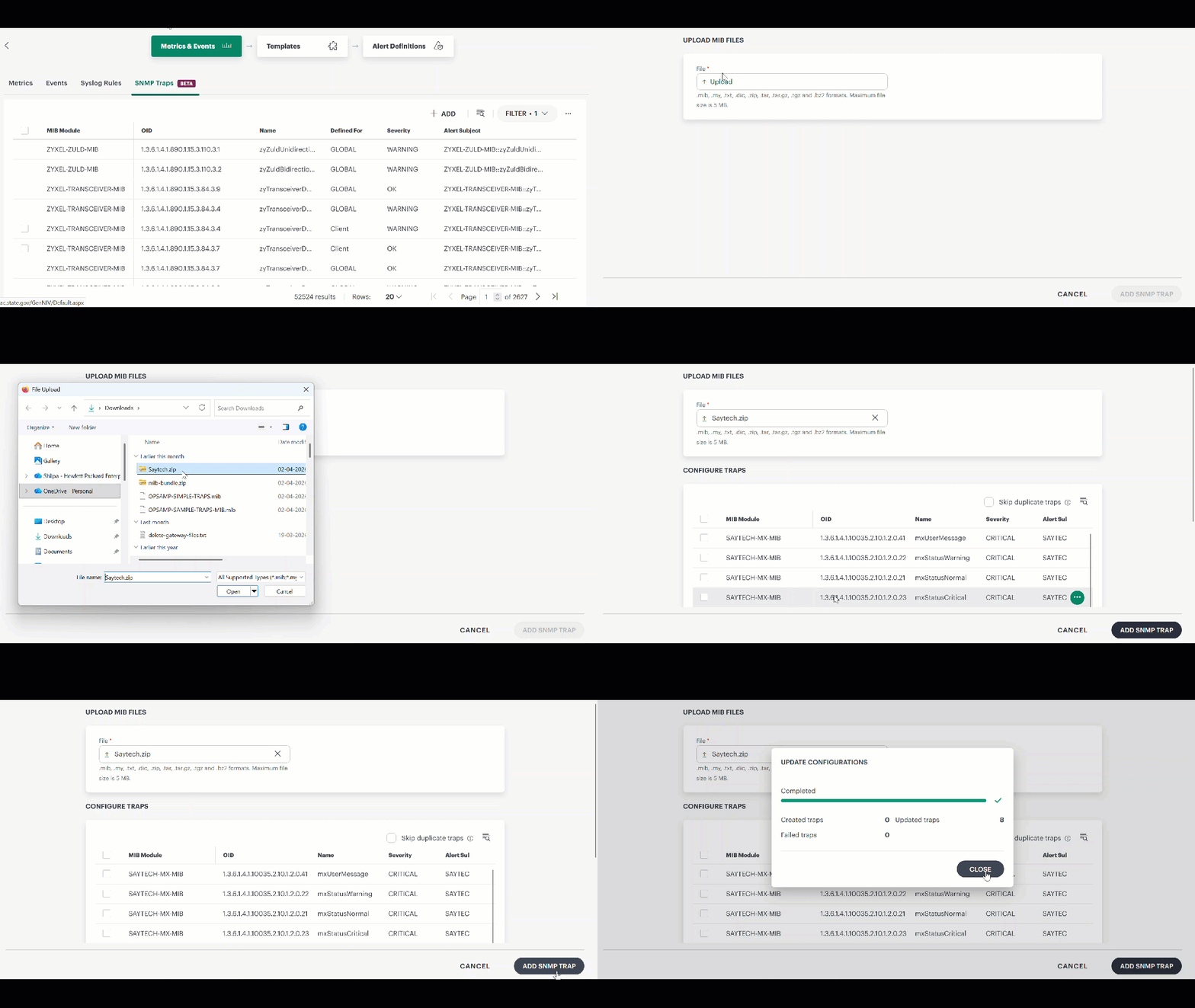
- Go to Setup → Account → Monitoring → Metrics & Events → SNMP Traps.
- Click +ADD. The UPLOAD MIB FILES page appears.
Tip
To ensure successful MIB upload and parsing:
- Use vendor-provided MIB files for the target device
- Ensure the MIB contains valid trap definitions
- Upload all dependent MIB files together in a .zip format, if the MIB references other modules
- Avoid incomplete or modified MIB files
- Test with smaller MIB files before uploading large or complex ones
- Click Upload and select the MIB file from your local system. OpsRamp parses the file and displays the extracted traps in the Configure Traps section.
- Review the trap definitions and click ADD SNMP TRAP
Configure Traps
After successful parsing, the extracted trap definitions are listed in the Configure Traps section. Each row represents a trap definition with details such as:
- MIB module: The source MIB file/module where the trap is defined.
- OID: The unique object identifier associated with the trap definition.
- Name: The trap name parsed from the MIB, used to identify the event.
- Severity: The default severity level assigned to the trap (for example, Critical, Warning, or Info).
- Alert subject: The default alert title/message generated when the trap is received.
You can perform the following actions in this section:
- Search: You can search for the specific trap using the search field by entering its OID. Results are filtered dynamically as you type, allowing you to quickly find the desired trap definition.
- Select traps: You can select specific traps or add all extracted traps, depending on your requirements.
- Remove: Removes the selected trap from the current selection list. This does not delete the trap from the MIB file.
- Skip duplicate traps: Enable this checkbox to automatically exclude traps that already exist at the current scope or higher scopes. When this option is enabled, manual selection is disabled and OpsRamp automatically includes all non-duplicate traps.
Troubleshooting MIB upload
If OpsRamp fails to parse the MIB file, it displays error logs indicating the reason for the failure. Common causes include:
- Invalid or corrupted MIB file
- Syntax errors in the MIB definition
- Missing dependencies (if the MIB references other modules that are not included in the upload)
- Large file size or complexity that exceeds parsing limits
- Missing or invalid OID definitions required for trap parsing
MIB file parsed but no traps displayed
If the MIB file parses successfully but no traps appear in the Configure Traps section, the file may not contain valid trap definitions. Common causes include:
- The MIB file defines only objects or metrics, not trap definitions
- Trap definitions use syntax that OpsRamp cannot parse
- Trap definitions are defined in a dependent MIB module that was not uploaded
- The MIB file is incomplete or a partial extract from a larger MIB module
To resolve this issue, verify that your MIB file includes proper SNMP trap definitions and upload any dependent MIB modules together.