This guide provides instructions for enabling or disabling the Squid Proxy service on a NextGen Gateway after the gateway has been registered. The Squid Proxy service allows the gateway to function as a proxy for OpsRamp Agents, enabling or restricting agent communication through the gateway as needed.
Prerequisites
Before proceeding, ensure that you have:
- Access to the Kubernetes cluster where the NextGen Gateway is deployed.
- helm installed and configured.
- Appropriate permissions to modify Helm releases and Kubernetes resources.
Enable Squid Proxy
Enable Squid Proxy
- Run the following command to open the Terminal UI:
opsramp-collector-start terminal-ui - Select the option to enable the Squid proxy service.
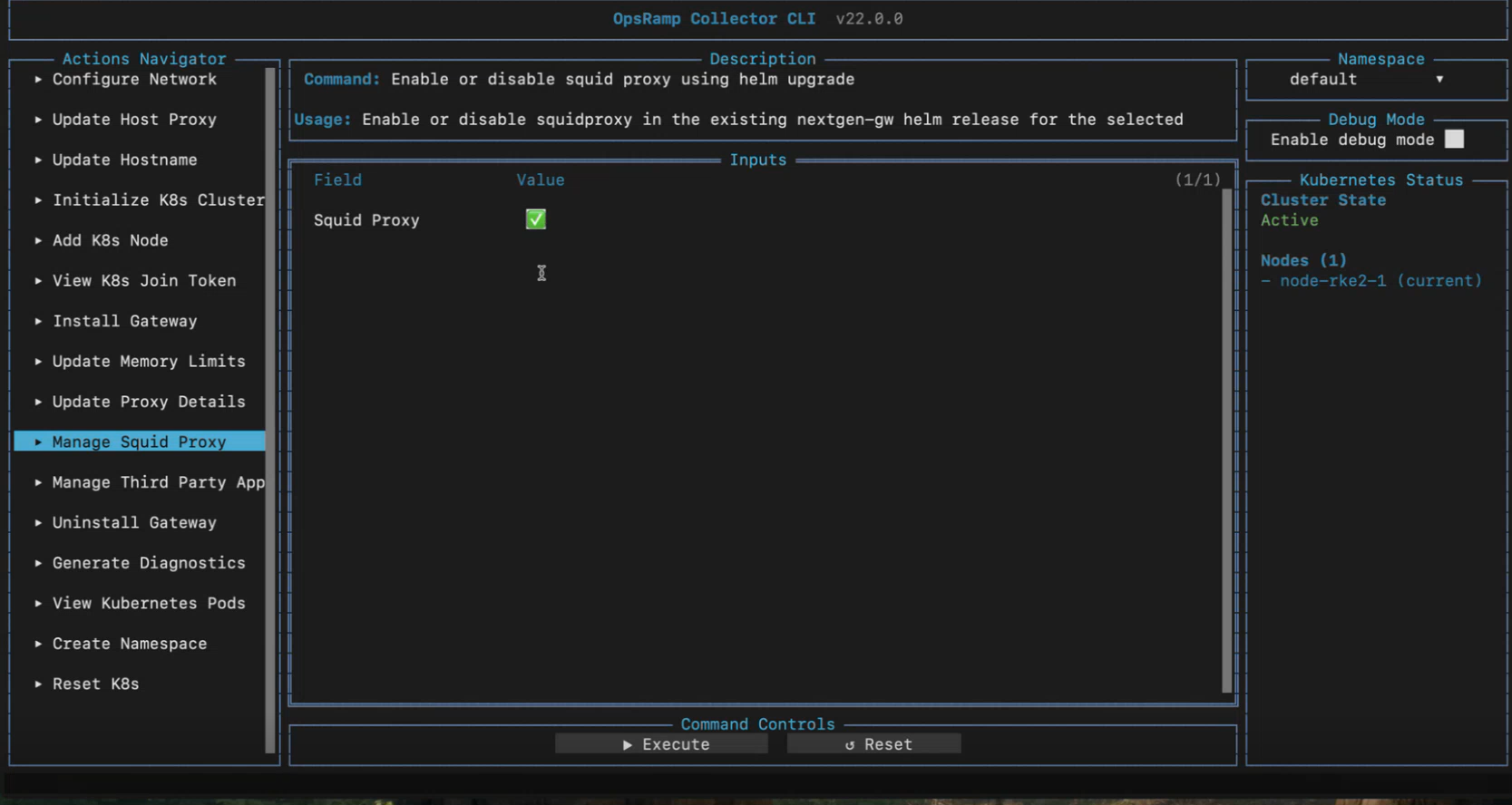
Select Execute to save the entered information.Field Description Squid Proxy Enables Squid proxy service. - Press
ESCto close the Terminal UI.
Retrieve the Current Helm Chart Version
Run the following command to get the current Helm chart version:
helm list -n <namespace><namespace> with your gateways namespace. If you don’t have a custom namespace, use default.Sample Response
NAME        NAMESPACE   REVISION    UPDATED                                 STATUS     CHART              APP VERSION
nextgen-gw default 1 2024-04-25 11:34:22.000000000 +0000 UTC deployed nextgen-gw-18.0.5 18.0.5nextgen-gw-18.0.5, the version is 18.0.5.Enable Squid Proxy
Run the following command to enable Squid Proxy:
helm upgrade nextgen-gw oci://us-docker.pkg.dev/opsramp-registry/gateway-cluster-charts/nextgen-gw --version <Chart_version> --set squidproxy=enable --reuse-values -n <namespace> Replace <Chart_version> with the version retrieved in the step Retrieve the Current Helm Chart Version and <namespace> with your gateway’s namespace.
After enabling squid-proxy
Once the Squid Proxy service is enabled:
- Verify that the Squid Proxy pod is running in the same namespace as your gateway.
kubectl get pods -n <namespace>
Sample Responseroot@opsram-gateway:/home/gateway-admin# kubectl get pods NAME READY STATUS RESTARTS AGE nextgen-gw-0 3/3 Running. 0 2m19s nextgen-gw-redis-master-0 1/1 Running 0 2m20s squid-proxy-7968dc4b7c-9lq26 1/1 Running 0 2m20s - Check the external IP address assigned to the Squid Proxy service:
kubectl get svc squid-proxy -o wide -n <namespace>
Sample Response
This will display the external IP address associated with the Squid Proxy service.root@opsram-gateway:/home/gateway-admin# kubectl get svc NAME TYPE CLUSTER-IP EXTERNAL-IP PORT(S) AGE kubernetes ClusterIP 10.43.0.1 <none> 443/TCP 3d1h nextgen-gw ClusterIP 10.43.255.215 <none> 25000/TCP 3m35s nextgen-gw-redis-headless ClusterIP None <none> 6379/TCP 3m35s nextgen-gw-redis-master ClusterIP 10.43.178.167 <none> 6379/TCP 3m35s nextgen-gw-tcp LoadBalancer 10.43.208.75 172.25.250.128 514/TCP 3m35s nextgen-gw-udp LoadBalancer 10.43.225.81 172.25.250.128 162/UDP,514/UDP 3m35s squid-proxy LoadBalancer 10.43.154.1 172.25.250.128 3128/TCP 3m35s
Disable Squid Proxy
Disable Squid Proxy
- Run the following command to open the Terminal UI:
opsramp-collector-start terminal-ui - Select the option to disable the Squid proxy service.
Select Execute to save the entered information.Field Description Squid Proxy Disables Squid proxy service. - Press
ESCto close the Terminal UI.
Retrieve the Current Helm Chart Version
Run the following command to get the current Helm chart version:
helm list -n <namespace><namespace> with your gateways namespace. If you don’t have a custom namespace, use default.Sample Response
NAME        NAMESPACE   REVISION    UPDATED                                 STATUS     CHART              APP VERSION
nextgen-gw default 1 2024-04-25 11:34:22.000000000 +0000 UTC deployed nextgen-gw-18.0.5 18.0.5nextgen-gw-18.0.5, the version is 18.0.5.Disable Squid Proxy
Run the following command to disable Squid Proxy:
helm upgrade nextgen-gw oci://us-docker.pkg.dev/opsramp-registry/gateway-cluster-charts/nextgen-gw --version <Chart_version> --set squidproxy=disable --reuse-values -n <namespace><Chart_version> with the version retrieved in Retrieve the Current Helm Chart Version and <namespace> with your Gateway’s namespace.After disabling squid-proxy
Once the Squid Proxy service is disabled:
- Verify that the Squid Proxy pod is no longer running in the same namespace as your gateway:
kubectl get pods -n <namespace>
Sample Responseroot@opsram-gateway:/home/gateway-admin# kubectl get pods NAME READY STATUS RESTARTS AGE nextgen-gw-0 3/3 Running. 0 2m19s nextgen-gw-redis-master-0 1/1 Running 0 2m20s - Ensure that the Squid Proxy service has been removed:
kubectl get svc -n <namespace>
Sample Responseroot@opsram-gateway:/home/gateway-admin# kubectl get svc NAME TYPE CLUSTER-IP EXTERNAL-IP PORT(S) AGE kubernetes ClusterIP 10.43.0.1 <none> 443/TCP 3d1h nextgen-gw ClusterIP 10.43.255.215 <none> 25000/TCP 3m35s nextgen-gw-redis-headless ClusterIP None <none> 6379/TCP 3m35s nextgen-gw-redis-master ClusterIP 10.43.178.167 <none> 6379/TCP 3m35s nextgen-gw-tcp LoadBalancer 10.43.208.75 172.25.250.128 514/TCP 3m35s nextgen-gw-udp LoadBalancer 10.43.225.81 172.25.250.128 162/UDP,514/UDP 3m35s
If the service has been successfully removed, this command will not return any results.