Introduction
The application provides user details for your organization in the OpsRamp Account. The report includes user names, roles, permissions, and other user management information.
Configuration parameters
- Included users: You can include all users or specific users across Accounts in the report.
- Specific users across Accounts: This option displays a dropdown that lists users grouped by Account.
- Use the Select Users dropdown to select up to 100 users.
- All users for specific Accounts: This option displays a list of all Accounts.
- When you select an Account, the report includes all users associated with that Account.
- The Select Clients dropdown lets you select up to 50 Accounts.
- When Multi-Client is selected, the Share and Notifications settings follow the same behavior as the All Clients option.
- Specific users across Accounts: This option displays a dropdown that lists users grouped by Account.
- Supported analysis period: The report supports the Snapshot option only.
- Supported formats: The report is generated in XLSX format only.
Report output
- Summary: This section provides configuration details.
- Details: This section provides your organization’s user details associated with the OpsRamp Account.
- Glossary: This section defines each section in the report tab to help you understand the generated data.
Sample report in XLSX format: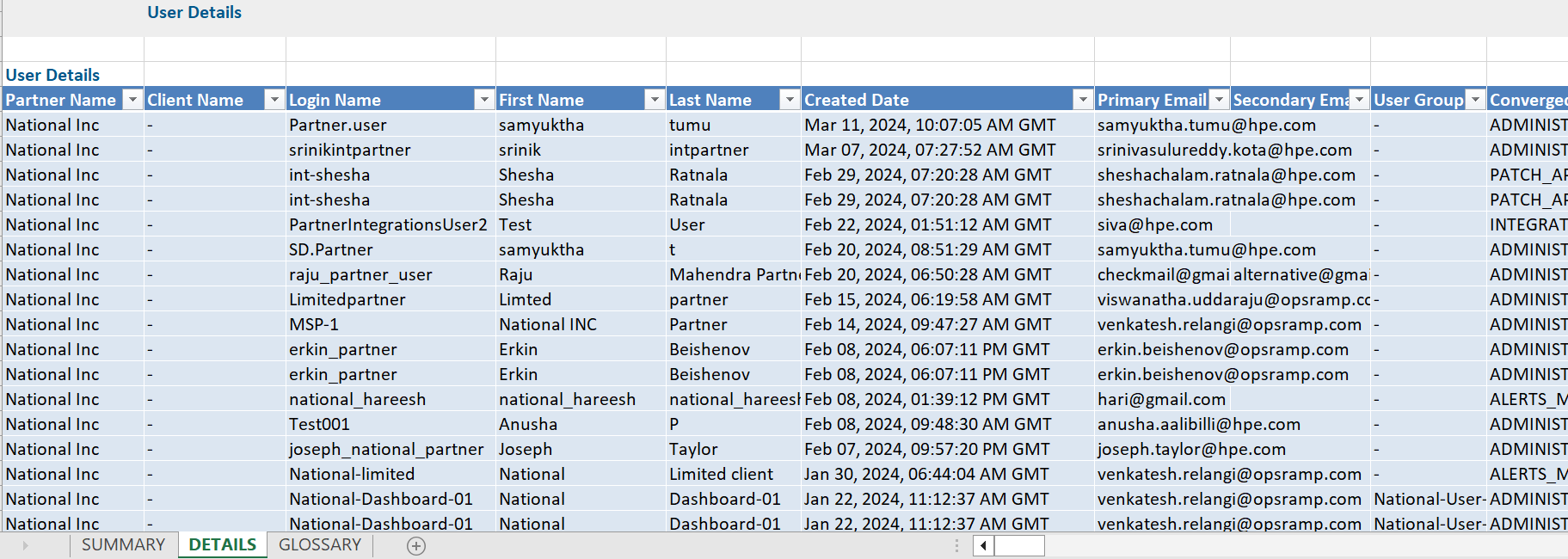
User report vs. user details attributes
Click here to view the supported attributes
| User Report | User Details | |
|---|---|---|
| UI Attributes Selection | Display format in report | |
| Partner Name | N/A | Partner Name |
| Client Name | N/A | Client Name |
| Login Name | N/A | Login Name |
| First Name | N/A | First Name |
| Last Name | N/A | Last Name |
| Created Date (IST) | N/A | Created Date |
| Primary Email | N/A | Primary Email |
| Secondary Email | N/A | Secondary Email |
| User Group(s) | N/A | User Group(s) |
| Converged Permissions | N/A | Converged Permissions |
| User Account Type | N/A | User Account Type |
| Last Login Time (IST) | N/A | Last Login Time |
| Last Login Failed Time (IST) | N/A | Last Login Failed Time |
| Password Modified Time (IST) | N/A | Password Modified Time |
| State | N/A | Status |
| Status | N/A | Is_Locked |
| Two Factor | N/A | Two Factor |
| Roles | N/A | Roles |
| Role Scope | N/A | Role Scope |
| Permission Sets | N/A | Permission Sets |
| Last Login Machine IP Address | N/A | N/A |
| Last Login Failed Machine IP Address | N/A | N/A |
| N/A | N/A | Authentication Type |
| N/A | N/A | User Access |