Introduction
OpsPilot provides a unified conversational interface for performing IT operations tasks. Users do not need to select a mode manually. OpsPilot automatically interprets user intent and routes requests to the appropriate functionality based on context.
How to Access
- Click the OpsPilot icon from anywhere in the OpsRamp portal.
- Enter your query in the Ask OpsPilot input field.
OpsPilot maintains conversation history in the sidebar, allowing users to revisit and continue previous sessions.
Key Capabilities
Documentation and Knowledge
Retrieve information from OpsRamp documentation, API references, installation guides, and configuration manuals using natural language queries.
Examples:
- How do I configure SNMP monitoring in OpsRamp?
- What are the prerequisites for NextGen Gateway installation?
- How do I set up Datadog integration?
- What is the difference between Classic and NextGen Gateway?
Alert and Incident Management
Investigate and act on alerts and incidents in real time.
Examples:
- Show me all critical alerts in the last 24 hours.
- Acknowledge all alerts on server-prod-01.
- What alerts are correlated with this incident?
- Show me the alert history for this resource.
Root Cause Analysis
Support multi-step investigation across operational data sources to identify likely causes and contributing factors for alerts and incidents.
Examples:
- What caused this alert?
- We deployed a new version 30 minutes ago. Could that be related?
- What metrics were abnormal around the time this fired?
- Show me the timeline of events leading to this incident.
- Check if any upstream services are affected.
Ticket Management
Manage service desk tickets, including searching, updating, and reviewing ticket details.
Examples:
- Show me open incidents assigned to my team.
- Find similar incidents to INC-12345.
- What was the resolution for the last network outage ticket?
- Update this ticket status to In Progress.
Resource and Infrastructure
Provide visibility into infrastructure resources and support operational analysis.
Examples:
- Show me all Linux servers with high memory usage.
- What is the CPU utilization on server-db-01?
- Show me the topology for the payment service.
- List all resources with agent installed.
Monitoring Configuration
Create and manage alert definitions and monitoring rules.
Examples:
- Create a CPU alert that fires when usage exceeds 90% for 5 minutes.
- Set up a latency alert for the payment service.
- Create a log alert for OutOfMemoryError patterns.
- Assign the Linux Basic monitoring template to these servers.
Dashboard Management
Create and manage dashboards that provide visual insights into system performance and behavior.
Examples:
- Create a dashboard called Production Overview.
- Add a CPU usage widget for all Linux servers.
- Show me my dashboards.
- What anomalies do my dashboards show?
User Onboarding
Note
The User Onboarding capability described in this section are currently available as Beta features. Functionality and coverage may be subject to change in future releases.OpsPilot enables users to perform configuration and onboarding activities using a conversational interface, eliminating the need to manually navigate multiple sections of the OpsRamp portal. By interpreting user intent, OpsPilot routes requests to the appropriate functionality and performs the required actions.This section describes the supported capabilities across User Onboarding, Gateway, Integration, and Monitoring categories.
Gateway Category
OpsPilot enables management of gateway-related configurations required for resource discovery and monitoring.
Supported activities include:
- Retrieve and manage Gateway Profiles
- Perform Gateway Profile actions
- Access guidance for Gateway registration
These capabilities help users configure and maintain gateways without manually navigating through gateway management interfaces.
Integration Category
OpsPilot supports configuration and management of integrations across various platforms and services. Users can initiate and manage integrations directly through conversational queries.
Supported integrations include:
- SNMP integrations
- VMware integrations
- Public cloud integrations
- SaaS integrations
Using OpsPilot, users can retrieve integration details, initiate configuration workflows, and manage connected systems from a single interface.
Monitoring Category
OpsPilot provides capabilities to manage monitoring configurations and templates associated with resources.
Supported activities include:
- Retrieve template details
- Get assigned templates on resources
- Assign or unassign templates to resources
- Update resource-level thresholds
- Get template suggestions
These features allow users to efficiently configure monitoring policies and ensure consistent monitoring coverage across resources.
Patch Manager Agent (patch-manager)
The Patch Manager agent (patch-manager) is an OpsPilot persona designed to manage the complete patch management lifecycle. It provides capabilities for patch posture visibility, missing patch analysis, compliance management, CVE risk assessment, approval workflows, scan scheduling, baseline management, and execution of patch-related actions.
How to Use
You can interact with the Patch Manager using natural language queries in OpsPilot. The persona is automatically invoked when the query context relates to patch management.
To explicitly invoke the agent, include the term “patch” in your request.
Example prompts:
- How are we doing with patches?
- Show critical missing patches
- What CVEs affect my Windows servers?
- Create a weekly scan schedule for Linux machines
- Is KB5034441 approved?
- Whitelist patch KB5034441
- Check compliance status
Capabilities
Patch Posture and Overview
Provides a high-level summary of the patch environment, including counts, severity distribution, operating system breakdown, and overall health status.
Supported queries:
| Query | Description |
|---|---|
| How are we doing? | Displays overall patch posture including missing patches by severity, category, and OS. |
| Show patch health score | Displays an aggregated health summary with severity breakdown. |
| How many patches are missing? | Returns the total number of missing patches. |
| How many patches are installed? | Returns the total number of installed patches. |
| Missing patches by severity | Groups missing patches by Critical, High, Medium, and Low. |
| Missing patches by category | Groups patches by Security, BugFix, and Feature. |
| Missing patches by OS | Groups missing patches by operating system. |
| Show critical missing patches | Lists all missing patches with Critical severity. |
| Show patches needing a reboot | Lists missing patches that require a reboot. |
| What’s the approval status breakdown? | Displays missing patches grouped by approval state. |
| Show oldest unpatched patches | Lists missing patches sorted by earliest release date. |
| What’s been installed recently? | Displays recently installed patches. |
| Security patches missing | Lists missing patches categorized as Security updates. |
| Newest discovered patches | Lists recently discovered patches sorted by release date. |
Missing Patch Analysis
Enables detailed analysis of missing patches across resources, including patch-level and resource-level insights.
Supported queries:
| Query | Description |
|---|---|
| Which resources have missing patches? | Displays per-resource missing patch counts. |
| Show missing patches for server X | Lists missing patches for a specific resource. |
| Find patch by name | Searches patches based on name or keyword. |
| What patches are missing on my Windows servers? | Lists missing patches filtered by OS. |
| Show patches missing for over 30 days | Lists patches based on age criteria. |
| Patches needing attention | Lists Critical and High severity missing patches. |
| Which resources are affected by patch X? | Displays impacted resources for a specific patch. |
Approval Workflows
Allows users to verify and manage patch approval states.
Supported queries:
| Query | Description |
|---|---|
| Is patch KB5034441 approved? | Displays approval status for a specific patch. |
| Show all approved patches | Lists all approved patches. |
| What’s pending approval? | Lists patches with NOT_APPROVED status. |
| Check approval status for patch X on server Y | Displays approval state for a patch scoped to a resource. |
Patch Actions
Supports execution of patch-related actions, including approvals, scans, installations, and system operations.
Supported queries:
| Query | Description |
|---|---|
| Approve patch KB5034441 on server X | Approves a patch for specified resources. |
| Unapprove patch KB5034441 | Removes approval for a patch. |
| Whitelist patch KB5034441 | Adds a patch to the whitelist. |
| Blacklist patch KB5034441 | Adds a patch to the blacklist. |
| Delete rating for patch KB5034441 | Removes existing whitelist or blacklist rating. |
| Run a patch scan on server X | Initiates an on-demand patch scan. |
| Install patch KB5034441 on server X | Installs a patch (approval required prior to execution). |
| Check install status of patch KB5034441 | Displays patch installation status. |
| Bulk approve patches | Approves multiple patches in a single operation. |
| Reboot server X after patching | Initiates reboot after patch installation. |
Compliance Management
Provides capabilities to create, update, and monitor patch compliance policies and associated device status.
Supported queries:
| Query | Description |
|---|---|
| Show compliance status | Displays summary of compliant, non-compliant, and not-applicable devices. |
| List all compliance policies | Lists all configured compliance policies. |
| Create compliance policy for Windows servers | Creates a new compliance policy. |
| Update compliance policy X | Modifies an existing policy. |
| Delete compliance policy X | Removes a policy. |
| Show compliant devices for policy X | Lists devices meeting compliance criteria. |
| Show non-compliant devices for policy X | Lists devices failing compliance. |
| Show not-applicable devices for policy X | Lists excluded devices. |
| Show details of compliance policy X | Displays full policy configuration. |
| Assign resources to compliance policy X | Adds resources to a policy. |
| Remove resources from compliance policy X | Removes resources from a policy. |
Scan Scheduling
Enables management of patch scan schedules and execution jobs.
Supported queries:
| Query | Description |
|---|---|
| Show all scan schedules | Lists all configured scan jobs. |
| Create daily scan for Windows servers | Creates a recurring scan schedule. |
| Update scan schedule X | Modifies an existing schedule. |
| Delete scan schedule X | Deletes a scan schedule. |
| What’s the scan status of X? | Displays execution status of a scan. |
| Show install schedules | Lists all patch install schedules. |
| List patch configs | Displays all patch configurations. |
| Show config details for X | Displays detailed configuration. |
| Run patch config X now | Executes a patch configuration immediately. |
| Add resources to config X | Updates resource assignments. |
Baseline Management
Allows management of patch baselines used for compliance and enforcement.
Supported queries:
| Query | Description |
|---|---|
| Create baseline for Windows security patches | Creates a new baseline. |
| List all baselines | Displays all configured baselines. |
| Show baseline X details | Displays baseline configuration. |
| Update baseline X | Modifies an existing baseline. |
| Delete baseline X | Removes a baseline. |
| Remove patches from baseline X | Updates baseline by removing patches. |
Resource Lookup
Supports identification and filtering of resources for patch operations.
Supported queries:
| Query | Description |
|---|---|
| Find server X | Searches for a resource by name. |
| Show Windows servers | Lists resources filtered by operating system. |
| Find resources by IP | Searches resources using IP address. |
| List all Linux servers | Lists resources by OS type. |
| Show resource details for UUID | Retrieves resource details using unique ID. |
Patch Ratings (Whitelist and Blacklist)
Provides visibility into patch ratings and classification.
Supported queries:
| Query | Description |
|---|---|
| Show whitelisted patches | Lists all whitelisted patches. |
| Show blacklisted patches | Lists all blacklisted patches. |
| What’s the rating for patch KB5034441? | Displays rating classification for a patch. |
How It Works
OpsPilot uses intelligent routing to interpret user queries and determine the appropriate handling mechanism. Based on query intent and context, it automatically directs the request to the relevant capability area.
| User Query Type | OpsPilot Handling |
|---|---|
| Documentation, guides, API reference | Knowledge retrieval with source citations |
| Alerts, incidents, investigation | Alert analysis and investigation |
| Tickets | Ticket search, updates, and resolution suggestions |
| Resources, metrics, topology | Infrastructure querying and performance analysis |
| Monitoring rules | Monitoring configuration management |
| Dashboards | Dashboard creation and management |
| Setup and integrations | Guided onboarding assistance |
OpsPilot automatically transitions to the appropriate capability when the conversation context changes.
Process Automation Agent (process-automation)
The Process Automation Agent is an AI-powered assistant that helps users design, manage, and execute workflow automation tasks within Process Automation. The agent leverages domain-specific skills and workflow frameworks to assist with workflow creation, activity execution, process orchestration, and lifecycle management.
The agent supports multiple Process Automation service areas and provides access to workflow components commonly used for building and managing automated processes.
Supported Service Areas
The Process Automation Agent supports the following service domains:
| Service Area | Description |
|---|---|
| Platform Services | Execute and manage core platform service activities. |
| Alert Services | Create, escalate, and resolve alerts. |
| Incident Services | Manage incident lifecycle activities. |
| Resource Services | Perform resource management and allocation tasks. |
| Service Request Services | Handle service request workflows and related operations. |
| Input Mapping and Wiring | Map and bind workflow input parameters for workflow execution. |
Workflow Activity Support
The Process Automation Agent supports the following workflow activity categories:
Integration and Scripting Activities
Use integration and scripting activities to interact with external systems and execute custom automation logic within workflows.
Utilities and Data Transformation Activities
Use utility and data transformation activities to manipulate, convert, and process data as part of workflow execution.
Workflow Design and Execution
The Process Automation Agent supports workflow development and runtime operations, including:
- Workflow assembly and configuration
- Workflow rendering
- Workflow recovery and error handling
- Workflow lifecycle management
These capabilities help users create, execute, and maintain automated workflows throughout their lifecycle.
Workflow Framework Support
The Process Automation Agent supports the following workflow frameworks and components:
| Component | Description |
|---|---|
| Start Events | Initiate workflow execution based on configured trigger conditions. |
| Intermediate Events | Handle workflow events that occur during process execution. |
| Gateways | Control workflow routing and decision-making paths. |
| User Tasks | Incorporate user-driven actions within workflow execution. |
| Sub-Processes | Organize complex workflows into reusable workflow segments. |
| Entity Tokens | Reference and manage entity-specific information during workflow execution. |
| Statistics | Access workflow-related statistical and operational information. |
Process Automation Core Services
The Process Automation Agent includes support for:
- Process Automation master skills
- Global references
- Workflow lifecycle management services
- Workflow execution frameworks
These services provide the foundational capabilities required for workflow orchestration and execution.
CLI Tool Support
The Process Automation Agent supports Process Automation CLI tools that enable command-line interaction with supported workflow automation operations.
Supported Capabilities Summary
The Process Automation Agent helps users:
- Build and assemble workflows
- Execute workflow activities
- Manage workflow lifecycles
- Configure workflow routing and decision logic
- Handle user-driven workflow tasks
- Create reusable sub-processes
- Manage workflow inputs and entity references
- Integrate with external systems through automation activities
- Transform and process workflow data
- Monitor workflow execution through supported framework services
Knowledge Base Management for the SRE Persona
OpsRamp enables the SRE persona to manage Knowledge Base (KB) content directly through AI-assisted interactions. This capability supports searching, analyzing, creating, updating, and deleting KB articles and categories, helping users efficiently access and maintain knowledge content.
Supported Capabilities
The SRE persona provides the following Knowledge Base management capabilities:
- Search KB articles using keyword-based search.
- Retrieve KB articles, categories, templates, and attachments.
- Create and manage KB articles and categories.
- Update existing KB articles and categories.
- Delete KB articles and categories.
- Analyze KB content for quality and relevance.
- Extract searchable text from supported attachments.
Knowledge Base Search
KB search includes enhanced search capabilities that improve article discovery:
- Supports stemming-based searches to match related words (for example, monitoring and monitor).
- Searches article content and supported attachment content.
- Automatically retrieves attachment content as part of the search process.
Attachment Support
The Knowledge Base service can extract and search text from the following attachment types:
- DOCX
- XLSX
This allows information stored in attached documents to be included in KB search results.
Knowledge Base Analysis
The SRE persona can analyze Knowledge Base articles to assess:
- Content quality
- Relevance
- Knowledge article effectiveness
This helps identify opportunities to improve article completeness and usability.
Note
- Knowledge Base management supports both article-level and category-level operations.
- Create, update, and delete actions are supported for KB articles and categories.
- Article analysis capabilities help maintain high-quality knowledge content.
- Attachment content is included in search operations when supported file types are present.
Generate dashboard insights with OpsPilot
OpsPilot can analyze dashboard data and generate insights across multiple tiles, helping you identify health conditions, anomalies, trends, and areas that require attention.
To generate dashboard insights:
Open the dashboard that you want to analyze.
Open OpsPilot from the dashboard.
Click the suggested prompt Generate insights for this dashboard.
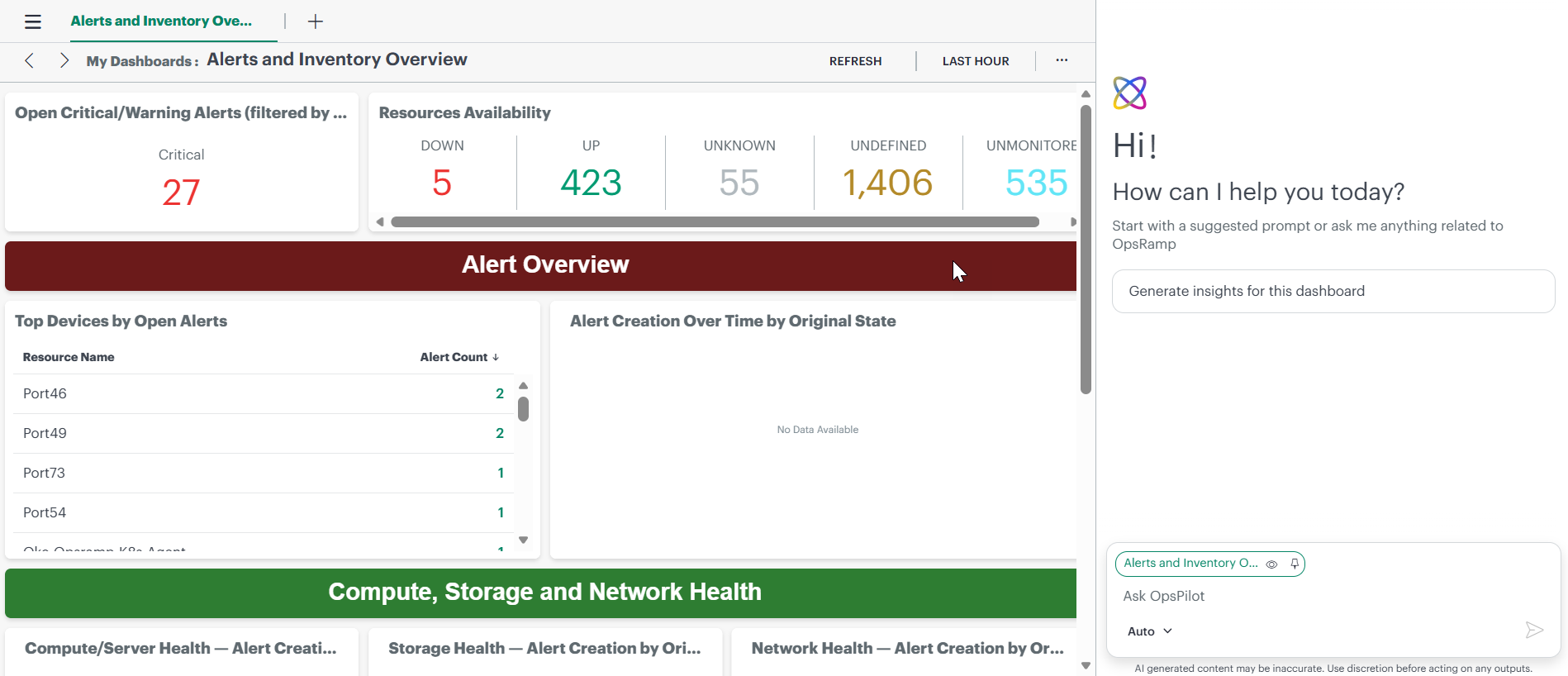
OpsPilot analyzes the available dashboard tiles and generates a consolidated report.
The analysis considers information across multiple dashboard tiles rather than evaluating each tile independently. When deeper analysis is available, OpsPilot can also compare data against a 7-day baseline to identify trends and anomalies.
Dashboard insights report
The generated report can include the following sections:
- Dashboard Overview: Provides a summary of the dashboard, tile data availability, and analyzed time range.
- Executive Highlights: Summarizes the key findings and observations across the dashboard.
- Tile Summary: Summarizes data across dashboard tiles and identifies tiles without data, including possible reasons when available.
- Health Score: Shows the overall dashboard health based on the number of tiles with usable data.
- Recommendations: Provides actionable recommendations based on the dashboard analysis.
- Deep Analysis: Provides additional trend, anomaly, and distribution analysis for tiles that undergo deeper analysis.
Note
The Deep Analysis section appears only when one or more dashboard tiles undergo deeper analysis.Conversation Management
- History: All conversations are saved in the sidebar for easy access.
- Context: Context is preserved within a conversation for follow-up queries.
- New Conversation: Use the + option to start a new session.
- Automatic Titles: Conversations are automatically titled based on their content.
Best Practices
- Be specific by including system names, timeframes, and metrics.
- Use follow-up questions to refine results.
- Provide relevant context such as alerts, resources, or recent changes.
- Use one topic per conversation for better clarity and results.